Services
Every service is reached through its normal boto3 client (or native driver).
This page lists what each one provides and where it diverges from AWS.
AI / ML
Service |
Description |
Limitations |
|---|---|---|
Bedrock (runtime) |
|
Local model quality ≠ frontier unless using the OpenRouter backend. |
Bedrock (control plane) |
|
Catalog is curated, not the full AWS list. |
Bedrock Guardrails |
|
Content-filter and PII ( |
Bedrock embeddings |
Titan Embed v1/v2 and Cohere Embed v3 mapped to Ollama |
Vectors are |
Bedrock Agents |
Agent loop with local tool calls (Ollama + SAM local). |
No managed orchestration; tool-calling quality is model-dependent. |
Bedrock AgentCore (Runtime) |
Local agent on the |
Runtime only, Gateway/Memory/Identity are managed-only. |
Bedrock Knowledge Bases |
Vector search with k-NN over OpenSearch. |
Retrieval only; no managed ingestion pipeline. |
SageMaker |
Own Docker engine on the real |
Needs |
SageMaker MLflow |
Managed MLflow tracking-server container (SigV4 auth, boto3-style creds); the |
Needs |
Storage & databases
Service |
Description |
Limitations |
|---|---|---|
S3 |
S3 API over the local filesystem (S3Proxy), plus object / bucket tagging, S3 Inventory, bucket policies and event notifications (to Lambda, SQS, SNS, EventBridge). Path-style and virtual-hosted ( |
No flexible-checksum / |
S3 Tables |
|
Single-warehouse catalog: a table bucket + namespace map to a |
S3 Vectors |
|
Brute-force k-NN (cosine / euclidean), not ANN; vectors are in-memory (not persisted across restart). |
DynamoDB |
Amazon’s DynamoDB Local behind an oblako proxy on |
Single local instance; no Streams→Lambda wiring. |
Kinesis |
Kinesis Data Streams via kinesalite ( |
Streams only; no Managed Flink. (Firehose is a separate service, see Analytics.) |
Redshift |
PostgreSQL 16 impersonating Redshift; |
Row-store, not columnar; late-binding views are bound underneath; Python UDFs are Python 3; the S3 bridge covers Parquet/CSV/text (not JSON/AVRO/ORC); SUPER dot-navigation yields text (numeric compares need a cast); PIVOT/UNPIVOT need a subquery source (a bare table has no schema in the proxy). |
Redshift (control plane) |
|
Metadata only, the cluster endpoint isn’t the queryable engine. |
Redshift Data API |
|
Statement results buffered in memory. |
Redshift ML |
|
Needs Docker (the engine mounts |
RDS / Aurora |
Real PostgreSQL 16 with pgvector ( |
Per-instance containers are PostgreSQL only; other engines and Aurora members are control-plane metadata on the shared engine. Instance class, storage and Multi-AZ are not modeled. |
RDS Data API |
|
PostgreSQL semantics; arrays as |
Analytics
Service |
Description |
Limitations |
|---|---|---|
Athena |
The real boto3 |
Trino SQL dialect, not Athena/Presto-exact; |
Firehose |
|
Destinations: S3 and Redshift only. No Lambda transformation, dynamic partitioning, ORC, or ZIP/Snappy compression; no |
Glue (jobs) |
The boto3 |
~5 GB image; workers, worker types and job bookmarks aren’t modeled (one local Spark); sequential workflows only (no full DAGs/crawlers). |
Glue Data Catalog |
boto3 |
No crawlers, connections or Lake Formation; Glue can’t write Iceberg metadata itself ( |
Orchestration & compute
Service |
Description |
Limitations |
|---|---|---|
MWAA (Airflow) |
|
The image builds on first use (about 6 minutes). Auth is Airflow’s simple auth manager (every user an admin); |
Step Functions |
Amazon’s |
Lambda-backed states need a running SAM CLI. |
Lambda |
Control plane + real Docker-based invocation. |
x86_64 + python3.12 runtime image; SAM CLI for the dev-loop. |
ECS / Fargate |
|
Fargate launch type; no continuous reconciliation/autoscaling; per-task compute needs a Docker socket. |
EKS |
|
Control-plane metadata only; no real Kubernetes data plane (for local k8s, use the Kubernetes container backend). |
ELBv2 (ALB) |
|
ALB (HTTP); no listener-rule path routing yet; NLB/GWLB not modeled. |
API Gateway |
External, AWS SAM CLI ( |
oblako doesn’t manage it; bring your own SAM CLI. |
Management & control planes
Service |
Description |
Limitations |
|---|---|---|
CloudFormation |
|
Subset of resource types (S3, DynamoDB, Redshift, Redshift Serverless, RDS, ECS, ELBv2, …). |
IAM / STS |
moto control plane + oblako’s policy evaluator. |
Policy evaluation is a best-effort reimplementation. |
EC2 |
moto control plane + real container-backed instances. |
|
OpenSearch |
OpenSearch single-node (Knowledge Bases / RAG). |
Security plugin disabled for local use. |
AppConfig |
Python reimplementation (control + data plane + rule evaluation). |
Reimplementation, not the AWS engine. |
EventBridge |
|
moto delivers SQS/SNS/Lambda targets of |
Common services (moto) |
Surfaced as-is via the moto container so unmodified boto3 works: |
moto’s control-plane fidelity; no data-plane behavior beyond what moto implements. |
The deep dives below cover the services with the most local-specific behavior.
Infrastructure as code
CloudFormation and SAM run on oblako’s CloudFormation engine. Terraform and Pulumi
call each service’s API directly, and reach oblako through the profile that
oblako configure writes: with AWS_PROFILE=oblako, the AWS provider of both
takes every endpoint from the profile’s services section, with no
provider-specific settings. Checked with Terraform 1.16.4 and its AWS provider
6.67.0, Pulumi 3.267.0 with pulumi-aws 7.48.0, and SAM CLI 1.166.2: each
created, re-planned without changes, and destroyed an S3 bucket, an IAM role and a
Redshift Serverless namespace and workgroup. The Go SDK they use addresses
buckets as bucket.localhost:9000 and reads bucket tags through S3 Control, which
is why oblako serves both.
MWAA (Airflow)
oblako up mwaa starts the MWAA API on port 8016
(AWS_ENDPOINT_URL_MWAA=http://localhost:8016). CreateEnvironment runs the
containers Amazon MWAA runs, from the images AWS publishes as source in
aws/amazon-mwaa-docker-images
(Apache-2.0): PostgreSQL for Airflow’s metadata, ElasticMQ as the Celery queue,
then the webserver, scheduler and worker, on a network of their own. The image is
built from a pinned commit of that repository the first time a version is used
(about 6 minutes and 4.7 GB for 3.3.1); later environments start in under a
minute.
mwaa = boto3.client("mwaa")
mwaa.create_environment(
    Name="etl", AirflowVersion="3.3.1",
    SourceBucketArn="arn:aws:s3:::my-dags", DagS3Path="dags",
    ExecutionRoleArn="arn:aws:iam::123456789012:role/mwaa",
    NetworkConfiguration={"SubnetIds": ["subnet-1", "subnet-2"]},
)
# CREATING, then AVAILABLE; WebserverUrl is localhost:<port>
mwaa.invoke_rest_api(Name="etl", Path="/dags", Method="GET")
DAG files under DagS3Path are mirrored into the environment every 10 seconds,
as MWAA syncs them. requirements.txt, the plugins zip and the startup script are
read when the environment is created or updated (UpdateEnvironment restarts
Airflow with them). Tasks use oblako’s services through the same
AWS_ENDPOINT_URL_* settings as oblako notebook, so a DAG’s plain boto3 calls
reach oblako. Airflow 2.9.2 to 3.3.1 are accepted; 3.3.1 is the version tested.
boto3 prefixes MWAA’s hostnames, so a client pointed at localhost:8016 calls
api.localhost:8016 and env.localhost:8016. macOS and Linux hosts with
systemd-resolved resolve those to the loopback address (the engine listens on
IPv4 and IPv6); inside a plain container they don’t resolve, so code there needs
Config(inject_host_prefix=False).
GetEnvironment reports the settings MWAA reports for an environment created
without them (one worker, scheduler and webserver for mw1.micro; task logs on,
the others off; EndpointManagement: SERVICE), and InvokeRestApi drops null
fields from Airflow’s responses, as MWAA does. Both were checked against a real
MWAA environment (Airflow 3.3.1, mw1.micro), which ran the same DAG, returned
the same RestApiClientException codes and messages, and took a similar few
minutes to list a new DAG file.
The webserver uses Airflow’s simple auth manager with every user an admin (AWS’s
testing auth type), so it accepts any login. CreateCliToken,
CreateWebLoginToken and CloudWatch logging are not simulated; environment class,
worker counts and network settings are recorded and reported, not enforced.
Redshift
A PostgreSQL 16 image (public.ecr.aws/oblako/redshift-local, mirrored on Docker
Hub as deburky/redshift-local) that impersonates Amazon
Redshift. A small shared_preload extension accepts the Redshift-only startup
parameters Amazon’s redshift-connector driver sends and reports
server_version 8.0.2, so the driver, and dbt-redshift, connect natively
(no wire shim for the handshake). A thin proxy bundled in the same container
makes the engine tolerate Redshift physical DDL (see below). It ships the
Redshift system tables, SET query_group, JSON/scalar
UDFs (json_extract_path_text, json_array_length, median, decode), and the
Redshift date/time functions PostgreSQL lacks: getdate, sysdate,
dateadd, datediff (boundary-crossing semantics), add_months, last_day,
months_between, trunc(timestamp), convert_timezone. AVG of a SMALLINT,
INTEGER or BIGINT column returns BIGINT, truncated, as Redshift’s does (PostgreSQL
returns NUMERIC): the proxy routes avg( to aggregates in schema pg_oblako,
which copy PostgreSQL’s avg for every other type. The date parts must be
quoted (dateadd('day', 7, ts)), as most SQL generators emit them. It also adds
the Redshift catalog views BI tools and dbt query for metadata, mapped onto
PostgreSQL’s catalogs: pg_table_def, svv_tables, svv_columns,
svv_table_info, and (empty) svv_external_schemas / svv_external_tables /
svv_external_columns.
SQLAlchemy / Alembic. The sqlalchemy-redshift dialect
(redshift+redshift_connector://…) reflects too: its introspection reads
Redshift-only catalog columns (reldiststyle, attencodingtype, …) and filters
by output-column aliases in WHERE, neither of which stock PostgreSQL has, so the
proxy answers them. get_columns, table autoload, has_table, ORM models with
redshift_diststyle/redshift_distkey/redshift_sortkey, and Alembic
autogenerate work against the engine (the driver is a client dependency, nothing
is added to the image). As on Redshift, the system tables, svv_* views and
built-in functions live in pg_catalog and oblako’s internals in the pg_oblako
schema, so public holds only your objects: reflection lists no stl_*/svv_*
relations, and autogenerate, with or without include_schemas, proposes no change
to them. Data volumes from older images are migrated on start.
Access management as code. Redshift tools that manage users, groups, roles and
privileges declaratively run against the engine too.
pgsesame keeps them in a YAML spec:
sesame plan reads the cluster and lists the statements a change needs, sesame apply runs them, and a second plan after apply is empty. It reads users and groups
from pg_user and pg_group, owners joined to pg_user, and privileges from the
SVV views below, so it runs against redshift-local unchanged:
SESAME_DSN="host=localhost port=5439 user=oblako password=oblako dbname=oblako sslmode=require" \
  sesame plan permissions.yaml
The image answers the catalog pieces PostgreSQL lacks (pg_user.usecatupd,
svv_external_schemas.eskind), accepts Redshift’s CREATEUSER and PASSWORD DISABLE, refuses GRANT CONNECT ON DATABASE with Redshift’s syntax error (Redshift
has no CONNECT privilege), and owns public by a real user (PostgreSQL 15+ owns it by
pg_database_owner, a role Redshift has no concept of, so a tool mapping a schema’s
owner to a user would find nobody).
It also renders ACL strings the Redshift way. Redshift prefixes a group grantee,
group analysts=r/bi_analyst; PostgreSQL unified roles and groups in 8.1 and writes
the identical grant analysts=r/bi_analyst. A client parsing the string would
otherwise file the group as a user and read it as holding nothing.
Identifiers. As on Redshift, a quoted database, schema, table or column name
is folded to lower case: CREATE SCHEMA "Sales" makes sales, and SELECT "Id" AS "MyAlias" returns myalias. SET enable_case_sensitive_identifier TO true
keeps the case for the rest of the session, until RESET. A quoted user name
keeps its case either way ("IAM:alice"), and redshift-local keeps role and group
names as written too.
Names run to 127 bytes, as on Redshift, not PostgreSQL’s 63: the engine is
PostgreSQL built with a longer NAMEDATALEN. A data directory made by an earlier
image, with 63-byte names, is moved over on the first start: the image dumps it with
the stock PostgreSQL it keeps for that purpose, initializes a new one and restores
the roles, databases, grants, masking policies and ALTER/DROP grants into it,
keeping the dumps in the data directory under oblako-names64-backup/. The
multi-node (Citus) variant isn’t moved, because its tables are sharded: recreate
its volumes.
Users, groups and roles. Redshift keeps three kinds of identity apart, and so
does redshift-local: CREATE USER, CREATE GROUP with ALTER GROUP ... ADD USER,
and Redshift’s role-based access control: CREATE ROLE, GRANT ROLE r TO user,
GRANT ROLE r TO ROLE r2, REVOKE ROLE, DROP ROLE r [ FORCE | RESTRICT ] (a
role still granted, or holding another, drops only with FORCE), and TO ROLE r
as the grantee of a privilege or a default privilege. Underneath they are all PostgreSQL roles; a
Redshift role is one that can’t log in and is marked as a role, so pg_group lists
only real groups, as on Redshift, and an ACL string prefixes only a group.
The privilege views access tools read instead of ACL strings answer with
Redshift’s columns and values (identity_type of user, group, role or
public; explicit grants only, not what an owner holds on its own object):
svv_roles, svv_user_grants, svv_role_grants, svv_relation_privileges,
svv_schema_privileges, svv_database_privileges, svv_function_privileges and
svv_default_privileges. The same scenario run on Redshift Serverless (2026-10-06)
gives the same rows in every one of them. As on Redshift, an ACL string leaves out
grants to roles, which show only in these views. A user who isn’t a superuser sees only its
own roles in svv_user_grants, and in svv_role_grants only the roles it has or
owns, as on Redshift. Redshift’s ACCESS SYSTEM TABLE system permission, granted to a
role (GRANT ACCESS SYSTEM TABLE TO ROLE r) and held through roles, shows every row
again, without making its holder a superuser or giving it any data; it’s listed in
svv_system_privileges. So are CREATE USER, ALTER USER, DROP USER and
CREATE ROLE, granted to and revoked from a role the same way (one or a comma
list, as on Redshift Serverless, checked 2026-10-13); they’re recorded and listed,
not enforced. As on Redshift, a superuser needs a password: CREATE USER x CREATEUSER PASSWORD DISABLE is refused with “CREATEUSER and PASSWORD DISABLE are
incompatible”. USER_IS_MEMBER_OF(user, role) and
ROLE_IS_MEMBER_OF(role, role) answer through grants followed role to role, and,
as on Redshift, asking about another user takes a superuser or that permission.
pg_group lists only groups however a query names it, with an alias or without
pg_catalog.
As on Redshift Serverless (checked 2026-10-11), ALTER DEFAULT PRIVILEGES FOR USER x IN SCHEMA s, GRANT or REVOKE, is refused with “permission denied for schema
s” unless x can create in s: directly, through a group, a role or PUBLIC, by
owning s, or as a superuser. That holds whoever runs it, superusers included.
The form without IN SCHEMA isn’t checked.
Redshift’s ALTER and DROP privileges, which PostgreSQL doesn’t have, work too:
GRANT ALTER, DROP ON [TABLE] t | ON SCHEMA s | ON ALL TABLES IN SCHEMA s TO ...
and their REVOKE, read back from svv_relation_privileges and
svv_schema_privileges. A user holding one can ALTER or DROP (and rename) an
object it doesn’t own, as on Redshift Serverless (checked 2026-10-10), without
being able to read it. Only the owner, or a holder WITH GRANT OPTION, can grant
them, and a dropped object takes its grants with it.
Redshift’s system-defined roles exist too, as roles: sys:monitor, sys:operator,
sys:dba, sys:superuser and sys:secadmin, granted with GRANT ROLE like any
other. A member of sys:monitor (and so of sys:operator and sys:dba) or of
sys:superuser sees every row of the grant views; sys:dba and sys:superuser
may drop schemas and tables they don’t own; sys:secadmin manages masking
policies and reads the masking views. What PostgreSQL can’t pass on through a
role, such as creating users, still takes a superuser.
What still differs from Redshift Serverless here: an ACL string spells an owner’s
privileges PostgreSQL’s way (arwdDxt), where Redshift writes its own letters
(arwdRxtDPA); and on Redshift the user an IAM identity maps to
is created at its first login, without a password, so making it a superuser needs
a password in the same statement (ALTER USER "IAM:x" PASSWORD '...' CREATEUSER),
whereas redshift-local creates it when the credentials are issued.
Dynamic data masking. CREATE MASKING POLICY [IF NOT EXISTS] p WITH (inputs) USING (expression), ALTER MASKING POLICY p USING (...), DROP MASKING POLICY p,
ATTACH MASKING POLICY p ON t (cols) [USING (inputs)] TO { user | ROLE r | PUBLIC } [PRIORITY n] and DETACH MASKING POLICY ... FROM ... keep policies and their
attachments, read back from svv_masking_policy and svv_attached_masking_policy
with Redshift’s columns and JSON formats. The rules are the ones Redshift
Serverless enforces (checked 2026-10-07): a different policy can’t share a
priority on a column, one policy can go to several grantees at one priority and to
one grantee at several, a role attached at the priority PUBLIC holds the same
policy at replaces PUBLIC’s attachment (checked 2026-10-10), one DETACH removes
all of a grantee’s, DROP is refused while the policy is attached, ALTER keeps
the output type exactly (varchar(64) and varchar(10) clash), an expression of ambiguous type (a bare
'***') is refused until cast ('***'::varchar(256)), TO GROUP is a syntax
error, dropping a table drops its attachments, and only a superuser manages or sees
policies. svv_column_privileges lists column-level grants.
A query reads each masked column as the user’s highest-priority attachment gives it: the user’s own, a role it has (directly or through other roles), or PUBLIC. The proxy replaces a masked table read in a query (in a FROM list, after JOIN, in subqueries and CTEs, not the target of INSERT, UPDATE or DELETE) with a SELECT that applies the policies, named as the table, and the policy is chosen per query for the current user. The column keeps its type, and the table stays a plain table: writes, ALTER TABLE and DROP TABLE work as before. ALTER, ATTACH and DETACH take effect for the next query.
As on Redshift Serverless (checked 2026-10-07): a filter on a masked column
(WHERE email = ..., LIKE, count(DISTINCT ...)) sees the masked value; a
superuser is masked like anyone else, by its own grants (it is not taken to hold
every role); and a user granted only some columns of a masked table reads those,
* included, while a column it wasn’t granted is refused.
What differs: naming a column the user wasn’t granted fails with “column does
not exist” here, where Redshift says “permission denied for relation”; and
Redshift stores an expression in its own normalized form ('***'::varchar(256)
becomes CAST(CAST('***' AS VARCHAR) AS VARCHAR(256))), where redshift-local keeps
it as written, so tools should compare expressions by round trip rather than by
text; and some output types are named differently (Redshift has no text, so a
::text cast reads as character varying there).
The catalog compat is installed in every database, not just the one POSTGRES_DB
names, because a tool managing a cluster walks pg_database and reconnects per
entry.
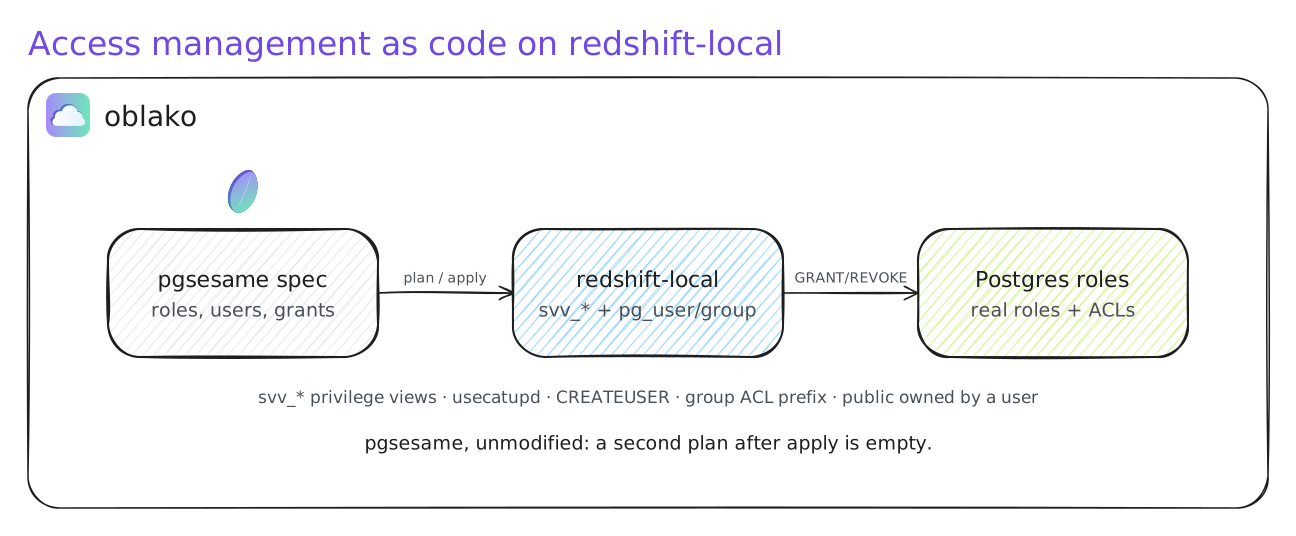
Access management as code: a real Redshift access tool reads and applies against redshift-local, which answers it with the Redshift catalog over real Postgres roles.
from oblako.services import RedshiftService
con = RedshiftService().connect()   # psycopg2 to the engine on 5439
dbt-redshift: a type: redshift profile pointed at host: localhost,
port: 5439. For verified TLS, run oblako trust once in the venv dbt uses, then
set sslmode: verify-ca (see TLS below).
TLS. The bundled proxy terminates SSL with a self-signed certificate for
localhost and 127.0.0.1. oblako makes it once per machine, in
~/.oblako/redshift/tls, and mounts it into every Redshift container, the
single-node engine and each node of a multi-node cluster. The key never leaves
your machine, and the certificate cannot sign others (CA:FALSE). It survives
container recreates and volume resets, so a pinned sslrootcert or oblako trust
stays valid. To use your own, replace the two files there. A container started
by plain docker compose makes its own certificate; oblako trust trusts it too
when it is running, besides the machine’s.
libpq clients (psycopg, and JDBC tools like Metabase) work out of the box with
sslmode=require(encrypt), orverify-fullwithsslrootcertpointed at~/.oblako/redshift/tls/server.crt.redshift_connector (dbt, awswrangler) verifies only against a hardcoded Amazon CA bundle with no override, so it can’t verify a local cert by default. Run
oblako trustonce: it appends this machine’s certificate to that venv’s redshift-connector bundle, then usesslmode: verify-cafor verified TLS (nossl=False). It also installs a small keeper in the venv (a.pthfile and the module it imports) that puts the certificate back at interpreter start, so the trust survives aredshift-connectorreinstall, which restores the pristine bundle. Run it once per venv or CI runner;oblako trust --removeundoes it. Without trust, usesslmode: disablelocally.Before oblako 0.1.0 the image carried one shared certificate whose key was public.
oblako trustremoves it from any bundle it had been added to.
OBLAKO_SSL=0 turns TLS off entirely.
Multi-node clusters. The Redshift API on http://localhost:8015 (a proxy over
moto, started by oblako up redshift) makes clusters real. A single-node cluster’s
endpoint is the shared engine, localhost:5439. A multi-node cluster runs as its
own Citus cluster, the same Redshift-compatible engine with Citus underneath:
redshift.create_cluster(ClusterIdentifier="analytics", ClusterType="multi-node",
                        NodeType="ra3.large", NumberOfNodes=2,
                        MasterUsername="admin", MasterUserPassword="...", DBName="dev")
redshift.get_waiter("cluster_available").wait(ClusterIdentifier="analytics")
The cluster is a leader node (the Citus coordinator, which holds no data) and
NumberOfNodes compute nodes (Citus workers), at
<id>.<region>.redshift.localhost on a port of its own; DescribeClusters
reports creating until every node is registered, and ClusterNodes lists each
node’s role and address. Unmodified Redshift DDL distributes: the proxy turns
CREATE TABLE … DISTKEY(col) into create_distributed_table and DISTSTYLE ALL
into a reference table before the CREATE returns; a SORTKEY becomes a btree
index. Tables with no distribution style stay on the leader. The Data API reaches
a cluster by ClusterIdentifier. Up to 8 compute nodes per cluster.
Redshift Serverless. The same port answers the redshift-serverless API
(AWS_ENDPOINT_URL_REDSHIFT_SERVERLESS=http://localhost:8015). A namespace
creates its admin user, with the given password, and its database (dev by
default) in the engine; every workgroup’s endpoint is the shared engine,
localhost:5439, whatever port is requested:
rss = boto3.client("redshift-serverless")
rss.create_namespace(namespaceName="analytics", adminUsername="admin",
                     adminUserPassword="...", dbName="dev")
rss.create_workgroup(workgroupName="analytics", namespaceName="analytics")
rss.get_workgroup(workgroupName="analytics")["workgroup"]["endpoint"]
# {'address': 'localhost', 'port': 5439}
DeleteNamespace drops the user and database it created, and refuses while a
workgroup uses the namespace (ConflictException). The Data API takes
WorkgroupName in place of ClusterIdentifier, and CloudFormation creates
AWS::RedshiftServerless::Namespace and ::Workgroup with their GetAtt
attributes (Workgroup.Endpoint.Address, …), and TagResource, UntagResource and
ListTagsForResource work on namespaces and workgroups. Base and maximum capacity, VPC
settings, snapshots, usage limits and GetCredentials are not simulated: a
workgroup has the engine’s resources, and the API accepts and reports the
capacity and network settings it is given.
The image (oblako/images/redshift-cluster) builds from the single-node one and
compiles Citus from source, so it is native on amd64 and arm64. Because Citus
can’t tolerate a spoofed server_version, the engine reports its real version and
the wire proxy presents Redshift’s version to clients instead
(OBLAKO_PROXY_SERVER_VERSION). For self-hosting without oblako’s API, the compose
cluster profile runs the same image:
docker compose --profile cluster up redshift-coordinator redshift-w1 redshift-w2
Passwords. The engine checks passwords as Redshift does when
POSTGRES_HOST_AUTH_METHOD is md5 (oblako’s default); a deployment that sets
trust keeps passwordless logins.
Redshift ML. CREATE MODEL, SHOW MODEL [ALL] and DROP MODEL [IF EXISTS]
work from any client, because the wire proxy turns them into calls to functions
in the engine. As on Redshift, CREATE MODEL is asynchronous: it validates the
statement and returns, the model is listed in svv_ml_model_info as TRAINING,
and an agent in the container trains it in a separate container on the host
Docker daemon (through the mounted /var/run/docker.sock), then publishes the
prediction function and moves model_state to Model is Ready (or to the failure
reason).
CREATE MODEL sandbox.credit
FROM (SELECT f1::float8 AS f_a, f2::float8 AS f_b, target::int AS target
      FROM sandbox.tape WHERE sample = 'train')
TARGET target FUNCTION credit_predict IAM_ROLE default
AUTO OFF MODEL_TYPE xgboost OBJECTIVE 'binary:logistic' PREPROCESSORS 'none'
HYPERPARAMETERS DEFAULT EXCEPT (num_round '150', max_depth '5', eta '0.1')
SETTINGS (S3_BUCKET 'ml-bucket', MAX_RUNTIME 1800);

SELECT model_name, model_state FROM svv_ml_model_info;  -- TRAINING -> Model is Ready
SHOW MODEL sandbox.credit;
SELECT sandbox.credit_predict(f1::float8, f2::float8) FROM sandbox.tape;
MODEL_TYPEXGBOOST,MLPorLINEAR_LEARNER, or none for Autopilot, which trains all three and keeps the best on a holdout; regression, binary and multiclass classification.FROMtakes a table or a subquery; names may be schema-qualified, and the function lands in the model’s schema.AUTO OFFis checked the way Redshift checks it: it needsMODEL_TYPE XGBOOST,OBJECTIVE,HYPERPARAMETERSandPREPROCESSORS, and at least 500 training rows. XGBoost hyperparameters (num_round,max_depth,eta,subsample,colsample_bytree,min_child_weight, …) are passed through.The prediction function returns the class label for classification (as Redshift does for
binary:logistic).OBJECTIVE 'reg:logistic'returns the probability, which is what AUC and decile tables need. Autopilot classification models also get<function>_probabilities, returning{"probabilities": [...], "labels": [...]}asSUPER.Features must be numeric (cast them in the
SELECT);PREPROCESSORSother than'none'are rejected. The model lives in the database it was created in.
COPY, UNLOAD and awswrangler. COPY loads Parquet, CSV, JSON and delimited
text from S3, and UNLOAD writes them, as Redshift does: files named after the
prefix as written (venue_0000_part_00, 000 with PARALLEL OFF; .parquet for
Parquet, .gz/.bz2/.zst when compressed, or EXTENSION), PARTITION BY (...) [INCLUDE] into Hive-style folders, MANIFEST [VERBOSE], and a refusal to write
into a non-empty prefix unless ALLOWOVERWRITE or CLEANPATH. Every function in
awswrangler’s wr.redshift works against redshift-local: to_sql in each mode
and with Redshift’s table options, copy, unload and unload_to_files, and all
three ways to connect: a Secrets Manager secret, a Glue connection, and
connect_temp, whose GetClusterCredentials call issues an IAMA:<user> login on
the cluster’s engine that acts as <user> until it expires.
GetClusterCredentialsWithIAM (a provisioned cluster) and Redshift Serverless’s
GetCredentials (a workgroup) work too: the database user is the calling IAM
identity, IAM:<user> or IAMR:<role> for an assumed role, created on first use
with a password that expires, and refreshed on every call. Like any new Redshift
user it holds no privileges until granted them (ALTER USER "IAM:ops" CREATEUSER
makes it a superuser, NOCREATEUSER takes that back).
SUPER. SUPER columns take JSON (json_parse, nested Parquet through
COPY) and PartiQL navigation, with dots or brackets: data.customer.name,
data.items[0].sku, data['customer']['name']. A navigated value selected on its
own comes back as Redshift sends SUPER to a driver, as JSON text: "Ann", with its
quotes, in a column named after the last step (name). Cast it for the plain value
(data.customer.name::varchar). Inside an expression or a filter, a navigated value
is text, so WHERE data.type = 'premium' works; compare numbers through a cast
(data.age::int > 30). A whole SUPER column, or a bracket path, comes back as
PostgreSQL jsonb, which some drivers decode into Python values.
Apache Iceberg tables. Redshift creates and writes Iceberg tables registered
in the Glue Data Catalog, and so does redshift-local. oblako’s Glue catalog keeps
Iceberg tables in its Iceberg REST catalog on S3Proxy, so a table Redshift writes
is the table Athena, Trino, Spark and PyIceberg read, and a table they create
shows up in Redshift. Start the catalog with oblako up iceberg (and s3).
CREATE EXTERNAL SCHEMA lake FROM DATA CATALOG DATABASE 'sales'
IAM_ROLE default CREATE EXTERNAL DATABASE IF NOT EXISTS;

CREATE TABLE lake.orders (order_id int, order_date date, total decimal(10,2))
USING ICEBERG LOCATION 's3://my-lake/orders/'
PARTITIONED BY (month(order_date))
TABLE PROPERTIES ('compression_type'='snappy');

INSERT INTO lake.orders VALUES (1, '2024-10-30', 299.99);
UPDATE lake.orders SET total = 310 WHERE order_id = 1;
DELETE FROM lake.orders WHERE order_date < '2024-01-01';
SHOW TABLE lake.orders;
DROP TABLE lake.orders;  -- removes the catalog entry; the files stay
CREATE TABLE ... USING ICEBERGtakesLOCATION(required, and empty, as on Redshift),PARTITIONED BYwithidentity,bucket(N, col),truncate(W, col),year,month,dayandhour, andTABLE PROPERTIEScompression_type(zstdby default).CREATE TABLE ... AS SELECTworks too.As on Redshift, strings are
VARCHARwithout a length (VARCHAR(N)is refused), andNOT NULLis the one column attribute taken; other constraints and attributes are refused. Errors carry Redshift’s own messages, checked against Redshift Serverless.SELECTscans the table, so joins with local tables are plain SQL.INSERT,UPDATEandDELETEwork from any client, parameterized statements included;MERGEworks too, written without bind parameters. An insert appends; any other write rewrites the table’s data files.Each write commits as one Iceberg snapshot when its transaction commits, and
ROLLBACKwrites nothing. As on Redshift, a transaction takes one Iceberg write.ALTER TABLErenames, adds and drops columns, widens a column’s type (inttobigint,realtodouble precision, a decimal’s precision), setsTABLE PROPERTIES ('compression_type'=...), and evolves the partition spec withADD,DROPandREPLACE PARTITION FIELD. These change metadata only.Redshift’s auto-mounted catalog works without
CREATE EXTERNAL SCHEMA:SELECT * FROM awsdatacatalog.sales.ordersreaches Glue databasesales, which oblako mounts as the schema"awsdatacatalog.sales"on first use.DDL completes as a command, with no result rows, as on Redshift.
svv_external_schemas,svv_external_tablesandsvv_external_columnslist the external schemas and their tables.Not yet: Iceberg v3 tables (
'format-version'='3', which Redshift Serverless also refused when this was checked) and columnDEFAULTvalues, S3 table buckets ("<bucket>@s3tablescatalog"names), and nested Iceberg types in writes. A table another engine creates afterCREATE EXTERNAL SCHEMAappears once you runCREATE EXTERNAL SCHEMA IF NOT EXISTSagain (anawsdatacatalogname picks it up by itself).
Limitations
Redshift physical DDL (
DISTSTYLE/DISTKEY/SORTKEY/ENCODE) is accepted and ignored (the bundled wire proxy strips it before the parser), andvarchar(max)becomesvarchar(65535), as Redshift stores it, so awswranglerto_sql, dbt physical configs, and dlt’s Redshift destination all work. It has no storage effect on the PostgreSQL engine. A late-binding view (WITH NO SCHEMA BINDING) is created as an ordinary view: its tables must exist when it’s made, and dropping one takesCASCADE.VARBYTEis still unsupported.It’s a row-store PostgreSQL, not columnar: no Redshift-style column compression / zone maps / sort-key ordering. Query results are faithful; storage and performance characteristics are not.
Python UDFs run as Python 3 (real Redshift’s are Python 2, which Amazon is sunsetting);
LANGUAGE plpythonuis aliased to the Python 3 handler.It’s a PostgreSQL engine underneath, no columnar storage, distribution, or the Redshift query planner.
Glue Data Catalog and Athena
The Glue engine (oblako up glue, :8486) is the catalog Athena, Trino and the
glue client share. It keeps two kinds of table:
Parquet, CSV and JSON tables under an S3 location, with their partitions and column statistics, in SQLite (
~/.oblako/glue/catalog.db). This is whatwr.s3.to_parquet(..., database=, table=)creates, and what Athena CTAS writes.Iceberg tables, kept in the Iceberg REST catalog that S3 Tables, Spark and Trino’s
icebergcatalog use. PyIceberg’s Glue catalog (load_catalog(type="glue", **{"glue.endpoint": ...})) works unchanged:CreateTableregisters its metadata file, and each commit’sUpdateTablemoves the table to the new file, refused if another writer got there first. Tables created through the REST catalog show up in Glue too.
Each database is also a REST namespace. Trino’s awsdatacatalog catalog is the
Hive connector with this engine as its Glue metastore, and Iceberg tables in it
are redirected to the iceberg catalog. Athena’s AwsDataCatalog maps to it,
so a query sees both kinds of table. Start them with oblako up iceberg and
oblako up trino (which starts the Glue engine too).
Athena:
Workgroups.
get/list/create/update/delete_work_group, kept in~/.oblako/athena/workgroups.json. Queries without anOutputLocationuse the workgroup’s, andEnforceWorkGroupConfigurationoverrides theirs, as on AWS. Locallyprimarycomes configured withs3://oblako-athena-results/, created on first use.CTAS.
CREATE TABLE ... WITH (...) AS SELECTcreates a Glue table. Its data goes underexternal_location, or<output>/tables/<query id>/without one. Athena’s properties are translated for Trino (write_compression,field_delimiter), and withtable_type = 'ICEBERG'the table is created in theicebergcatalog. The query’sDataManifestLocationlists the files written, which is how awswrangler’s defaultctas_approach=Truereads results.
Limitations
GetPartitionsfilters support Glue’s documented subset (=,<>,<,>,BETWEEN,IN,LIKE,IS NULL,AND/OR/NOT). Anything else is refused withInvalidInputException.No crawlers, connections, user-defined functions, table versions or Lake Formation. Glue can’t create Iceberg metadata itself (
OpenTableFormatInput), so create Iceberg tables with PyIceberg, Spark or Trino.Athena runs Trino’s SQL dialect: Athena’s Hive DDL (
CREATE EXTERNAL TABLE ... ROW FORMAT,MSCK REPAIR TABLE) andUNLOADaren’t translated. Query results report no scanned bytes.
S3
S3 API backed by S3Proxy over the local filesystem. S3Proxy doesn’t implement
tagging, Inventory, bucket policies or event notifications, so oblako up s3
puts a stock nginx on :9000 in front of it: every request goes straight to
S3Proxy (on :9001), except those calls, which an oblako engine answers. nginx
also logs each completed write to a file the engine follows, for notifications.
Tagging.
put_object(..., Tagging="k=v"),put_object_tagging/get_object_tagging/delete_object_tagging, tags on multipart uploads and copies (TaggingDirectiveCOPYorREPLACE), and bucket tagging. Tags belong to an object version, as on S3: overwrite the object and its tags go. S3’s limits apply (10 tags per object, key 128 / value 256 characters).Inventory.
put/get/list/delete_bucket_inventory_configuration. S3 takes up to 48 hours for the first report; oblako writes it when the configuration is saved, then daily (OBLAKO_S3_INVENTORY_INTERVALseconds): a CSV (gzipped) or Parquet data file plusmanifest.jsonunder<prefix>/<source>/<id>/in the destination bucket.Bucket policy.
put/get/delete_bucket_policyandget_bucket_policy_status(public when anyone is allowed unconditionally). Stored and returned only: S3Proxy has no IAM, so nothing is enforced.Event notifications.
put/get_bucket_notification_configurationwith Lambda, SQS and SNS destinations (in moto, :5500) and EventBridge, with prefix / suffix filters.ObjectCreated(Put, Copy, CompleteMultipartUpload) andObjectRemoved:Deleteevents are delivered as S3 event records once the write lands, so an upload toraw/can invoke a Lambda that writes tocurated/.Headers S3Proxy rejects. boto3 sends
x-amz-security-tokenwith session credentials (inside Lambda, with SSO or an assumed role), and newer AWS SDKs ask listings forx-amz-optional-object-attributes(Trino, Spark). S3Proxy answers either withNotImplemented, so the front drops both.
Limitations
S3Proxy doesn’t implement the AWS SDK v2 default flexible checksums (
x-amz-checksum-*overaws-chunked); oblako sets checksum calculation towhen_requiredso uploads work.Tags are stored and returned, but nothing acts on them: S3Proxy has no lifecycle rules or tag-based access control. Bucket policies likewise aren’t enforced. Batch deletes (
DeleteObjects) don’t produce events: their keys are in the request body, which isn’t logged. Inventory doesn’t produce ORC, and Parquet reports needpyarrow.These additions need the front, which
oblako up s3starts on a Docker-API backend (Docker, Podman, Colima). On Kubernetes or Applecontainer, plaindocker compose up, or withOBLAKO_S3_EXTENSIONS=0, S3Proxy serves :9000 directly and those calls returnNotImplemented.Large downloads through the front run at several hundred MB/s rather than S3Proxy’s direct speed; small requests show no measurable difference.
SageMaker
oblako runs SageMaker workloads in its own Docker containers, honoring the
real /opt/ml contract: input channels are copied in (put_archive), the model
artifact is collected from /opt/ml/model as model.tar.gz (get_archive), and
serving containers are polled on /ping and invoked on :8080/invocations. It
does not rely on the SDK’s local mode, so it pins sagemaker>=3.4,<4 (v3) as
a client-only dependency. Three clients all point at the same engine:
sagemaker (control plane), sagemaker-runtime, and
sagemaker-featurestore-runtime.
The SDK v3 local modes. Client code can also use the SDK’s own local modes:
ModelTrainer(training_mode=Mode.LOCAL_CONTAINER), ModelBuilder(mode=Mode.LOCAL_CONTAINER),
the LocalSession endpoint calls, and a local pipeline session. These still reach
for AWS at the edges (IAM role validation, the sagemaker-<region>-<account>
default bucket, an ECR pull), so oblako.engines.sagemaker.use_local_stubs()
neutralizes those calls. The demo notebooks under examples/demo-notebooks/ use
this path. Things to know:
v2 modules (
sagemaker.estimator,sagemaker.local,sagemaker.workflow,sagemaker.serializers, …) are gone in v3 and raise on import. Training issagemaker.train.ModelTrainer, servingsagemaker.serve.ModelBuilderorsagemaker.core.local.LocalSession, pipelinessagemaker.mlops.workflow.ModelTrainer’slocal_container_rootis bind-mounted into the container, so keep it under your home directory: Docker Desktop doesn’t share the/var/folderstemp dir, and a root there mounts empty. The model lands in<root>/compressed_artifacts/model.tar.gz.A local pipeline session needs both halves v3 splits across two classes:
class LocalPipelineSession(sagemaker.mlops.local.local_pipeline_session.LocalPipelineSession, sagemaker.core.processing.PipelineSession). Register and run it withsession.create_pipeline(...)/session.start_pipeline_execution(...);pipeline.upsert()/start()need a real control plane. EveryProcessingOutputneeds an explicits3_uri.ModelBuilder.deploy_local()(SDK 3.17) starts the serving container, then registers it throughLocalSession.create_endpoint, which starts a second one on the same port and blocks. Call theLocalSessionendpoint APIs directly instead.
The implemented surface:
Training / HPO / processing / transform.
CreateTrainingJob,CreateHyperParameterTuningJob(AMT),CreateProcessingJob,CreateTransformJob, each with itsDescribe*/List*/Stop*operations, running the job’s image for real.Endpoints.
CreateModel/CreateEndpointConfig/CreateEndpointand invocation, including async inference (InvokeEndpointAsync, S3 in and out, with an SNS success/error notification) and multi-model endpoints (models loaded on demand by theX-Amzn-SageMaker-Target-Modelheader).Studio.
CreateDomain/CreateUserProfileand their lifecycle ops.Feature Store.
CreateFeatureGroup+PutRecord/GetRecord/BatchGetRecord; the online store is in-memory, the offline store appends Parquet to S3.Model Monitor. Monitoring schedules plus endpoint data capture (the real
captureDataenvelope) written to S3, with a violations report.Model Registry. Versioned model package groups and packages with approval status.
Tags (
AddTags/ListTags/DeleteTags) across all of the above.
Limitations
Requires
pip install 'oblako[sagemaker]'(v3 SDK, client-only) and Docker.No Pipelines API on the engine yet (
CreatePipeline/StartPipelineExecution): run pipelines through the SDK’s local pipeline session (see above).Compute is local Docker containers, not managed instances;
instance_typeis cosmetic (local_gpurequests all GPUs).The Feature Store online store is in-memory (lost on restart); the offline store is plain Parquet append, not the managed Glue/Iceberg-cataloged store.
Model Monitor produces a one-shot violations report, not scheduled drift detection. HPO uses a TPE (Syne Tune) or random searcher, not AWS’s Bayesian tuner.
ServerlessConfigis accepted and echoed back, but endpoints are still container-backed.