1 What is oblako?
How oblako runs the AWS data services on your machine, and where it differs from AWS.
The name is Russian: oblako (облако), stressed on its first syllable, is the word for a cloud.1 oblako puts a small one on your machine, with the AWS data services running inside it.
1.1 Developing against the cloud
Code that uses AWS is awkward to develop because every experiment touches remote resources, such as a bucket that has to exist, a warehouse that has to be running and a role that has to allow the call. Each try is a deployment, which makes the loop slow, and some services bill from the moment they start, whether you query them or not. A team also usually shares one development account, so your half-finished table sits next to a colleague’s.
The usual alternative is a mock, a library that intercepts the call your code makes and returns a response written in advance. Mocks suit unit tests because they are fast, need nothing installed and make a test independent of the network. A mock returns only what its author wrote, though: a mocked S3 keeps your bytes in a Python dictionary, and a mocked Redshift accepts CREATE TABLE and runs nothing. When your code depends on what the service does, such as how a query engine reads partitioned Parquet or whether your SQL is valid, only a real engine can answer the question.
1.2 Real behavior, simulated topology
oblako’s design follows from one principle, real behavior, simulated topology.
Every AWS service has two parts. The engine does the work of storing the bytes, running the SQL or reading the files. The topology is the AWS shape around the engine, which includes the endpoint you call, the cluster or bucket it belongs to, the account and region in its ARN, and the control plane that creates and describes it.
oblako runs a real engine for each service wherever one exists and simulates only the topology around it. S3 is served by S3Proxy, an open-source implementation of the S3 API that writes real files. Redshift is a PostgreSQL 16 database that accepts Redshift’s SQL, Athena is the Trino query engine, and DynamoDB is Amazon’s own DynamoDB Local. oblako adds the parts that make these engines look like AWS to your code: the endpoints, the cluster metadata, and the APIs that create and describe resources.
oblako sits between a mock and the cloud. Like a mock, it runs on your machine, costs nothing and resets in seconds, and like the cloud, it does the work, so a wrong query fails and a correct query returns the rows.
1.3 What oblako covers
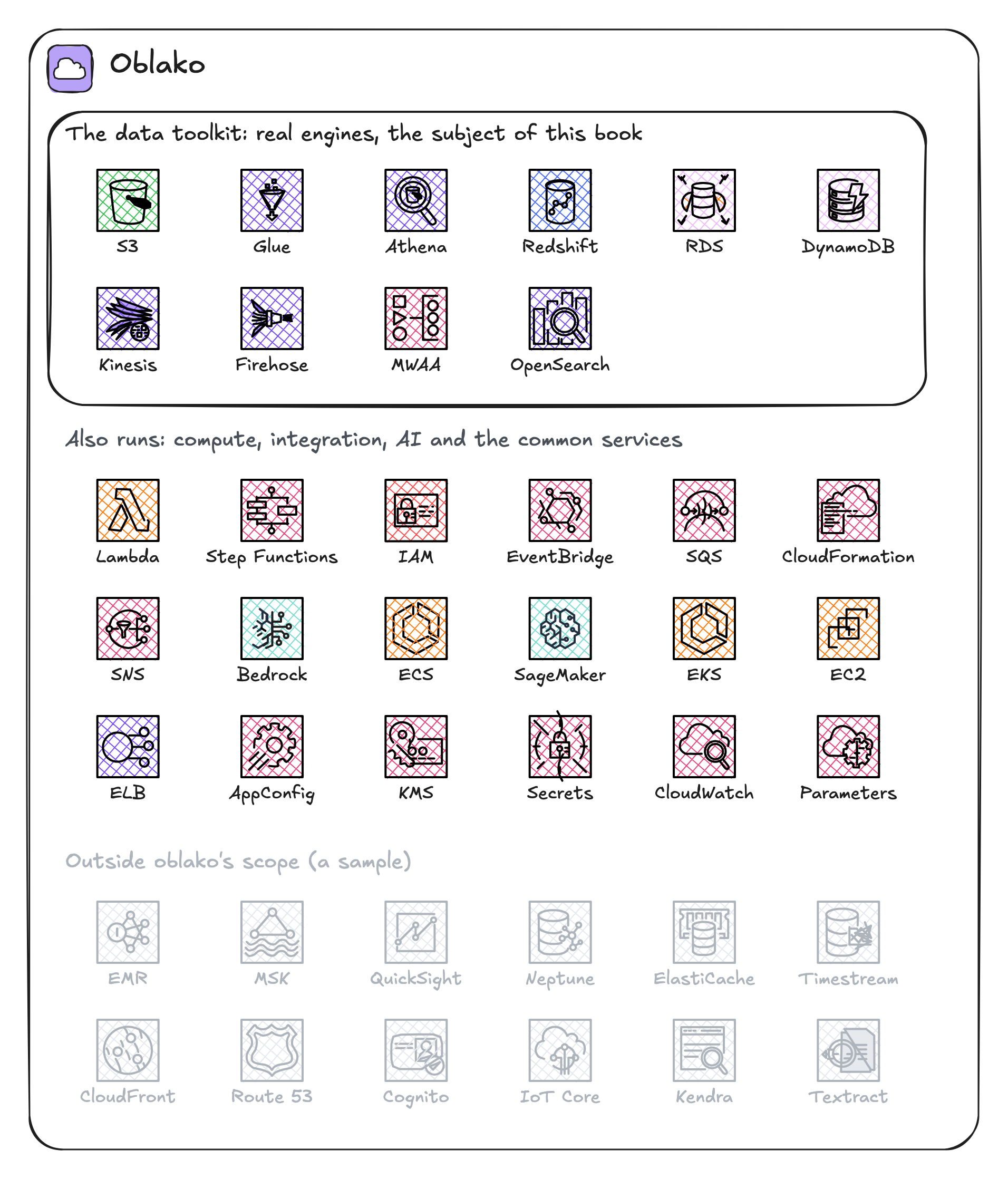
oblako does not try to run all of AWS. Its core is the data toolkit in the frame of Figure 1.1: the storage, catalog, query, warehouse, database, streaming and orchestration services. Each of them is backed by a real engine and is the subject of a chapter in Parts II and III. oblako also runs the compute, integration and AI services that data pipelines call, such as Lambda, Step Functions, EventBridge and Bedrock. moto answers the common services that most code touches, such as IAM, SQS, SNS, Secrets Manager and KMS.
The rest of AWS is outside its scope. A call to one of those services goes to moto, which records it if it implements that service’s control plane, with no engine behind it, and rejects it otherwise.
1.4 Ports
Each service listens on its own fixed port on localhost, and your code sends its calls there instead of to AWS. The AWS SDKs and the AWS CLI can read a separate endpoint for each service from a profile in their configuration file. oblako writes such a profile, named oblako, with an endpoint for every service it runs and local credentials, and Chapter 2 creates it. Selecting the profile is the only change, and the code itself stays the same:
export AWS_PROFILE=oblakoWith the profile selected, this ordinary boto3 code runs against oblako’s S3:
import boto3

s3 = boto3.client("s3")
s3.create_bucket(Bucket="raw-data")
s3.put_object(
    Bucket="raw-data", Key="hello.txt", Body=b"hello from oblako"
)

obj = s3.get_object(Bucket="raw-data", Key="hello.txt")
body = obj["Body"].read()
print(body.decode())
hello from oblakoSelect one of your AWS profiles instead, and the same script talks to AWS.
Because the ports are fixed, the profile, notebooks and CI jobs can all use the same map. Table 1.1 lists the ports for the services this book uses.
| Service | Port |
|---|---|
| S3 | 9000 |
| S3 Tables | 8013 |
| S3 Vectors | 8012 |
| Glue Data Catalog | 8486 |
| Athena | 8009 |
| Redshift (SQL) | 5439 |
| Redshift Data API | 8002 |
| RDS PostgreSQL (shared) | 5432 |
| RDS API (instances, replicas) | 8014 |
| RDS Data API | 8006 |
| DynamoDB | 8007 |
| DynamoDB Streams | 8001 |
| Kinesis Data Streams | 4567 |
| Firehose | 8008 |
| Redshift API (clusters) | 8015 |
| Control planes (IAM, Lambda, EC2) | 5500 |
1.5 Request paths
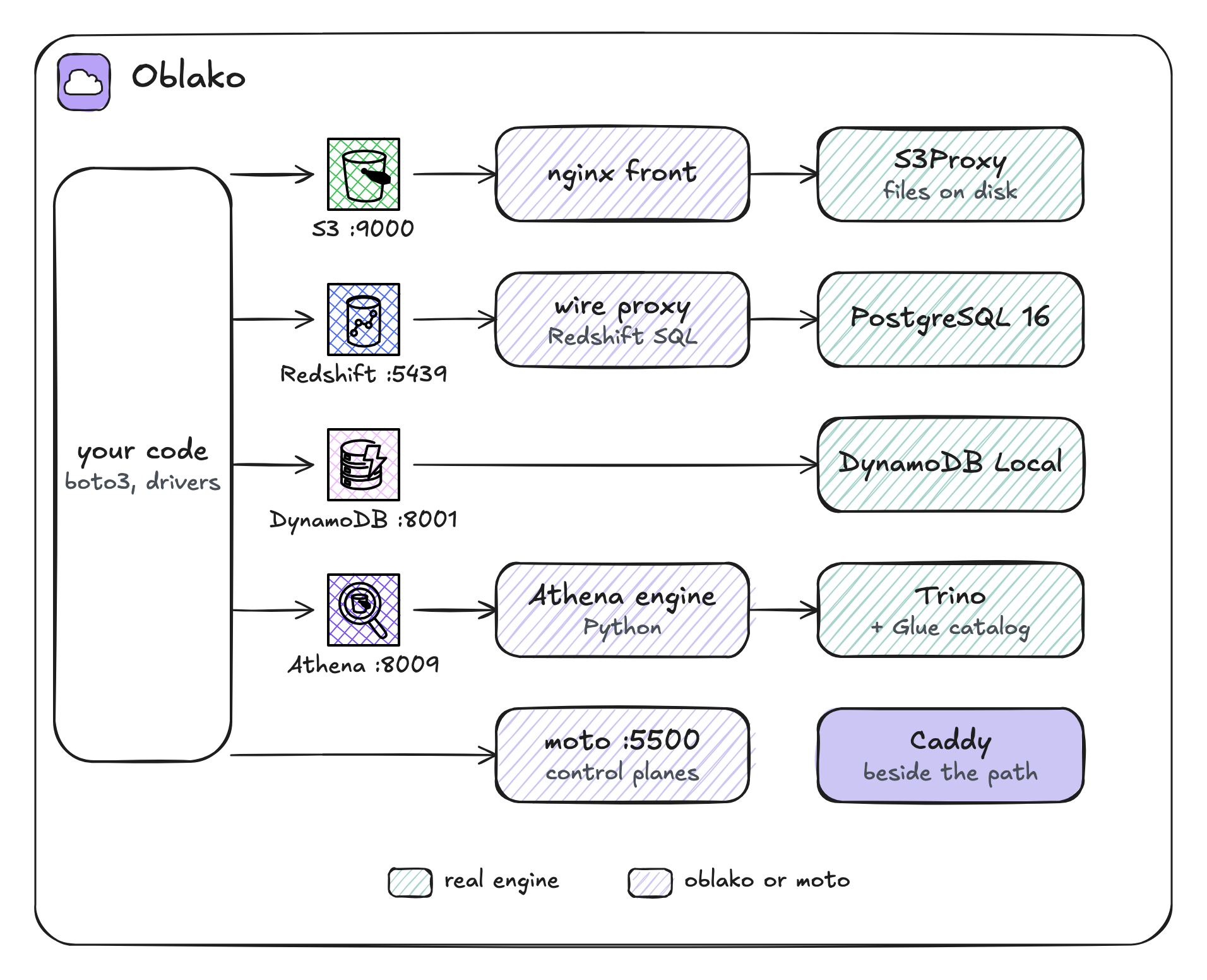
Figure 1.2 shows the path a call takes. Your code sends the call, unchanged, to a port. Behind each port is one of four things: the engine itself, a thin front that adds what the engine lacks, a Python engine that oblako provides, or the control plane.
Direct
In the direct case the client talks to the engine with nothing in between. Kinesis Data Streams is kinesalite on port 4567, which your boto3 Kinesis client calls directly, and DynamoDB Streams is served by DynamoDB Local itself, on port 8001. When an engine already speaks the AWS API, oblako’s only job is to start it on the right port.
Fronted engines
Some engines implement only part of the AWS API. S3Proxy stores and serves objects but lacks object tagging, S3 Inventory and event notifications, so port 9000 is a stock nginx in front of S3Proxy. nginx passes ordinary requests to S3Proxy on port 9001, sends tagging and Inventory requests to a small oblako engine on port 8020, and logs completed writes so that notifications can fire. Your client sees one S3 endpoint.
DynamoDB has a front of the same kind. Port 8007 is an oblako proxy that forwards every call to DynamoDB Local on port 8001 and adds the operations DynamoDB Local lacks: vector indexes, SearchVectors, and tags.
Redshift needs a different kind of front, because PostgreSQL rejects Redshift-only syntax such as DISTKEY and SORTKEY while it parses a statement, before any code inside the database runs. The Redshift image therefore carries a wire proxy that listens on Redshift’s port, 5439, terminates TLS, rewrites Redshift SQL into SQL PostgreSQL accepts and passes everything else through byte for byte. The proxy also turns COPY and UNLOAD into reads and writes against oblako’s S3, and your driver connects to it as it would to a single Redshift endpoint:
import redshift_connector

conn = redshift_connector.connect(
    host="localhost",
    port=5439,
    database="oblako",
    user="oblako",
    password="oblako",
    ssl=True,
    sslmode="verify-ca",
)
conn.autocommit = True
cur = conn.cursor()
cur.execute(
    "CREATE TABLE IF NOT EXISTS stock"
    " (sku varchar(16), on_hand int)"
    " DISTKEY(sku) SORTKEY(sku)"
)
cur.execute("SELECT split_part(version(), ' on ', 1)")
print(cur.fetchone()[0])
PostgreSQL 16.15 (Debian 16.15-1.pgdg13+2)The CREATE TABLE with its distribution and sort keys succeeds because the proxy removed the Redshift-only clauses before PostgreSQL parsed the statement. The version() call reports the PostgreSQL underneath, which is the one place where the simulation is visible on purpose.2
oblako engines
For some services, Athena among them, no open-source engine implements the AWS API. Trino can run Athena’s queries, but it lacks StartQueryExecution and writes its results differently from Athena. For these services oblako provides a small Python server that implements the AWS API and passes the work to a real engine. The Athena engine on port 8009 accepts the athena API, runs each query on Trino and writes the results to S3, where Athena would put them. Trino reads table definitions from oblako’s Glue Data Catalog, another Python engine, on port 8486.
S3 Tables, S3 Vectors, Firehose, EventBridge and the Data APIs for Redshift and RDS work the same way. oblako up starts each of these engines as a background process on its port, outside any container:
oblako up athenaThe control plane
Every service also has calls that create and describe resources, such as create_cluster, describe_db_instances and create_role. oblako answers them with moto, a widely used open-source library that models AWS control planes, served on port 5500. For some services a thin oblako proxy sits in front of moto and points the resources at real engines; Redshift’s is on port 8015:
import boto3

redshift = boto3.client("redshift")
redshift.create_cluster(
    ClusterIdentifier="analytics",
    NodeType="ra3.large",
    MasterUsername="oblako",
    MasterUserPassword="Oblako123",
)
resp = redshift.describe_clusters(ClusterIdentifier="analytics")
cluster = resp["Clusters"][0]
print(cluster["ClusterStatus"])
print(cluster["Endpoint"]["Address"], cluster["Endpoint"]["Port"])
available
localhost 5439With AWS_PROFILE=oblako, the redshift client calls this proxy on port 8015. moto records the cluster, so code that creates, describes or waits on a cluster works. The proxy then reports the endpoint of the engine that serves it, which for a single-node cluster is the Redshift engine of the previous section, on port 5439. A multi-node cluster runs on its own servers (Chapter 13). oblako keeps the mocked surface small on purpose and uses moto only where there is nothing real to run.
Caddy
Caddy, a web server, sits beside the request path and has two jobs in oblako. Each Application Load Balancer you create is its own Caddy container, which spreads requests across the load balancer’s targets. Caddy also gives some services AWS-shaped hostnames; a local MLflow tracking server, for example, gets a URL of the same form as a SageMaker-managed one. Ordinary service traffic goes straight to the ports described above and bypasses Caddy.
1.6 Real and simulated parts
Table 1.2 summarizes, for each data service in this book, which part is real and which part oblako simulates.
| Service | Real | Simulated |
|---|---|---|
| S3 | objects, on disk (S3Proxy) | tags, Inventory and notifications (oblako engine) |
| S3 Tables | Iceberg tables in a REST catalog | table buckets and namespaces |
| Glue Data Catalog | table metadata Trino reads | the Glue API (oblako engine) |
| Athena | queries (Trino) | the Athena API, workgroups |
| Redshift | SQL (PostgreSQL 16) | clusters and nodes (moto) |
| RDS | SQL (PostgreSQL), a server per instance, streaming replicas | Aurora clusters and their members (moto) |
| DynamoDB | tables, items and streams (DynamoDB Local) | vector search and tags (oblako proxy) |
| Kinesis | streams (kinesalite) | nothing |
| Firehose | delivery to S3 and Redshift | the Firehose API (oblako engine) |
1.7 Where oblako differs from AWS
These are the differences that matter for the data services in this book, and each later chapter repeats the ones that apply to it.
Permissions are not enforced. Any access key works, and bucket policies are stored and returned without being evaluated, so test IAM on AWS.
S3 checksums. S3Proxy does not support the flexible checksums newer SDKs send by default, so oblako sets the SDK to calculate checksums only when an operation requires them.
Redshift is a row store. It runs your SQL correctly without reproducing Redshift’s columnar performance, and
version()reports PostgreSQL. Python user-defined functions still run, though Redshift no longer supports them (Chapter 7).Athena speaks Trino’s SQL. Athena’s own engine is based on Trino too, but some functions and DDL differ.
Glue has no crawlers. You define tables yourself, or let a tool such as awswrangler or PyIceberg define them.
RDS runs PostgreSQL 16 whichever engine you request. oblako can run MySQL instead, but only when you start it from its Python API.
Vector search is exact. S3 Vectors and DynamoDB vector search compare the query with every vector, and S3 Vectors keeps its vectors in memory, so they are lost on a restart.
Scale is your machine’s. Everything runs on one computer, so oblako shows whether your code is correct but gives no prediction of its performance on AWS.
When a chapter needs something oblako lacks, the book says so and reports the gap to the oblako project instead of working around it in the example.
1.8 Summary
oblako runs real engines (S3Proxy, PostgreSQL, Trino, DynamoDB Local) behind fixed local ports and simulates the AWS topology around them, meaning the endpoints, the control planes and the APIs no engine implements. Your code reaches oblako through the oblako profile, which gives every service its local endpoint, and is the same on oblako and AWS. oblako differs from AWS in permissions, in scale and in a short list of service-specific details, and each chapter states the details that apply to it.
The next chapter installs oblako, starts it, and makes the first calls against it.
The word comes from Old Church Slavonic облакъ (oblakŭ). By its parts, об- and волок-, it is related to волочить, “to drag”. Wiktionary, “облако”, https://en.wiktionary.org/wiki/облако.↩︎
sslmode="verify-ca"needs the engine’s certificate in your driver’s trust bundle. The next chapter runsoblako trust, which adds it.↩︎