17 Infrastructure as code
The same stack of a bucket, an IAM role and Redshift Serverless, written for SAM, Terraform and Pulumi and deployed to oblako.
17.1 Before you start
oblako up s3
oblako up redshift
oblako up cloudformation
oblako configure
export AWS_PROFILE=oblako
The listings take the admin password from ADMIN_PASSWORD and the address allowed to connect from ALLOWED_CIDR; on oblako any address will do, such as 203.0.113.7/32. The chapter uses SAM CLI 1.166, Terraform 1.16 with the AWS provider 6.67, and Pulumi 3.267 with pulumi-aws 7.48. Each section deploys the stack and removes it again, so the three can run in any order.
17.2 Describing infrastructure in code
The pipeline of Chapter 16 needs a bucket to stage files in, an IAM role that Redshift assumes to read them with COPY, and a Redshift database to load them into. Creating these by hand, in the console or with one-off scripts, leaves no record of how they were configured and no reliable way to create the same set again. Infrastructure as code describes them in files kept with the pipeline’s code: a tool compares the description with what exists, creates or changes what differs, and can remove everything it created.
Three tools are common on AWS. CloudFormation is AWS’s own service: you send it a template, and it creates the resources as a stack and keeps the stack’s state on its side. SAM, the Serverless Application Model, is an extension of CloudFormation templates with a command-line tool, sam, that deploys and deletes stacks. Terraform and Pulumi run on your machine instead: they call each service’s API directly and keep their own record of what they created, called state. Terraform reads its own configuration language, HCL; Pulumi runs a program in a general-purpose language, here Python, that declares the resources.
What oblako runs
oblako runs a CloudFormation engine on port 8017, which creates a template’s resources in oblako’s engines and keeps each stack’s state across restarts. Terraform and Pulumi need nothing of their own. Both use the AWS SDK for Go, which reads the per-service endpoints in the oblako profile from Chapter 2, so with AWS_PROFILE=oblako their calls reach oblako’s S3, IAM and Redshift Serverless APIs (Figure 17.1). The Go SDK addresses buckets by host name, as daily-totals-123456789012.localhost:9000, and reads a bucket’s tags through the S3 Control API, and oblako answers both.
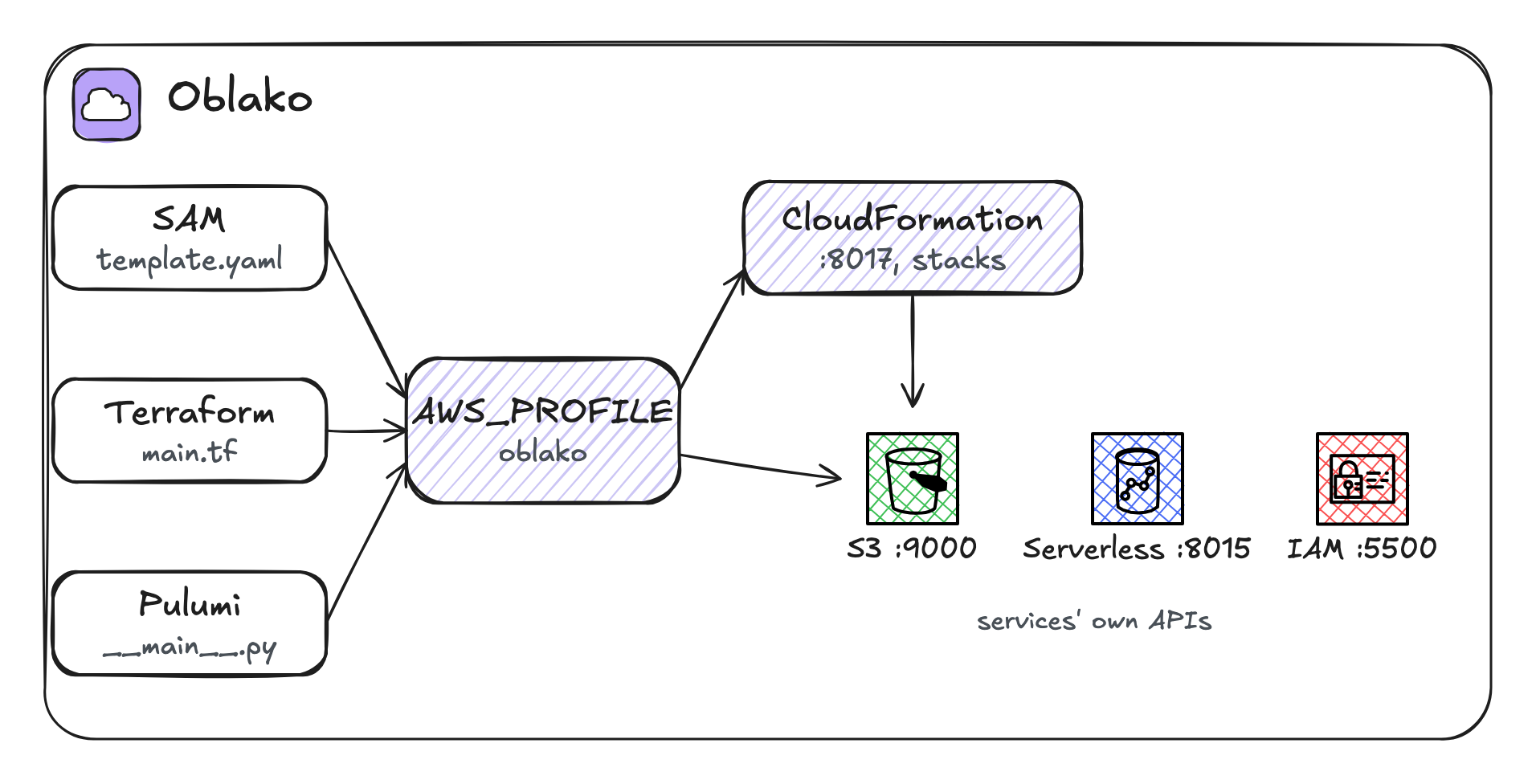
AWS_PROFILE=oblako.
17.3 The stack
The three versions describe the same resources:
a bucket named after the account,
daily-totals-followed by the account ID, because bucket names are global on AWS;an IAM role,
daily-totals-copy, that Redshift may assume and that may read buckets nameddaily-totals-*in the same account: the staging bucket and those the tests of Chapter 16 create;a Redshift Serverless namespace,
daily-totals, with an admin user and a database nameddev, and the role attached so thatCOPYcan use it;a security group that admits connections to port 5439 from one address, given as a parameter;
a workgroup,
daily-totals, with 8 RPUs of base capacity, reachable from outside its VPC through that security group.
Each version outputs the bucket’s name, the role’s ARN and the workgroup’s host name, which the pipeline’s tests take as settings. The admin password and the allowed address are parameters, not part of the code.
17.4 SAM
AWSTemplateFormatVersion: "2010-09-09"
Transform: AWS::Serverless-2016-10-31
Description: Staging bucket, COPY role and Redshift Serverless

Parameters:
  AdminPassword:
    Type: String
    NoEcho: true
  AllowedCidr:
    Type: String
    Description: The address that may connect to Redshift

Resources:
  Staging:
    Type: AWS::S3::Bucket
    Properties:
      BucketName: !Sub "daily-totals-${AWS::AccountId}"

  CopyRole:
    Type: AWS::IAM::Role
    Properties:
      RoleName: daily-totals-copy
      AssumeRolePolicyDocument:
        Version: "2012-10-17"
        Statement:
          - Effect: Allow
            Principal:
              Service: redshift.amazonaws.com
            Action: sts:AssumeRole
      Policies:
        - PolicyName: read-staging
          PolicyDocument:
            Version: "2012-10-17"
            Statement:
              - Effect: Allow
                Action: [s3:GetObject, s3:ListBucket]
                # the staging bucket and the tests' buckets; the
                # condition keeps them to this account, as bucket
                # ARNs carry no account ID
                Resource:
                  - "arn:aws:s3:::daily-totals-*"
                  - "arn:aws:s3:::daily-totals-*/*"
                Condition:
                  StringEquals:
                    aws:ResourceAccount: !Ref AWS::AccountId

  Namespace:
    Type: AWS::RedshiftServerless::Namespace
    Properties:
      NamespaceName: daily-totals
      AdminUsername: pipeline_admin
      AdminUserPassword: !Ref AdminPassword
      DbName: dev
      IamRoles: [!GetAtt CopyRole.Arn]

  RedshiftAccess:
    Type: AWS::EC2::SecurityGroup
    Properties:
      GroupDescription: Redshift from one address
      SecurityGroupIngress:
        - IpProtocol: tcp
          FromPort: 5439
          ToPort: 5439
          CidrIp: !Ref AllowedCidr

  Workgroup:
    Type: AWS::RedshiftServerless::Workgroup
    Properties:
      WorkgroupName: daily-totals
      NamespaceName: !Ref Namespace
      BaseCapacity: 8
      PubliclyAccessible: true
      SecurityGroupIds: [!GetAtt RedshiftAccess.GroupId]

Outputs:
  Bucket:
    Value: !Ref Staging
  CopyRoleArn:
    Value: !GetAtt CopyRole.Arn
  RedshiftHost:
    Value: !GetAtt Workgroup.Workgroup.Endpoint.Address
!Sub builds a string from parameters and attributes, here the account ID; !GetAtt reads an attribute of another resource, such as the role’s ARN or the workgroup’s endpoint. sam deploy sends the template as a change set and waits for the stack:
sam deploy --stack-name daily-totals \
  --template-file template.yaml \
  --capabilities CAPABILITY_NAMED_IAM \
  --parameter-overrides AdminPassword=$ADMIN_PASSWORD \
    AllowedCidr=$ALLOWED_CIDR \
  --no-confirm-changeset
Key Bucket
Value daily-totals-123456789012
Key CopyRoleArn
Value arn:aws:iam::123456789012:role/daily-totals-copy
Key RedshiftHost
Value localhost
Successfully created/updated stack - daily-totals in NoneCAPABILITY_NAMED_IAM acknowledges that the stack creates an IAM role with a fixed name. Deleting the stack removes every resource in it:
sam delete --stack-name daily-totals --no-prompts17.5 Terraform
terraform {
  required_providers {
    aws = { source = "hashicorp/aws", version = "~> 6.0" }
  }
}

provider "aws" {}

variable "admin_password" {
  type      = string
  sensitive = true
}

# the address that may connect to Redshift, such as 203.0.113.7/32
variable "allowed_cidr" {
  type = string
}

data "aws_caller_identity" "me" {}

locals {
  account = data.aws_caller_identity.me.account_id
}

resource "aws_s3_bucket" "staging" {
  bucket = "daily-totals-${local.account}"
}

resource "aws_iam_role" "copy" {
  name = "daily-totals-copy"
  assume_role_policy = jsonencode({
    Version = "2012-10-17"
    Statement = [{
      Effect    = "Allow"
      Principal = { Service = "redshift.amazonaws.com" }
      Action    = "sts:AssumeRole"
    }]
  })
}

resource "aws_iam_role_policy" "read_staging" {
  name = "read-staging"
  role = aws_iam_role.copy.id
  policy = jsonencode({
    Version = "2012-10-17"
    Statement = [{
      Effect = "Allow"
      Action = ["s3:GetObject", "s3:ListBucket"]
      # the staging bucket and the tests' daily-totals-* buckets,
      # in this account only: bucket ARNs carry no account ID
      Resource = [
        "arn:aws:s3:::daily-totals-*",
        "arn:aws:s3:::daily-totals-*/*",
      ]
      Condition = {
        StringEquals = { "aws:ResourceAccount" = local.account }
      }
    }]
  })
}

resource "aws_redshiftserverless_namespace" "ns" {
  namespace_name      = "daily-totals"
  admin_username      = "pipeline_admin"
  admin_user_password = var.admin_password
  db_name             = "dev"
  iam_roles           = [aws_iam_role.copy.arn]
}

resource "aws_security_group" "redshift" {
  name        = "daily-totals-redshift"
  description = "Redshift from one address"
  ingress {
    from_port   = 5439
    to_port     = 5439
    protocol    = "tcp"
    cidr_blocks = [var.allowed_cidr]
  }
}

resource "aws_redshiftserverless_workgroup" "wg" {
  workgroup_name      = "daily-totals"
  namespace_name      = aws_redshiftserverless_namespace.ns.id
  base_capacity       = 8
  publicly_accessible = true
  security_group_ids  = [aws_security_group.redshift.id]
}

output "bucket" {
  value = aws_s3_bucket.staging.bucket
}

output "copy_role_arn" {
  value = aws_iam_role.copy.arn
}

output "redshift_host" {
  value = aws_redshiftserverless_workgroup.wg.endpoint[0].address
}
The provider "aws" block is empty: the region, the credentials and, under the oblako profile, the endpoints all come from the profile. terraform apply creates the resources and writes what it created to terraform.tfstate in the working directory:
terraform init
export TF_VAR_admin_password=$ADMIN_PASSWORD
export TF_VAR_allowed_cidr=$ALLOWED_CIDR
terraform apply
Apply complete! Resources: 6 added, 0 changed, 0 destroyed.
bucket = "daily-totals-123456789012"
copy_role_arn = "arn:aws:iam::123456789012:role/daily-totals-copy"
redshift_host = "localhost"The role policy is its own resource here, so Terraform counts six. Running terraform plan afterwards compares the state with what the services report; on oblako it found no differences, which shows that oblako answers the provider’s reads with what it was given. terraform destroy removes the six resources. The state file holds the admin password in plain text, like every value Terraform manages, so keep it out of version control or in an encrypted remote backend.
17.6 Pulumi
import json

import pulumi
import pulumi_aws as aws

config = pulumi.Config()
me = aws.get_caller_identity()

staging = aws.s3.Bucket(
    "staging", bucket=f"daily-totals-{me.account_id}"
)
copy_role = aws.iam.Role(
    "copy",
    name="daily-totals-copy",
    assume_role_policy=json.dumps(
        {
            "Version": "2012-10-17",
            "Statement": [
                {
                    "Effect": "Allow",
                    "Principal": {
                        "Service": "redshift.amazonaws.com"
                    },
                    "Action": "sts:AssumeRole",
                }
            ],
        }
    ),
)
aws.iam.RolePolicy(
    "read-staging",
    role=copy_role.id,
    # the staging bucket and the tests' daily-totals-* buckets, in
    # this account only: bucket ARNs carry no account ID
    policy=json.dumps(
        {
            "Version": "2012-10-17",
            "Statement": [
                {
                    "Effect": "Allow",
                    "Action": ["s3:GetObject", "s3:ListBucket"],
                    "Resource": [
                        "arn:aws:s3:::daily-totals-*",
                        "arn:aws:s3:::daily-totals-*/*",
                    ],
                    "Condition": {
                        "StringEquals": {
                            "aws:ResourceAccount": me.account_id,
                        }
                    },
                }
            ],
        }
    ),
)
access = aws.ec2.SecurityGroup(
    "redshift",
    name="daily-totals-redshift",
    description="Redshift from one address",
    ingress=[
        {
            "protocol": "tcp",
            "from_port": 5439,
            "to_port": 5439,
            "cidr_blocks": [config.require("allowedCidr")],
        }
    ],
)
namespace = aws.redshiftserverless.Namespace(
    "namespace",
    namespace_name="daily-totals",
    admin_username="pipeline_admin",
    admin_user_password=config.require_secret("adminPassword"),
    db_name="dev",
    iam_roles=[copy_role.arn],
)
workgroup = aws.redshiftserverless.Workgroup(
    "workgroup",
    workgroup_name="daily-totals",
    namespace_name=namespace.namespace_name,
    base_capacity=8,
    publicly_accessible=True,
    security_group_ids=[access.id],
)

pulumi.export("bucket", staging.bucket)
pulumi.export("copy_role_arn", copy_role.arn)
pulumi.export("redshift_host", workgroup.endpoints[0].address)
Resources are Python objects, and an attribute that is known only after creation, such as the bucket’s ARN in the role policy, is an output that Pulumi resolves when it creates the resource. Pulumi keeps its state in a backend; for the book it is a folder in the project, and the passphrase encrypts the secrets stored there:
export PULUMI_BACKEND_URL=file://$PWD/.state
export PULUMI_CONFIG_PASSPHRASE=choose-one
pulumi stack init dev
pulumi config set aws:region us-east-1
pulumi config set --secret adminPassword $ADMIN_PASSWORD
pulumi config set allowedCidr $ALLOWED_CIDR
pulumi up --yes
+ aws:iam:Role copy created (0.04s)
+ aws:iam:RolePolicy read-staging created (0.02s)
+ aws:s3:Bucket staging created (0.08s)
+ aws:redshiftserverless:Namespace namespace created (0.20s)
+ aws:ec2:SecurityGroup redshift created (0.28s)
+ aws:redshiftserverless:Workgroup workgroup created (0.02s)
+ pulumi:pulumi:Stack daily-totals-dev created (0.51s)
Outputs:
bucket : "daily-totals-123456789012"
copy_role_arn: "arn:aws:iam::123456789012:role/daily-totals-copy"
redshift_host: "localhost"
Resources:
+ 7 createdPulumi counts the stack itself as a seventh resource. pulumi preview --refresh reported all seven unchanged, and pulumi destroy removes them.
17.7 Choosing between them
The three produce the same resources, and the choice is mostly about where state lives and what language a team prefers to write. CloudFormation keeps state in the service, so there is nothing to store or lock, and SAM adds conveniences for Lambda functions and APIs; it covers AWS only. Terraform’s state is a file you manage, usually in an S3 bucket with locking, and its providers cover many clouds and services beyond AWS. Pulumi has the same model as Terraform, with programs in Python, TypeScript, Go or other languages, which suits teams that would rather write loops and functions than a configuration language.
On oblako the difference that matters is coverage. oblako’s CloudFormation engine supports a subset of resource types, listed in its documentation, and refuses a template with others. Terraform and Pulumi have no such list: any resource whose API oblako serves can be created through them.
17.8 Where oblako differs from AWS
IAM policies are stored, not enforced, so a role that lacks a permission still works on oblako.
A workgroup is oblako’s single Redshift engine. Base capacity, VPC settings and public access are recorded and reported as given.
CloudFormation supports a subset of resource types, and a template that uses another type fails to deploy, with the stack rolled back as on AWS.
17.9 Running it on AWS
With an AWS profile selected, each version creates the same resources in your account. The workgroup bills for its RPUs while it runs queries, and storage for the namespace’s data. PubliclyAccessible gives the workgroup a public address, and the stack’s security group admits your address, given as the allowed CIDR: your public IP address followed by /32. Without it, the VPC’s default security group would allow connections only from inside the group. When you finish, run sam delete, terraform destroy or pulumi destroy.
17.10 Summary
Infrastructure as code describes resources in files that a tool applies and can remove again. SAM sends a template to CloudFormation, which keeps the state; Terraform and Pulumi call the services’ APIs and keep their own state, in HCL and in a general-purpose language respectively. On oblako, SAM uses oblako’s CloudFormation engine and the other two reach oblako through the oblako profile, so the same description deploys locally and, with another profile, to AWS.