6 Glue jobs
A PySpark job on Glue, from script to Parquet output.
6.1 Before you start
Glue jobs need S3, the Glue engine, and Docker, because each run starts a container:
oblako up s3
oblako up glue
export AWS_PROFILE=oblako
uv add boto3 pandas pyarrowThe first run pulls amazon/aws-glue-libs:5, the image AWS publishes for developing Glue 5 jobs locally. It is about 5 GB, so the first run takes a while; later runs start in seconds.
6.2 Glue jobs in brief
Besides the Data Catalog, Glue runs serverless Spark. A job is a definition made up of a Python script in S3, the arguments to pass it, the Glue version and the number of workers to run it on. A job run is one execution of that definition. You pay for worker time while a run is in progress and nothing between runs.
The script is ordinary PySpark plus Glue’s own library, awsglue, whose main type is the DynamicFrame, Glue’s version of a Spark DataFrame. Where a DataFrame needs one schema up front, a DynamicFrame works out each record’s schema as it reads. A field that is a number in some files and a string in others becomes a choice between the two types, which you resolve explicitly; a DataFrame would fail partway through the run on the same data. This makes DynamicFrames suited to messy raw data, and toDF() and DynamicFrame.fromDF() convert between the two at any point.
What oblako runs
oblako’s Glue engine, on port 8486, serves Glue’s job API next to the Data Catalog. When you start a run, the engine fetches the script from S3 and runs it with spark-submit in a fresh container of AWS’s Glue 5 image, which has the same Spark and awsglue versions as Glue 5.0. Inside the container, s3:// paths and the AWS SDKs point at oblako, so the script needs no settings of its own. The run’s output goes to CloudWatch Logs, served by moto, in the log groups Glue uses. Figure 6.1 shows the arrangement.
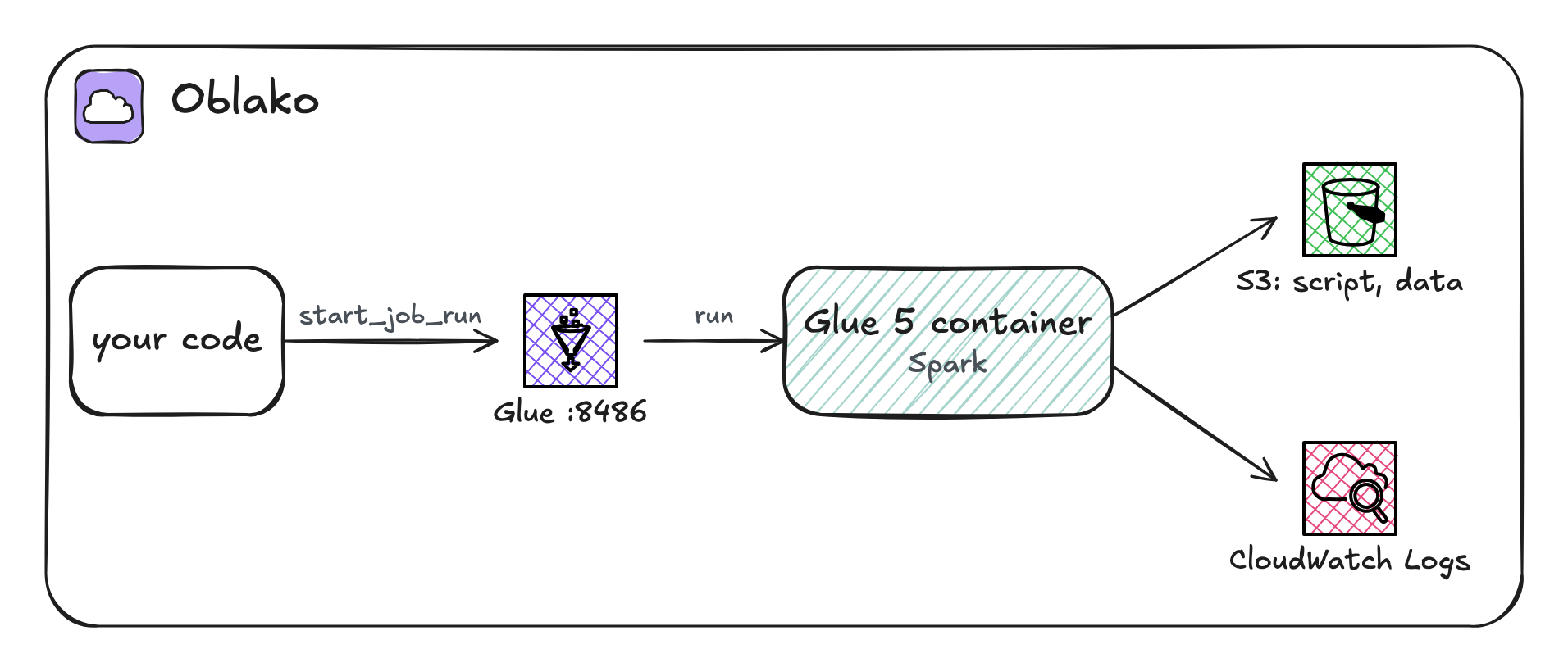
6.3 Raw data
The job cleans page-click events that arrive as JSON lines, one event per line:
import json

import boto3

s3 = boto3.client("s3")
s3.create_bucket(Bucket="etl-demo")

clicks = [
    ("2026-09-01", "u-1", "/", 820),
    ("2026-09-01", "u-2", "/pricing", 1430),
    ("2026-09-01", "u-3", "/", 2650),
    ("2026-09-02", "u-1", "/docs", 2210),
    ("2026-09-02", "u-4", "/", 450),
    ("2026-09-03", "u-2", "/docs", 1980),
]
lines = [
    json.dumps({"day": d, "user": u, "page": p, "ms": ms})
    for d, u, p, ms in clicks
]
s3.put_object(
    Bucket="etl-demo",
    Key="raw/clicks/batch-001.json",
    Body="\n".join(lines).encode(),
)
print(len(lines), "events")
6 events6.4 The job script
The complete job is saved as clean_clicks.py. It reads the raw events, gives each field its type and a clearer name, keeps only page loads under two seconds, and writes the result as Parquet partitioned by day:
import sys

from awsglue.context import GlueContext
from awsglue.job import Job
from awsglue.transforms import ApplyMapping, Filter
from awsglue.utils import getResolvedOptions
from pyspark.context import SparkContext

args = getResolvedOptions(
    sys.argv, ["JOB_NAME", "source", "target"]
)
glue = GlueContext(SparkContext())
job = Job(glue)
job.init(args["JOB_NAME"], args)

raw = glue.create_dynamic_frame.from_options(
    "s3", {"paths": [args["source"]]}, format="json"
)
typed = ApplyMapping.apply(
    frame=raw,
    mappings=[
        ("day", "string", "day", "string"),
        ("user", "string", "user", "string"),
        ("page", "string", "page", "string"),
        ("ms", "long", "load_ms", "long"),
    ],
)
fast = Filter.apply(
    frame=typed, f=lambda row: row["load_ms"] < 2000
)
glue.write_dynamic_frame.from_options(
    fast,
    "s3",
    {"path": args["target"], "partitionKeys": ["day"]},
    format="parquet",
)
print("rows in:", raw.count(), "rows out:", fast.count())
job.commit()
The script does the following.
getResolvedOptionsreads the job’s arguments. Glue passes every run--JOB_NAMEand the arguments you define, here--sourceand--target, so the same script runs against any paths.GlueContextwraps Spark with Glue’s readers and writers, andJobmarks the start and end of the run.from_optionsreads every file under the source prefix into a DynamicFrame.from_catalog(database=..., table_name=...)reads a table defined in the Data Catalog instead, as in Chapter 5.ApplyMappingselects, renames and types fields in one step:ms, a long, becomesload_ms.Filterkeeps the rows for which the function returns true.write_dynamic_framewrites Parquet, one prefix per value ofday, the layout Athena reads as partitions.
The script leaves endpoints and credentials to the environment it runs in, so the same file runs on Glue.
6.5 Creating the job
Upload the script and define the job around it:
import boto3

s3 = boto3.client("s3")
glue = boto3.client("glue")

s3.upload_file(
    "clean_clicks.py", "etl-demo", "scripts/clean_clicks.py"
)
glue.create_job(
    Name="clean-clicks",
    Role="arn:aws:iam::123456789012:role/glue-etl",
    Command={
        "Name": "glueetl",
        "ScriptLocation": "s3://etl-demo/scripts/clean_clicks.py",
        "PythonVersion": "3",
    },
    DefaultArguments={
        "--source": "s3://etl-demo/raw/clicks/",
        "--target": "s3://etl-demo/clean/clicks/",
    },
    GlueVersion="5.0",
    WorkerType="G.1X",
    NumberOfWorkers=2,
)
print(glue.list_jobs()["JobNames"])['clean-clicks']glueetl is the Spark job type, and DefaultArguments are passed to every run unless the run overrides them. On AWS the job runs as the given role, which must allow it to read and write its S3 paths and write its logs; oblako records the role and runs the job without checking its permissions.
6.6 Running the job
A run is asynchronous, like an Athena query, so the listing starts a run and polls its state until it finishes:
import time

import boto3

glue = boto3.client("glue")
DONE = ("SUCCEEDED", "FAILED", "TIMEOUT", "STOPPED", "ERROR")

run_id = glue.start_job_run(JobName="clean-clicks")["JobRunId"]
while True:
    run = glue.get_job_run(JobName="clean-clicks", RunId=run_id)
    state = run["JobRun"]["JobRunState"]
    if state in DONE:
        break
    time.sleep(10)
print(state)
if state != "SUCCEEDED":
    print(run["JobRun"]["ErrorMessage"])

logs = boto3.client("logs")
events = logs.get_log_events(
    logGroupName="/aws-glue/jobs/output", logStreamName=run_id
)["events"]
for event in events:
    print(event["message"])
SUCCEEDED
rows in: 6 rows out: 4What the script prints goes to the CloudWatch Logs group /aws-glue/jobs/output, in a stream named after the run; Spark’s own logging goes to /aws-glue/jobs/error. Glue on AWS uses the same log groups, so the same code finds a run’s logs there. When a run fails, ErrorMessage holds the error, for example GlueArgumentError: the following arguments are required: --target when an argument is missing.
6.7 Output
The output is a partitioned Parquet dataset, which pandas reads directly:
import boto3
import pandas as pd
from pyarrow import fs

# pandas reads and writes S3 through pyarrow, whose S3 client
# ignores the profile's endpoints, so it gets the one boto3 uses
endpoint = boto3.client("s3").meta.endpoint_url
s3_fs = fs.S3FileSystem(endpoint_override=endpoint)

clean = pd.read_parquet(
    "etl-demo/clean/clicks/", filesystem=s3_fs
)
print(clean.sort_values(["day", "user"]).to_string(index=False))
load_ms user page day
820 u-1 / 2026-09-01
1430 u-2 /pricing 2026-09-01
450 u-4 / 2026-09-02
1980 u-2 /docs 2026-09-03Two events took two seconds or more and were filtered out. To query this dataset with Athena, define a table over it as in Chapter 5.
6.8 Where oblako differs from AWS
One container per run. oblako records
WorkerTypeandNumberOfWorkersbut runs every job as one container running Spark locally. Results match Glue’s, while speed and memory depend on your machine.Job bookmarks are not modeled. On Glue, a bookmark lets a job process only the files that arrived since its last run; on oblako every run reads all of its input.
Unsupported features. Triggers, crawlers, streaming jobs and interactive sessions are unavailable, so you start runs yourself with
StartJobRun.Directory markers. The open-source S3 client that Spark uses locally writes empty objects such as
clean/clicks/day=2026-09-01/next to the data, whereas Glue on AWS uses its own S3 client. Readers skip these objects, though a listing shows them.The role is not checked, so a job that runs locally can still fail on AWS for lack of a permission.
6.9 Running it on AWS
Unset the oblako variables and use a bucket name of your own. Create an IAM role for the job that Glue can assume, with permission to read the script and the raw data, write the output prefix, and write to CloudWatch Logs. Use its ARN as Role, and the listings run as they are. On AWS a run of this size usually takes a minute or two, most of it starting workers, and is billed per worker-second with a one-minute minimum. Delete the job and the bucket when you finish.
6.10 Summary
A Glue job is a PySpark script in S3 with arguments and a worker count, and a job run executes it. DynamicFrames work out the schema of messy data as they read it, and ApplyMapping, Filter and write_dynamic_frame cover most cleaning jobs. You create and run jobs with boto3, and read their output from CloudWatch Logs. On oblako each run is AWS’s Glue 5 image in a local container, with S3, the Data Catalog and logs pointing at oblako, so the same script runs on AWS unchanged.