8 RDS and Aurora
Aurora PostgreSQL: connecting, writing, pgvector and the Data API.
8.1 Before you start
oblako up rds
oblako up rds-data
export AWS_PROFILE=oblako
uv add boto3 "psycopg[binary]"The examples keep a small shop’s product catalog and the embeddings of a few documentation pages.
8.2 RDS and Aurora in brief
RDS gives you a database instance: one server running PostgreSQL, MySQL, MariaDB, SQL Server or Oracle, which AWS installs, patches, backs up and fails over. You choose its size, and pay for it while it runs.
Aurora is a cluster: one writer instance and up to fifteen readers, all on a single storage volume that AWS replicates across three availability zones. Because readers share the writer’s storage, adding one copies no data, and a reader can take over as writer in seconds. A cluster has two endpoints: the writer endpoint always reaches the writer, and the reader endpoint spreads connections over the readers. Aurora PostgreSQL speaks the PostgreSQL wire protocol, so PostgreSQL drivers and tools such as psycopg and psql connect to it as they would to PostgreSQL.
In both cases your application connects to a PostgreSQL server. AWS adds the control plane that creates and resizes it and, for Aurora, the Data API, which takes SQL over HTTPS.
What oblako runs
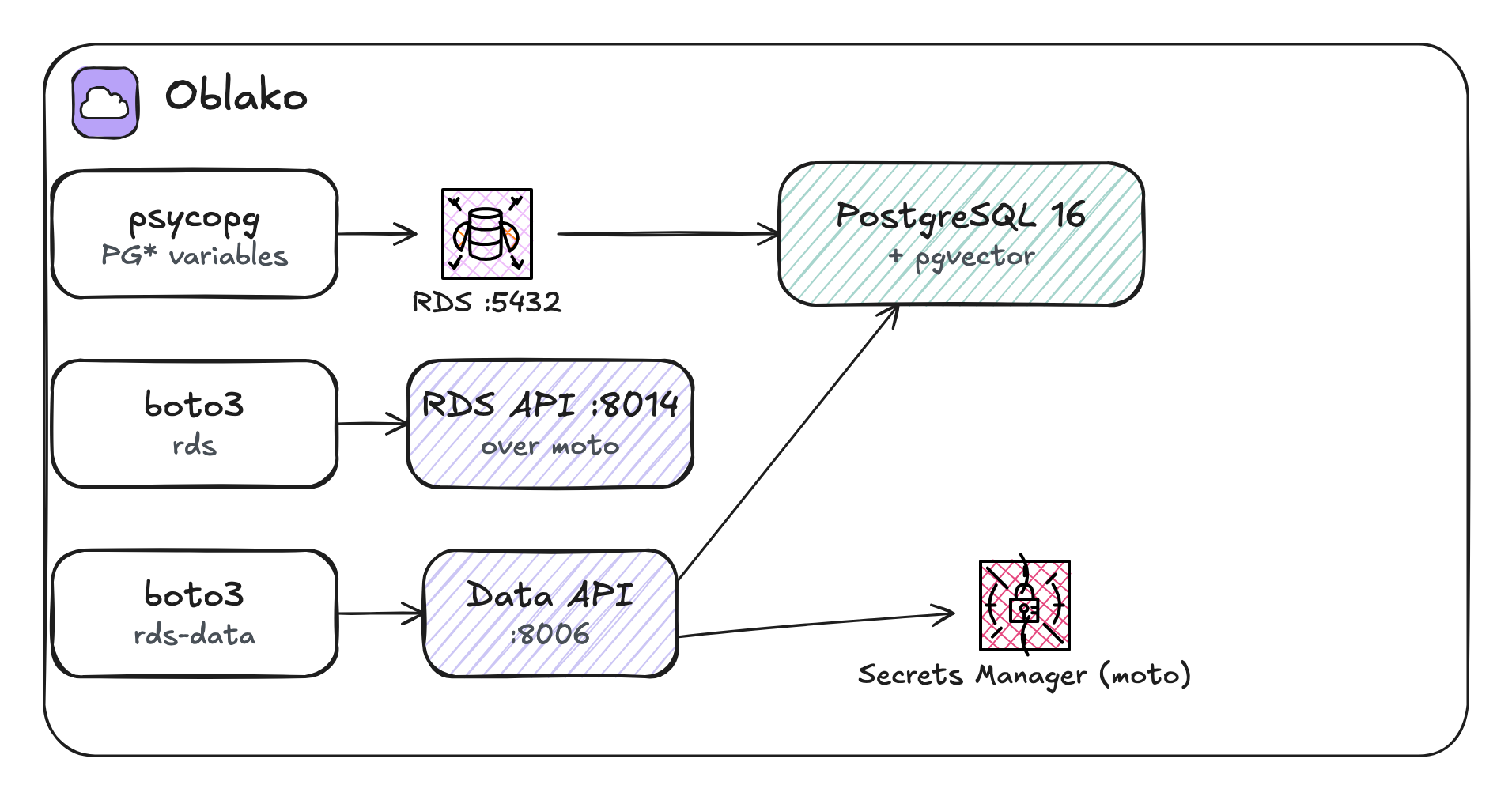
oblako runs one real PostgreSQL 16 with the pgvector extension, the same engine RDS and Aurora PostgreSQL run, on port 5432. The RDS API on port 8014 keeps its metadata in moto, so the Aurora clusters and cluster instances you create exist as metadata, and all of them lead to this one database. (A standalone PostgreSQL instance, created without a cluster, gets a server of its own; Chapter 9 uses those.) The Data API is an oblako engine on port 8006 that runs its statements on the same PostgreSQL. Figure 8.1 shows the three paths.
8.3 Creating an Aurora cluster
On AWS you create a database through the control plane. Create a cluster, then the writer instance in it:
import boto3

rds = boto3.client("rds")
rds.create_db_cluster(
    DBClusterIdentifier="catalog",
    Engine="aurora-postgresql",
    EngineVersion="16.4",
    MasterUsername="oblako",
    MasterUserPassword="oblako-local-1",
    DatabaseName="oblako",
    EnableHttpEndpoint=True,
)
rds.create_db_instance(
    DBInstanceIdentifier="catalog-writer",
    DBClusterIdentifier="catalog",
    DBInstanceClass="db.r6g.large",
    Engine="aurora-postgresql",
)
cluster = rds.describe_db_clusters(DBClusterIdentifier="catalog")
c = cluster["DBClusters"][0]
print(c["Status"], c["Engine"], c["EngineVersion"])
print("writer", c["Endpoint"])
print("reader", c["ReaderEndpoint"])
members = c["DBClusterMembers"]
print("members:", [m["DBInstanceIdentifier"] for m in members])
available aurora-postgresql 16.4
writer catalog.cluster-jpzuh2lsl2s9.us-east-1.rds.amazonaws.com
reader catalog.cluster-ro-jpzuh2lsl2s9.us-east-1.rds.amazonaws.com
members: ['catalog-writer']EnableHttpEndpoint turns on the Data API for the cluster. The endpoints have AWS’s format but exist only as moto metadata, so they do not resolve. On oblako the database is always at localhost:5432, while on AWS you connect to the writer endpoint. The connection module in the next section keeps this difference out of the code.
8.4 Connecting
PostgreSQL drivers built on libpq, which includes psycopg, read their connection settings from standard environment variables when the code gives none: PGHOST, PGPORT, PGDATABASE, PGUSER and PGPASSWORD. They are not AWS settings, so the oblako profile does not set them; export them for oblako:
export PGHOST=localhost PGPORT=5432 PGDATABASE=oblako
export PGUSER=oblako PGPASSWORD=oblako
If another PostgreSQL already listens on port 5432 on your machine, oblako up rds stops with an error that names the port; stop that server first.
psycopg reads every connection setting from these variables, so the listings call psycopg.connect() with no settings of their own, and they run against AWS once the variables hold the writer endpoint and your credentials.
8.5 Writing data
Aurora PostgreSQL is PostgreSQL, so this listing is ordinary PostgreSQL. It creates a table, inserts with RETURNING to get the stored row back, updates an existing row with an upsert, and writes two rows in one transaction:
import psycopg

with psycopg.connect(autocommit=True) as conn:
    conn.execute("DROP TABLE IF EXISTS products")
    conn.execute(
        "CREATE TABLE products ("
        " sku text PRIMARY KEY,"
        " name text NOT NULL,"
        " price numeric(10, 2) NOT NULL)"
    )
    row = conn.execute(
        "INSERT INTO products VALUES (%s, %s, %s)"
        " RETURNING sku, price",
        ("TEA-01", "Green tea", 4.50),
    ).fetchone()
    print("inserted:", row)

    upsert = (
        "INSERT INTO products VALUES (%s, %s, %s)"
        " ON CONFLICT (sku) DO UPDATE SET price = EXCLUDED.price"
    )
    conn.execute(upsert, ("TEA-01", "Green tea", 4.95))

    with conn.transaction():
        conn.execute(upsert, ("MUG-01", "Mug", 12.00))
        conn.execute(upsert, ("POT-01", "Teapot", 29.00))

    rows = conn.execute(
        "SELECT sku, price FROM products ORDER BY sku"
    )
    for row in rows:
        print(row)
inserted: ('TEA-01', Decimal('4.50'))
('MUG-01', Decimal('12.00'))
('POT-01', Decimal('29.00'))
('TEA-01', Decimal('4.95'))ON CONFLICT ... DO UPDATE makes the write idempotent: running it twice leaves one row with the latest price. conn.transaction() commits both rows together, or rolls both back if anything inside the block raises an exception.
8.6 Embeddings with pgvector
RDS and Aurora PostgreSQL include pgvector, an extension that adds a vector column type, distance operators and indexes for nearest-neighbor search. It lets you keep embeddings next to the rows they describe and search them with SQL. This listing stores the same three hand-made vectors as the S3 Vectors listing in Chapter 4:
import psycopg

pages = [
    ("pricing", "Plans and prices", "[0.9, 0.1, 0.0]"),
    ("quickstart", "Install and first run", "[0.1, 0.9, 0.2]"),
    ("api", "API reference", "[0.0, 0.8, 0.6]"),
]
with psycopg.connect(autocommit=True) as conn:
    conn.execute("CREATE EXTENSION IF NOT EXISTS vector")
    conn.execute("DROP TABLE IF EXISTS doc_pages")
    conn.execute(
        "CREATE TABLE doc_pages ("
        " slug text PRIMARY KEY, title text, embedding vector(3))"
    )
    with conn.cursor() as cur:
        cur.executemany(
            "INSERT INTO doc_pages VALUES (%s, %s, %s)", pages
        )
    conn.execute(
        "CREATE INDEX ON doc_pages"
        " USING hnsw (embedding vector_cosine_ops)"
    )

    query = "[0.1, 1.0, 0.3]"
    nearest = conn.execute(
        "SELECT slug,"
        " round((embedding <=> %s::vector)::numeric, 4)"
        " FROM doc_pages"
        " ORDER BY embedding <=> %s::vector LIMIT 2",
        (query, query),
    ).fetchall()
    print(nearest)
[('quickstart', Decimal('0.0027')), ('api', Decimal('0.0656'))]<=> is cosine distance, and the HNSW (hierarchical navigable small world) index, a graph-based index, answers an ORDER BY on it without comparing the query with every row. The distances match S3 Vectors’ to four places, since the vectors and the measure are the same. pgvector keeps vectors in the same transaction as your other data and lets you join and filter them with SQL. S3 Vectors, by contrast, stores many more vectors at lower cost and has no server to run.
8.7 SQLAlchemy
SQLAlchemy works with RDS and Aurora PostgreSQL as with any PostgreSQL. Its psycopg dialect passes only what the URL contains, so a URL with no host or credentials takes them from the PG* variables. pgvector ships a SQLAlchemy column type, Vector, with the distance functions as methods:
uv add sqlalchemy pgvectorThis listing maps the two tables from the previous sections as ORM classes, upserts a product with PostgreSQL’s INSERT ... ON CONFLICT, queries through the ORM, and runs the nearest-neighbor search as an ORM query:
from decimal import Decimal

import sqlalchemy as sa
from pgvector.sqlalchemy import Vector
from sqlalchemy.dialects.postgresql import insert
from sqlalchemy.orm import (
    DeclarativeBase,
    Mapped,
    Session,
    mapped_column,
)

# no host, port or credentials: psycopg reads the PG* variables
engine = sa.create_engine("postgresql+psycopg://")


class Base(DeclarativeBase):
    pass


class Product(Base):
    __tablename__ = "products"
    sku: Mapped[str] = mapped_column(primary_key=True)
    name: Mapped[str]
    price: Mapped[Decimal] = mapped_column(sa.Numeric(10, 2))


class DocPage(Base):
    __tablename__ = "doc_pages"
    slug: Mapped[str] = mapped_column(primary_key=True)
    title: Mapped[str]
    embedding = mapped_column(Vector(3))


with Session(engine) as session:
    upsert = insert(Product).values(
        sku="CUP-01", name="Cup", price=Decimal("6.50")
    )
    session.execute(
        upsert.on_conflict_do_update(
            index_elements=["sku"],
            set_={"price": upsert.excluded.price},
        )
    )
    session.commit()

    cheap = session.scalars(
        sa.select(Product)
        .where(Product.price < 10)
        .order_by(Product.sku)
    )
    print([(p.sku, p.price) for p in cheap])

    query = [0.1, 1.0, 0.3]
    nearest = session.scalars(
        sa.select(DocPage)
        .order_by(DocPage.embedding.cosine_distance(query))
        .limit(2)
    )
    print([page.slug for page in nearest])
[('CUP-01', Decimal('6.50')), ('TEA-01', Decimal('4.95'))]
['quickstart', 'api']cosine_distance compiles to the same <=> operator as before, so the HNSW index serves the ORM query too.
8.8 The Data API
The Data API runs SQL against an Aurora cluster over HTTPS, without a driver or an open connection, which suits Lambda functions, where connections are expensive to hold. Each call names the cluster by its ARN and authenticates with a Secrets Manager secret that holds the database credentials:
import json

import boto3

secrets = boto3.client("secretsmanager")
secret_arn = secrets.create_secret(
    Name="catalog/oblako",
    SecretString=json.dumps(
        {"username": "oblako", "password": "oblako"}
    ),
)["ARN"]
rds = boto3.client("rds")
cluster = rds.describe_db_clusters(DBClusterIdentifier="catalog")
cluster_arn = cluster["DBClusters"][0]["DBClusterArn"]

rds_data = boto3.client("rds-data")
target = {
    "resourceArn": cluster_arn,
    "secretArn": secret_arn,
    "database": "oblako",
}

tx = rds_data.begin_transaction(**target)["transactionId"]
rds_data.execute_statement(
    **target,
    transactionId=tx,
    sql="UPDATE products SET price = price * 1.1"
    " WHERE sku = :sku",
    parameters=[
        {"name": "sku", "value": {"stringValue": "MUG-01"}}
    ],
)
done = rds_data.commit_transaction(
    resourceArn=cluster_arn,
    secretArn=secret_arn,
    transactionId=tx,
)
print(done["transactionStatus"])

result = rds_data.execute_statement(
    **target,
    sql="SELECT sku, price FROM products ORDER BY sku",
    formatRecordsAs="JSON",
)
print(json.loads(result["formattedRecords"]))
Transaction Committed
[{'sku': 'MUG-01', 'price': '13.20'},
{'sku': 'POT-01', 'price': '29.00'},
{'sku': 'TEA-01', 'price': '4.95'}]Parameters are named, as in :sku, and typed, as in stringValue, which keeps values out of the SQL text. A transaction spans calls: begin_transaction returns an ID that later statements pass until commit_transaction or rollback_transaction ends it. formatRecordsAs="JSON" returns the rows as one JSON string instead of typed fields, and the prices in it are strings, because the Data API returns DECIMAL as a string so that no precision is lost. To get numbers, pass:
resultSetOptions = {"decimalReturnType": "DOUBLE_OR_LONG"}8.9 Where oblako differs from AWS
One database behind every cluster. Clusters, their instances, readers and endpoints are metadata, and any two clusters you create share one PostgreSQL, so use separate databases or schemas if you need to keep them apart.
Always PostgreSQL 16, whatever
EngineandEngineVersionyou request. oblako can run MySQL instead, but only when started from its Python API,RdsService(engine="mysql").Aurora readers, failover and backups are metadata. The calls succeed and are recorded, but the database stays as it was. Read replicas and parameter groups of standalone instances are real (Chapter 9).
Credentials are not checked. The control plane accepts any credentials, and the Data API runs statements without reading the secret it is given.
Extensions: pgvector is installed; other extensions RDS offers may not be.
8.10 Running it on AWS
On AWS the control-plane listing creates a real Aurora cluster, which bills by the hour per instance, so delete the instance and the cluster afterwards. Point the PG* variables at the cluster’s writer endpoint and your credentials. Your machine reaches the cluster only if its instances are publicly accessible and their security group allows your address; otherwise, run the listings from inside the VPC. Store the secret for the Data API with create_secret as shown, and grant your role rds-data:ExecuteStatement and secretsmanager:GetSecretValue on it. pgvector is enabled per database with the same CREATE EXTENSION vector.
8.11 Summary
RDS runs a database instance for you; Aurora runs a cluster of instances over shared storage, with writer and reader endpoints. Your code speaks PostgreSQL to either, and with the PG* variables set it leaves the host to the environment. pgvector adds vector columns and nearest-neighbor indexes inside the database, and the Data API runs SQL over HTTPS with named parameters, transactions and JSON results. On oblako, all of it is one PostgreSQL 16 with pgvector, under moto’s cluster metadata.