5 The Glue Data Catalog and Athena
Describing data in S3 as tables with the Glue Data Catalog, and querying it with Athena.
5.1 Before you start
Athena on oblako needs four services: S3 for the data, the Iceberg catalog, Trino (which also starts the Glue Data Catalog), and the Athena engine itself:
oblako up s3
oblako up iceberg
oblako up trino
oblako up athena
export AWS_PROFILE=oblako
uv add boto3 pandas pyarrow awswranglerThe examples analyze page clicks: which pages were opened, by whom, and how long they took to load.
5.2 The Data Catalog
A table in the Glue Data Catalog is a description of data that lives elsewhere, in S3. It records a database and table name, the columns and their types, the file format, the S3 location of the files, and the columns the files are partitioned by. Each partition is a further entry that maps a value, such as day=2026-09-02, to a prefix.
Any engine that reads the catalog (Athena, Spark, Redshift Spectrum, Trino) sees the same tables over the same files. The files belong to none of them: a change to a table’s description is visible to every engine, and deleting a table leaves its files in place.
What oblako runs
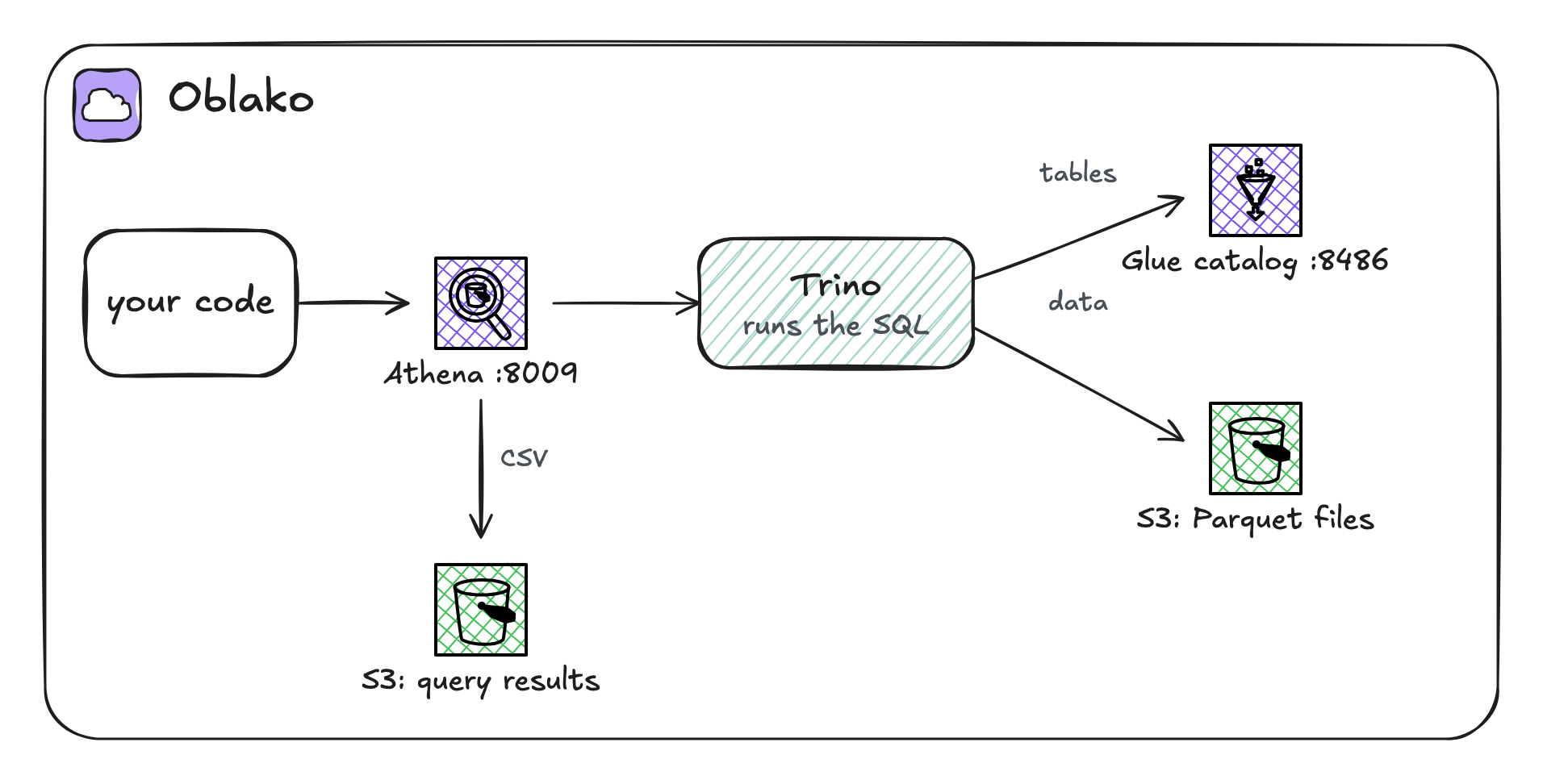
oblako’s Glue Data Catalog is a Python engine on port 8486. It keeps Parquet, CSV and JSON tables, with their partitions, in a small database of its own, and Iceberg tables in the shared Iceberg catalog from Chapter 4. Athena’s engine on port 8009 accepts the athena API and runs each query on Trino, whose awsdatacatalog catalog reads table definitions from the Glue engine. Figure 5.1 shows the path of a query.
5.3 Sample data
Write a small partitioned Parquet dataset, as in Chapter 3:
import boto3
import pandas as pd
from pyarrow import fs

s3 = boto3.client("s3")
s3.create_bucket(Bucket="lake-data")
# pandas reads and writes S3 through pyarrow, whose S3 client
# ignores the profile's endpoints, so it gets the one boto3 uses
s3_fs = fs.S3FileSystem(endpoint_override=s3.meta.endpoint_url)
clicks = pd.DataFrame(
    {
        "day": ["2026-09-01"] * 3
        + ["2026-09-02"] * 2
        + ["2026-09-03"] * 3,
        "user": [
            "u-1",
            "u-2",
            "u-3",
            "u-1",
            "u-4",
            "u-2",
            "u-3",
            "u-5",
        ],
        "page": [
            "/",
            "/pricing",
            "/",
            "/docs",
            "/",
            "/docs",
            "/",
            "/pricing",
        ],
        "ms": [820, 1430, 610, 2210, 450, 1980, 700, 1250],
    }
)
clicks.to_parquet(
    "lake-data/clicks/",
    partition_cols=["day"],
    filesystem=s3_fs,
)
print(len(clicks), "rows")
8 rows5.4 Defining a table
A table definition names the columns, the format and the location. For Parquet, the format is three Hive class names, which every engine recognizes. The partition column, day, is listed separately from the other columns because its values come from the prefixes rather than from the files:
import boto3

glue = boto3.client("glue")
glue.create_database(DatabaseInput={"Name": "web"})

hive = "org.apache.hadoop.hive.ql.io.parquet"
parquet = {
    "InputFormat": f"{hive}.MapredParquetInputFormat",
    "OutputFormat": f"{hive}.MapredParquetOutputFormat",
    "SerdeInfo": {
        "SerializationLibrary": f"{hive}.serde.ParquetHiveSerDe"
    },
}
glue.create_table(
    DatabaseName="web",
    TableInput={
        "Name": "clicks",
        "TableType": "EXTERNAL_TABLE",
        "PartitionKeys": [{"Name": "day", "Type": "string"}],
        "StorageDescriptor": {
            "Columns": [
                {"Name": "user", "Type": "string"},
                {"Name": "page", "Type": "string"},
                {"Name": "ms", "Type": "bigint"},
            ],
            "Location": "s3://lake-data/clicks/",
            **parquet,
        },
    },
)
The table now exists, but a query finds rows only in registered partitions, so register one partition per prefix:
days = ["2026-09-01", "2026-09-02", "2026-09-03"]
glue.batch_create_partition(
    DatabaseName="web",
    TableName="clicks",
    PartitionInputList=[
        {
            "Values": [day],
            "StorageDescriptor": {
                "Location": f"s3://lake-data/clicks/day={day}/",
                **parquet,
            },
        }
        for day in days
    ],
)
parts = glue.get_partitions(
    DatabaseName="web", TableName="clicks"
)
print(sorted(p["Values"][0] for p in parts["Partitions"]))
['2026-09-01', '2026-09-02', '2026-09-03']On AWS, a Glue crawler can discover tables and partitions by scanning S3, and Athena can add partitions with MSCK REPAIR TABLE. oblako has neither, so on oblako you define tables explicitly, as here or with a library.
5.5 Querying with Athena
Athena’s API is asynchronous: you start a query, wait for it to finish, then fetch the result. The helper in athena_query.py does all three steps:
import time

import boto3

athena = boto3.client("athena")
DONE = ("SUCCEEDED", "FAILED", "CANCELLED")


def run_query(sql, database="web"):
    query_id = athena.start_query_execution(
        QueryString=sql,
        QueryExecutionContext={"Database": database},
        WorkGroup="primary",
    )["QueryExecutionId"]
    while True:
        execution = athena.get_query_execution(
            QueryExecutionId=query_id
        )
        status = execution["QueryExecution"]["Status"]
        if status["State"] in DONE:
            break
        time.sleep(0.5)
    if status["State"] != "SUCCEEDED":
        raise RuntimeError(status.get("StateChangeReason"))
    results = athena.get_query_results(QueryExecutionId=query_id)
    rows = results["ResultSet"]["Rows"]
    return [
        [col.get("VarCharValue") for col in row["Data"]]
        for row in rows
    ]
With the helper, a query is one call:
from athena_query import run_query

for row in run_query(
    "SELECT page, count(*) AS clicks, avg(ms) AS avg_ms"
    " FROM clicks WHERE day >= '2026-09-02'"
    " GROUP BY page ORDER BY clicks DESC, page"
):
    print(row)
['page', 'clicks', 'avg_ms']
['/', '2', '575.0']
['/docs', '2', '2095.0']
['/pricing', '1', '1250.0']The first row is the header, and every value comes back as a string, as Athena returns them. The WHERE day >= ’2026-09-02’ filter is on the partition column, so the engine reads only two of the three prefixes, which on AWS lowers the cost because Athena charges by the bytes it scans.
Query results
Athena writes every result to S3 as a CSV file, in the location the workgroup names. A workgroup groups queries and holds their settings, and every account has one called primary:
import boto3

athena = boto3.client("athena")
group = athena.get_work_group(WorkGroup="primary")["WorkGroup"]
results = group["Configuration"]["ResultConfiguration"]
print(results["OutputLocation"])s3://oblako-athena-results/On oblako, primary comes configured with that bucket, while on AWS you set the output location on the workgroup yourself, once.
5.6 awswrangler
awswrangler, the AWS SDK for pandas, wraps the steps above: wr.s3.to_parquet writes a partitioned dataset, creates the table and registers its partitions, and wr.athena.read_sql_query runs a query and returns a DataFrame:
import awswrangler as wr
import pandas as pd

signups = pd.DataFrame(
    {
        "day": ["2026-09-01", "2026-09-01", "2026-09-02"],
        "user": ["u-1", "u-2", "u-4"],
        "plan": ["free", "team", "free"],
    }
)
wr.s3.to_parquet(
    signups,
    path="s3://lake-data/signups/",
    dataset=True,
    database="web",
    table="signups",
    partition_cols=["day"],
)

df = wr.athena.read_sql_query(
    "SELECT plan, count(*) AS n FROM signups"
    " GROUP BY plan ORDER BY plan",
    database="web",
)
print(df)
plan n
0 free 2
1 team 1By default to_parquet with dataset=True appends, so running the listing twice doubles the rows; pass mode="overwrite" to replace them. read_sql_query wraps the query in a CREATE TABLE AS SELECT, which writes Parquet, and then reads those files, which for large results is much faster than fetching rows through the API.
5.7 CREATE TABLE AS SELECT
CREATE TABLE AS SELECT, or CTAS, runs a query and saves its result as a new table, in the format and location you choose. Use it to build a smaller, faster table from a larger one:
from athena_query import run_query

run_query(
    "CREATE TABLE daily_pages"
    " WITH (format = 'PARQUET',"
    " external_location = 's3://lake-data/daily_pages/')"
    " AS SELECT day, page, count(*) AS clicks"
    " FROM clicks GROUP BY day, page"
)
rows = run_query("SELECT * FROM daily_pages ORDER BY day, page")
for row in rows:
    print(row)
['day', 'page', 'clicks']
['2026-09-01', '/', '2']
['2026-09-01', '/pricing', '1']
['2026-09-02', '/', '1']
['2026-09-02', '/docs', '1']
['2026-09-03', '/', '1']
['2026-09-03', '/docs', '1']
['2026-09-03', '/pricing', '1']The new table is in the Glue Data Catalog and its Parquet files are under external_location, so any engine can read it.
5.8 Querying S3 Tables
Athena reaches S3 Tables through a catalog per table bucket, named s3tablescatalog/<bucket>, in which each namespace is a database. Chapter 4’s table is page_views in namespace web of bucket analytics:
from athena_query import run_query

sql = (
    "SELECT day, sum(views) AS views"
    ' FROM "s3tablescatalog/analytics"."web"."page_views"'
    " GROUP BY day ORDER BY day"
)
for row in run_query(sql):
    print(row)
['day', 'views']
['2026-09-01', '151']
['2026-09-02', '45']
['2026-09-03', '98']
['2026-09-04', '52']These are the rows PyIceberg wrote in Chapter 4, which Athena reads from the same table without a copy. You can also leave the catalog out of the SQL and pass it in the query context, as QueryExecutionContext={"Catalog": "s3tablescatalog/analytics", "Database": "web"}.
5.9 Where oblako differs from AWS
Trino’s SQL. Athena’s engine is based on Trino, and oblako runs Trino itself, so most queries behave the same. Athena’s Hive DDL (
CREATE EXTERNAL TABLE ... ROW FORMAT,MSCK REPAIR TABLE) andUNLOADare not translated, so define tables through Glue or a library.No crawlers, connections, Lake Formation permissions or table versions in the Glue Data Catalog.
No scan statistics. Query results do not report bytes scanned, so you cannot measure locally what a query would cost.
Scale. Trino runs as a single node on your machine.
5.10 Running it on AWS
Unset the oblako variables, give the primary workgroup an output location in a bucket you own (or create a workgroup of your own), and use a globally unique name instead of lake-data. Your role needs the Glue permissions for the database and tables, the S3 permissions for the data and the results bucket, and the Athena permissions to run queries. Querying S3 Tables also needs the table buckets integrated with AWS analytics services, an integration the S3 console offers when you create the first table bucket.
Delete what you created when you finish: the tables and the database in Glue, which leaves the files, and then the files.
5.11 Summary
A Glue table is metadata (columns, format, location and partitions) over files in S3, and Athena runs SQL over those tables and writes the results to the workgroup’s S3 location. Filtering on partition columns reduces the bytes a query scans, and so its cost. awswrangler creates tables and runs queries from pandas in one call each, and CTAS saves a query’s result as a new table. On oblako, the Glue engine holds the catalog, Trino runs the queries, and S3 Tables are reachable as s3tablescatalog/<bucket>.