3 S3
Objects, keys, tags, Parquet datasets, bucket policies and event notifications in S3.
3.1 Before you start
Start S3 and source the environment file from Chapter 2. oblako up s3 starts S3Proxy together with the front that adds tags, policies and notifications:
oblako up s3
export AWS_PROFILE=oblako
The listings use boto3, and the Parquet section adds pandas with its S3 support:
uv add boto3 pandas pyarrowThe examples store sign-ups and page clicks from a small website in a bucket called events, one JSON object per event.
3.2 Buckets, objects and keys
S3 has three basic concepts. A bucket is a named container that belongs to one account and one region. An object is a sequence of bytes plus a little metadata. A key is the object’s name inside the bucket, any string up to 1,024 bytes long.
Keys are flat: a key such as raw/2026-09-01/signup-0001.json is a single string, which S3 stores as written, and its slashes take on meaning only when you list the bucket. A list request can ask for the keys that start with a prefix and group the rest of each key at a delimiter, which is how tools that browse a bucket show it as a file tree. Key design is therefore the main design decision in S3.
S3 writes objects whole, so changing an object, whether by appending to it or by changing a byte in the middle, means replacing it. Since December 2020, S3 has been strongly consistent: once a write returns, every read and every listing sees it.
3.3 What oblako runs
On port 9000, oblako runs a stock nginx in front of S3Proxy, an open-source server that implements the S3 API over a directory of files. nginx passes object reads and writes to S3Proxy and sends the parts of the API that S3Proxy lacks (object tags and S3 Inventory) to a small oblako engine. It also records every completed write so that event notifications can fire. Figure 3.1 shows the arrangement.
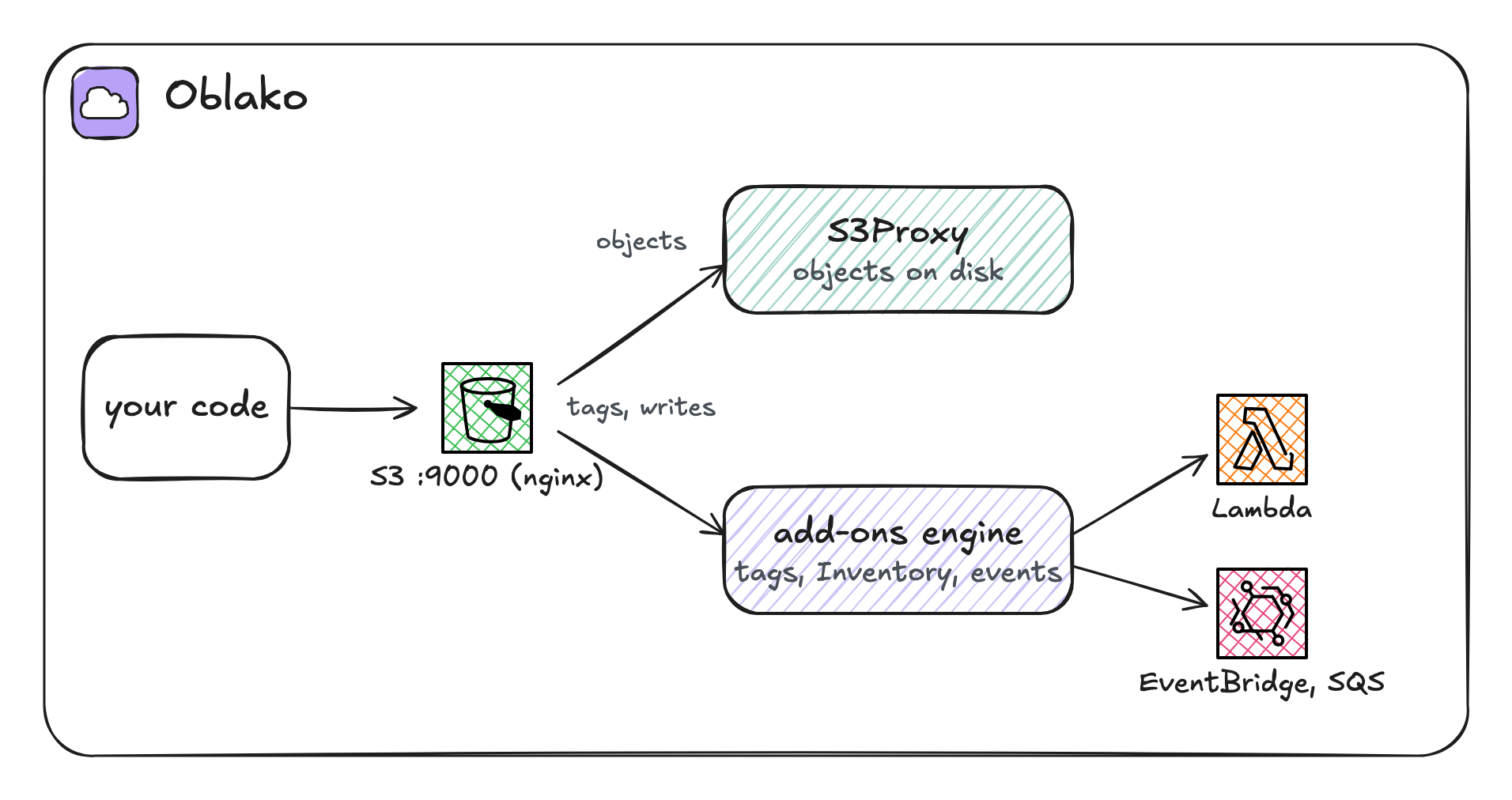
The objects live in a Docker volume, oblako-s3-data, so they survive oblako down.
3.4 Objects and metadata
Create the bucket and write one event:
import json

import boto3

s3 = boto3.client("s3")
s3.create_bucket(Bucket="events")

event = {
    "user": "u-17",
    "action": "signup",
    "at": "2026-09-01T08:15:00Z",
}
s3.put_object(
    Bucket="events",
    Key="raw/2026-09-01/signup-0001.json",
    Body=json.dumps(event).encode(),
    ContentType="application/json",
    Metadata={"source": "web"},
)

key = "raw/2026-09-01/signup-0001.json"
head = s3.head_object(Bucket="events", Key=key)
print(
    head["ContentLength"], head["ContentType"], head["Metadata"]
)

obj = s3.get_object(Bucket="events", Key=key)
print(json.loads(obj["Body"].read()))
66 application/json {'source': 'web'}
{'user': 'u-17', 'action': 'signup', 'at': '2026-09-01T08:15:00Z'}An object carries two kinds of metadata. System metadata, such as the size and ContentType, is set by S3. User metadata is the Metadata dictionary you set, which is stored with the object and returned on every head_object and get_object. When you need only the metadata, use head_object, which returns it without transferring the body.
User metadata is fixed once the object is written, and changing it means copying the object onto itself with new metadata, which rewrites the whole object. Labels that need to change without a rewrite belong in tags, described below.
3.5 Prefixes and listing
Write a few more events, one prefix per day:
import boto3

s3 = boto3.client("s3")
for day in ["2026-09-01", "2026-09-02", "2026-09-03"]:
    for n in range(3):
        key = f"raw/{day}/click-{n:04d}.json"
        s3.put_object(Bucket="events", Key=key, Body=b"{}")

resp = s3.list_objects_v2(
    Bucket="events", Prefix="raw/", Delimiter="/"
)
for prefix in resp["CommonPrefixes"]:
    print(prefix["Prefix"])

resp = s3.list_objects_v2(
    Bucket="events", Prefix="raw/2026-09-02/"
)
print([obj["Key"] for obj in resp["Contents"]])
raw/2026-09-01/
raw/2026-09-02/
raw/2026-09-03/
['raw/2026-09-02/click-0000.json',
'raw/2026-09-02/click-0001.json',
'raw/2026-09-02/click-0002.json']The first call asks for the keys under raw/ and groups everything after the next slash, so it returns three CommonPrefixes in place of nine keys; these are what a console shows as folders. The second call lists the keys for one day.
Design keys around how you will read them. If you usually read one day at a time, put the day early in the key, as here, so that the data one read needs sits under one prefix.
Listing more than 1,000 keys
A single list_objects_v2 call returns at most 1,000 keys, with a continuation token for the rest. A paginator follows the tokens:
import boto3

s3 = boto3.client("s3")
for n in range(1200):
    key = f"many/day=2026-09-04/part-{n:05d}.json"
    s3.put_object(Bucket="events", Key=key, Body=b"{}")

paginator = s3.get_paginator("list_objects_v2")
pages = paginator.paginate(Bucket="events", Prefix="many/")
sizes = [len(page["Contents"]) for page in pages]
print(sizes, sum(sizes))
[1000, 200] 1200Use a paginator in any code that may list a large prefix. Code that reads only the first response works on small prefixes during development and then, in production, silently misses every key after the first 1,000.
3.7 Datasets in Parquet
A query over JSON objects reads every byte of every file. Data you will query is better written as Parquet, a columnar format that stores each column together and compressed, so that a query reads only the columns it uses. Splitting the data into partitions, one prefix per value of a column you filter on, also lets a query read only the partitions it needs.
pandas writes a partitioned dataset in one call:
import boto3
import pandas as pd
from pyarrow import fs

# pandas reads and writes S3 through pyarrow, whose S3 client
# ignores the profile's endpoints, so it gets the one boto3 uses
endpoint = boto3.client("s3").meta.endpoint_url
s3_fs = fs.S3FileSystem(endpoint_override=endpoint)

clicks = pd.DataFrame(
    {
        "day": [
            "2026-09-01",
            "2026-09-01",
            "2026-09-02",
            "2026-09-03",
        ],
        "user": ["u-1", "u-2", "u-1", "u-3"],
        "page": ["/", "/pricing", "/docs", "/"],
    }
)
clicks.to_parquet(
    "events/clicks/",
    partition_cols=["day"],
    filesystem=s3_fs,
)

one_day = pd.read_parquet(
    "events/clicks/",
    filters=[("day", "=", "2026-09-02")],
    filesystem=s3_fs,
)
print(one_day)
user page day
0 u-1 /docs 2026-09-02pandas writes one prefix per day:
clicks/day=2026-09-01/<file>.parquet
clicks/day=2026-09-02/<file>.parquet
clicks/day=2026-09-03/<file>.parquet
The column=value form is the Hive convention, which Athena, Glue, Spark and Redshift Spectrum read as a partition column. pandas uses it to apply the filters argument, listing only the day=2026-09-02 prefix and opening only the files under it.
boto3, the AWS CLI, awswrangler and s3fs read the endpoints of the oblako profile, but tools with their own S3 client may not. pandas reads and writes Parquet on S3 through pyarrow’s S3 client, which takes the credentials and region from the profile but not its endpoints, and DuckDB has its own client too. The listing therefore gives pyarrow the endpoint that boto3 uses, boto3.client("s3").meta.endpoint_url, which on AWS is AWS’s own. Without it, pyarrow goes to AWS, which rejects oblako’s credentials.
The Glue and Athena chapter gives this kind of dataset a table definition and queries it with SQL.
3.8 Bucket policies
A bucket policy is a JSON document attached to a bucket that allows or denies actions to principals. This one denies everyone permission to delete objects:
import json

import boto3

s3 = boto3.client("s3")
policy = {
    "Version": "2012-10-17",
    "Statement": [
        {
            "Sid": "DenyDelete",
            "Effect": "Deny",
            "Principal": "*",
            "Action": "s3:DeleteObject",
            "Resource": "arn:aws:s3:::events/*",
        }
    ],
}
s3.put_bucket_policy(Bucket="events", Policy=json.dumps(policy))
resp = s3.get_bucket_policy(Bucket="events")
stored = json.loads(resp["Policy"])
print(stored["Statement"][0]["Sid"])

# On AWS this delete is refused with AccessDenied. oblako stores
# the policy but does not evaluate it, so the delete goes through.
s3.delete_object(
    Bucket="events", Key="raw/2026-09-03/click-0002.json"
)
print("deleted")
DenyDelete
deletedThis is the main limit of S3 on oblako, which stores and returns policies without enforcing them. Code and infrastructure templates that set policies run unchanged, but what a policy allows and denies has to be tested on AWS.
3.9 Event notifications
When an object is created or deleted, S3 can send a message describing the event to an SQS queue, an SNS topic, a Lambda function or EventBridge. A pipeline uses these notifications to process data as it arrives, without polling.
This listing sends an event to an SQS queue whenever an object is created under incoming/. moto serves SQS, and the oblako profile points the SDK’s SQS endpoint at it.
import json
import time

import boto3

s3 = boto3.client("s3")
sqs = boto3.client("sqs")

queue_url = sqs.create_queue(QueueName="new-events")["QueueUrl"]
attrs = sqs.get_queue_attributes(
    QueueUrl=queue_url, AttributeNames=["QueueArn"]
)
queue_arn = attrs["Attributes"]["QueueArn"]

prefix_rule = {"Name": "prefix", "Value": "incoming/"}
s3.put_bucket_notification_configuration(
    Bucket="events",
    NotificationConfiguration={
        "QueueConfigurations": [
            {
                "QueueArn": queue_arn,
                "Events": ["s3:ObjectCreated:*"],
                "Filter": {"Key": {"FilterRules": [prefix_rule]}},
            }
        ]
    },
)

s3.put_object(
    Bucket="events", Key="incoming/batch-001.json", Body=b"{}"
)

for _ in range(10):
    resp = sqs.receive_message(
        QueueUrl=queue_url, WaitTimeSeconds=1
    )
    messages = resp.get("Messages", [])
    if messages:
        record = json.loads(messages[0]["Body"])["Records"][0]
        print(record["eventName"], record["s3"]["object"]["key"])
        break
    time.sleep(1)
ObjectCreated:Put incoming/batch-001.jsonThe message body is the same JSON document S3 sends on AWS, with a Records list, the event name and the bucket and key, so the same consumer code runs on both.
Two details apply on AWS and on oblako alike. Notifications are delivered at least once, so a consumer must handle the same event arriving twice. They usually arrive within seconds of the write rather than at once, which is why the listing polls for a few seconds.
3.10 Where oblako differs from AWS
Policies are not enforced, and neither are IAM permissions on S3 calls.
Tags have no effect. oblako stores and returns them, but it has no lifecycle rules or tag-based access control to act on them.
Checksums. S3Proxy does not support the flexible checksums newer SDKs send by default; the
oblakoprofile sets the SDK to calculate checksums only when an operation requires them.Batch deletes send no events.
delete_objectsremoves the objects, but its keys travel in the request body, which the front does not log, so no deletion notifications fire.The front is Docker-only. Tags, policies and notifications need the nginx front, which runs on Docker, Podman and Colima; on Kubernetes or Apple’s
container, those calls returnNotImplemented.Throughput. Large downloads through the front run at several hundred megabytes per second, which is slower than S3Proxy alone and well below S3’s aggregate throughput. Small requests run at the same speed with or without the front.
3.11 Running it on AWS
To run the listings against S3, unset the oblako variables (or open a new shell) and use your AWS credentials. AWS then requires three changes:
Bucket names are global. All AWS accounts share one bucket namespace, and
eventsis taken, so use a name with something unique in it, such as your account ID.Regions other than us-east-1 need the region named when you create the bucket, through
CreateBucketConfiguration, as shown after this list.The queue must allow S3 to write to it. On AWS,
put_bucket_notification_configurationchecks that S3 is allowed to send to the queue and fails if it is not. Before configuring the notification, attach a queue policy that allows thes3.amazonaws.comservice principal to callsqs:SendMessagefor this bucket. oblako skips this check, which makes this the one listing that needs an extra step on AWS.
Creating a bucket outside us-east-1:
s3.create_bucket(
    Bucket="events-123456789012",
    CreateBucketConfiguration={"LocationConstraint": "eu-west-1"},
)
Delete what you created when you finish: the objects, then the bucket, then the queue.
3.12 Summary
S3 stores whole objects under keys in buckets, and listing with a prefix and a delimiter makes the keys look like folders; code that lists a large prefix needs a paginator. Tags can be changed after a write, while user metadata is fixed at write time. Data you query is best written as partitioned Parquet in the column=value key layout. On oblako, S3Proxy stores the objects and an nginx front adds tags, policies and notifications; policies are stored but not enforced, so test permissions on AWS.