14 Feature Store with Feast
A feature store with Redshift as its offline store and DynamoDB as its online store.
14.1 Before you start
oblako up s3
oblako up redshift
oblako up redshift-data
oblako up dynamodb
export AWS_PROFILE=oblako
uv add "feast[aws]" pyarrow pandasThe listings use Feast 0.66 and the Redshift cluster analytics and database oblako of Chapter 7. The last listing removes everything they create.
14.2 Feature stores
A feature is a value a model takes as input, such as a customer’s number of orders in the last seven days. The same features are needed twice: as history, to build a training set, and as the latest value, when the model scores one customer in production. Computing them in two places invites the two to drift apart, and a training set built carelessly from history can leak information from after the moment it describes.
A feature store keeps both sides consistent. Features are defined once, in code. An offline store, usually a warehouse, holds their history; a point-in-time join reads, for each training example, the values that were current at that example’s timestamp and none later. An online store, a key-value database, holds the latest value of each feature for each entity, and materialization copies those values from the offline store into it. Feast is an open-source feature store that works with either store from AWS: Redshift offline and DynamoDB online.
Feast’s Redshift offline store uses only the Redshift Data API and S3. It uploads the training examples to S3 and loads them into Redshift with COPY, runs the point-in-time join as SQL, and unloads the result to S3 with UNLOAD. Its DynamoDB online store keeps one table per feature view. A registry, a file that Feast keeps in S3 here, records the definitions, so every process that opens the store, from a notebook to a scheduled job, sees the same ones.
What oblako runs
Every part of that path is an oblako engine from earlier chapters. The Redshift Data API (Chapter 7) runs COPY and UNLOAD against oblako’s S3, and DynamoDB sits behind oblako’s proxy (Chapter 10), which provides the table tags Feast reads and writes. Feast runs in your Python process (Figure 14.1).
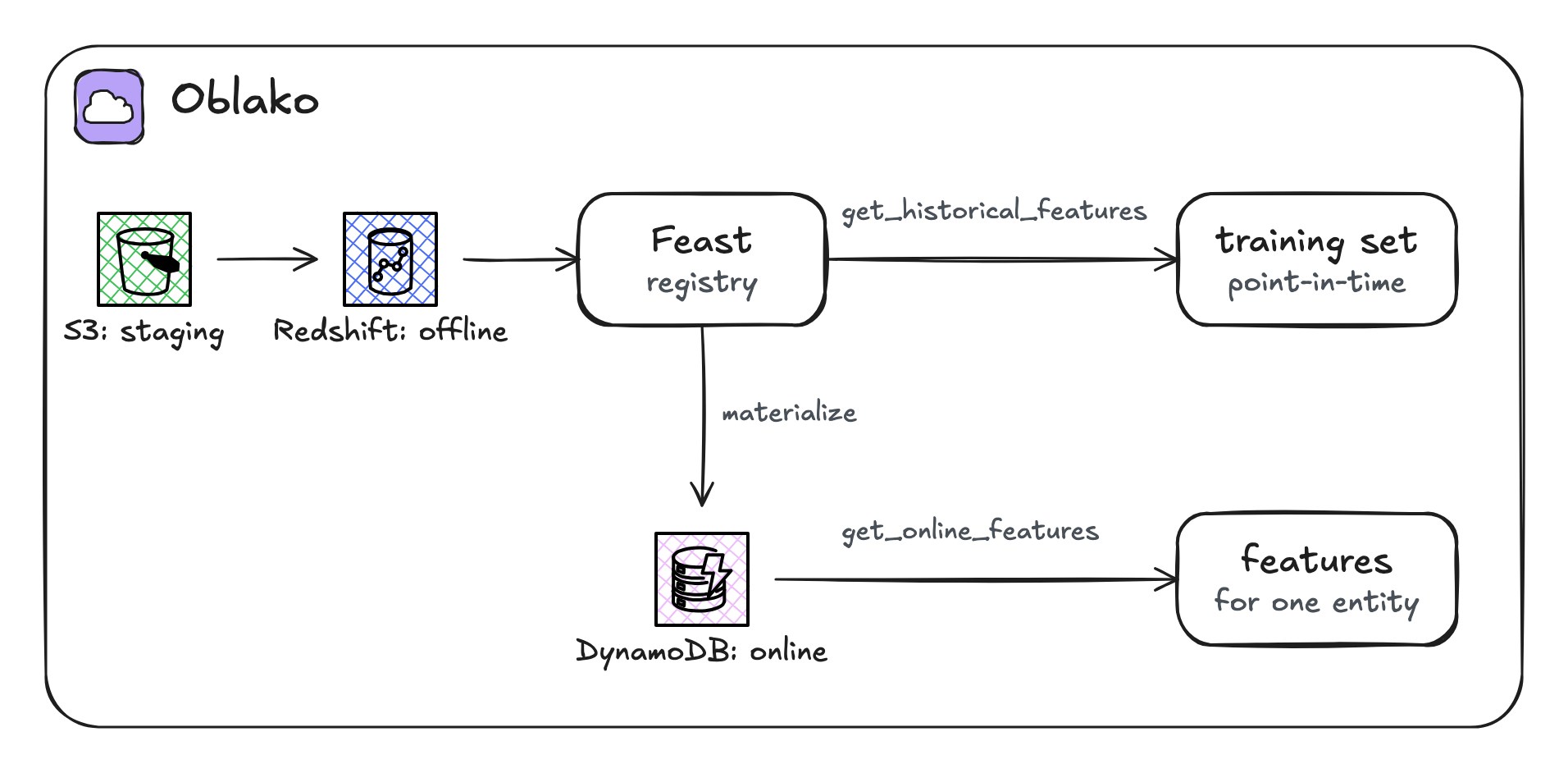
14.3 Feature data in Redshift
The features are daily statistics for 50 customers over 14 days: orders and spend over the previous seven days. The listings run their SQL through the Data API, as Feast does, with one helper:
import time

import boto3

data = boto3.client("redshift-data")


def run(sql):
    statement = data.execute_statement(
        ClusterIdentifier="analytics",
        Database="oblako",
        DbUser="oblako",
        Sql=sql,
    )
    while True:
        desc = data.describe_statement(Id=statement["Id"])
        if desc["Status"] in ("FINISHED", "FAILED", "ABORTED"):
            break
        time.sleep(0.2)
    if desc["Status"] != "FINISHED":
        raise RuntimeError(desc.get("Error"))
    return statement["Id"]
The statistics are written to S3 as Parquet and loaded with COPY:
import datetime
import io
import random

import boto3
import pyarrow as pa
import pyarrow.parquet as pq
from warehouse import run

s3 = boto3.client("s3")
s3.create_bucket(Bucket="feature-staging")
rng = random.Random(3)
day0 = datetime.datetime(2026, 9, 1)

rows = []
for customer in range(1, 51):
    for day in range(14):
        orders = rng.randint(0, 9)
        spend = round(orders * rng.uniform(10, 60), 2)
        at = day0 + datetime.timedelta(days=day)
        rows.append(
            {
                "customer_id": customer,
                "event_timestamp": at,
                "orders_7d": orders,
                "spend_7d": spend,
                "created": at + datetime.timedelta(hours=1),
            }
        )
buffer = io.BytesIO()
pq.write_table(pa.Table.from_pylist(rows), buffer)
s3.put_object(
    Bucket="feature-staging",
    Key="customer_stats/part-0.parquet",
    Body=buffer.getvalue(),
)

run("""
    CREATE TABLE customer_stats (
        customer_id     integer,
        event_timestamp timestamp,
        orders_7d       bigint,
        spend_7d        double precision,
        created         timestamp)
    DISTKEY(customer_id) SORTKEY(event_timestamp)""")
run("""
    COPY customer_stats
    FROM 's3://feature-staging/customer_stats/'
    IAM_ROLE 'arn:aws:iam::123456789012:role/redshift-copy'
    FORMAT AS PARQUET""")
print(len(rows), "rows in customer_stats")
700 rows in customer_statsevent_timestamp is the time each value describes. created is the time the row was written; when two rows for the same customer have the same event time, Feast uses the later created.
14.4 Defining features
A Feast definition names an entity, the thing features describe, and a feature view, a set of features read from one source. The module also holds the store’s configuration, so the listings share it:
from datetime import timedelta

from feast import (
    Entity,
    FeatureStore,
    FeatureView,
    Field,
    RepoConfig,
    ValueType,
)
from feast.infra.offline_stores.redshift import (
    RedshiftOfflineStoreConfig,
)
from feast.infra.offline_stores.redshift_source import (
    RedshiftSource,
)
from feast.infra.online_stores.dynamodb import (
    DynamoDBOnlineStoreConfig,
)
from feast.types import Float64, Int64

FEATURES = ["customer_stats:orders_7d", "customer_stats:spend_7d"]

customer = Entity(
    name="customer",
    join_keys=["customer_id"],
    value_type=ValueType.INT64,
)

customer_stats = FeatureView(
    name="customer_stats",
    entities=[customer],
    ttl=timedelta(days=2),
    schema=[
        Field(name="orders_7d", dtype=Int64),
        Field(name="spend_7d", dtype=Float64),
    ],
    source=RedshiftSource(
        name="customer_stats_source",
        table="customer_stats",
        timestamp_field="event_timestamp",
        created_timestamp_column="created",
    ),
    online=True,
)

config = RepoConfig(
    project="shop",
    provider="aws",
    registry="s3://feature-staging/feast/registry.db",
    offline_store=RedshiftOfflineStoreConfig(
        cluster_id="analytics",
        region="us-east-1",
        database="oblako",
        user="oblako",
        s3_staging_location="s3://feature-staging/feast",
        iam_role="arn:aws:iam::123456789012:role/redshift-copy",
    ),
    online_store=DynamoDBOnlineStoreConfig(region="us-east-1"),
    entity_key_serialization_version=3,
)


def open_store():
    return FeatureStore(config=config)
The feature view’s ttl of two days limits how old a value may be: a training example more than two days after a customer’s latest statistics gets no values. The configuration names no endpoints: Feast creates boto3 clients for DynamoDB, the Redshift Data API and S3, including the one that reads and writes the registry, and each takes its endpoint from the selected profile. apply registers the definitions and creates the online store’s DynamoDB table:
from store import customer, customer_stats, open_store

store = open_store()
store.apply([customer, customer_stats])
for view in store.list_feature_views():
    fields = [field.name for field in view.features]
    print(view.name, view.ttl, fields)
customer_stats 2 days, 0:00:00 ['orders_7d', 'spend_7d']Running apply again after changing a definition updates the registry and the table; it is safe to run on every deployment.
14.5 Training sets
A training set starts from labels: entity keys with the time each example refers to. Here customer 7 has two examples, a week apart, and customer 21 one, at the end of the month:
import pandas as pd
from store import FEATURES, open_store

store = open_store()
times = [
    "2026-09-05 18:00",
    "2026-09-12 09:30",
    "2026-09-30 12:00",
]
labels = pd.DataFrame(
    {
        "customer_id": [7, 7, 21],
        "event_timestamp": pd.to_datetime(times),
    }
)
training = store.get_historical_features(
    entity_df=labels,
    features=FEATURES,
).to_df()
print(
    training.sort_values(
        ["customer_id", "event_timestamp"]
    ).to_string(index=False)
)
customer_id event_timestamp orders_7d spend_7d
7 2026-09-05 18:00:00+00:00 3.0 162.73
7 2026-09-12 09:30:00+00:00 5.0 197.37
21 2026-09-30 12:00:00+00:00 NaN NaNEach row has the values that were current at its own timestamp. Customer 7’s first example, at 18:00 on 5 September, gets the statistics dated that midnight; the second gets those of 12 September. Customer 21’s example on 30 September is 16 days after the last statistics, beyond the two-day TTL, so its values are missing rather than stale values presented as current. That missing value is also why orders_7d prints as 3.0 and 5.0 although the feature is an Int64: pandas stores a column with a missing value as floating point. Feast did the work in Redshift: it loaded the labels with COPY, joined them to customer_stats in SQL, and read the result back through S3.
14.6 Materializing
materialize copies the latest value of each feature, for each customer, within a time range, from Redshift to DynamoDB:
from datetime import datetime

import boto3
from store import open_store

store = open_store()
store.materialize(
    start_date=datetime(2026, 9, 1),
    end_date=datetime(2026, 9, 15),
)
dynamodb = boto3.client("dynamodb")
tables = dynamodb.list_tables()["TableNames"]
table = [t for t in tables if t.startswith("shop.")][0]
items = dynamodb.scan(TableName=table, Select="COUNT")["Count"]
print(table, items, "items")
Materializing 1 feature views from 2026-09-01 00:00:00+00:00 to
2026-09-15 00:00:00+00:00 into the dynamodb online store.
customer_stats:
shop.customer_stats 50 itemsThe table holds one item per customer. In production a scheduled job runs materialize_incremental, which continues from where the last run stopped.
14.7 Online features
A service that scores a customer reads the latest features from DynamoDB by key:
from store import FEATURES, open_store

store = open_store()
features = store.get_online_features(
    features=FEATURES,
    entity_rows=[{"customer_id": 7}, {"customer_id": 21}],
).to_dict()
for key in ("customer_id", "orders_7d", "spend_7d"):
    print(key, features[key])
customer_id [7, 21]
orders_7d [4, 3]
spend_7d [132.94, 59.02]These are the statistics of 14 September, the last day materialized, for each customer.
Customer 21’s values are the same 16-day-old statistics that the training set left empty. Feast, in version 0.66, does not apply the feature view’s ttl to online reads: get_online_features returns the last values materialized, however old they are. A model would therefore be served values that its training data treated as missing, which is the skew between training and serving that a feature store is meant to prevent. Online freshness depends on materializing often: run materialize_incremental on a schedule shorter than the ttl, and alert when it fails.
14.8 Cleaning up
import boto3
from store import open_store
from warehouse import run

open_store().teardown()
run("DROP TABLE IF EXISTS customer_stats")
s3 = boto3.client("s3")
listing = s3.list_objects_v2(Bucket="feature-staging")
for obj in listing.get("Contents", []):
    s3.delete_object(Bucket="feature-staging", Key=obj["Key"])
s3.delete_bucket(Bucket="feature-staging")
teardown deletes the online store’s tables; the listing then drops the source table and deletes the staging bucket, with the registry in it.
14.9 Where oblako differs from AWS
Credentials are not checked: the IAM role in the configuration is a name only, and the Data API uses the engine’s user.
Speed is your machine’s. The point-in-time join runs on oblako’s single Redshift engine; on a cluster (Chapter 13) distributing the source table on the entity key keeps the join on each slice.
14.10 Running it on AWS
With an AWS profile selected, the same code uses Redshift, S3 and DynamoDB in your account. The IAM role named in the configuration must be attached to the cluster and allowed to read and write the staging location, because Feast’s COPY and UNLOAD use it. Your credentials need the Data API actions and redshift:GetClusterCredentials for the database user. The Data API calls it to get temporary credentials for that user, and it is usually the first permission missing. They also need S3 access to the staging location and the registry, and DynamoDB permissions to create, write and read the online tables. DynamoDB tables bill per request in on-demand mode; teardown removes them.
14.11 Summary
Feast keeps training and serving consistent, as long as materialization keeps up, by defining features once and reading them from two stores. Redshift holds the history, and get_historical_features builds training sets with a point-in-time join that returns, for each example, only the values current at its timestamp, within the feature view’s TTL. materialize copies the latest values to DynamoDB, where get_online_features reads them by key. On oblako the whole path runs on the Redshift Data API, S3 and DynamoDB of earlier chapters, with the same code as on AWS.