12 Spark with Iceberg
Building and maintaining an Iceberg table in S3 Tables with Apache Spark.
12.1 Before you start
Spark runs on the Java virtual machine, so it needs a Java runtime. Spark 4 requires Java 17 or later; on a Mac, Homebrew installs it:
brew install openjdk@17
export JAVA_HOME=/opt/homebrew/opt/openjdk@17
The listings use PySpark 4.0.1, the Spark release that Iceberg 1.10 is built for, together with boto3 and PyIceberg:
uv add "pyspark==4.0.1" boto3 "pyiceberg[pyarrow]"
oblako up s3tables
oblako up trino
oblako up athena
export AWS_PROFILE=oblako
The first Spark session downloads two Iceberg libraries from Maven Central, about 110 MB, and keeps them in Ivy’s cache under your home directory for later runs. The chapter also reuses catalog.py from Chapter 4 and athena_query.py from Chapter 5; copy both next to this chapter’s listings and change the prefix in catalog.py to lakehouse.
12.2 Spark and Iceberg
Apache Spark is a distributed engine for batch and streaming jobs, and it is the most common engine for writing Iceberg tables. Iceberg ships a Spark runtime library that adds Iceberg catalogs, table DDL, MERGE INTO and DELETE, and stored procedures for maintenance. Chapter 4 created an Iceberg table with PyIceberg, which suits small writes from Python; Spark is the tool for rewriting large tables, merging changes and maintaining files.
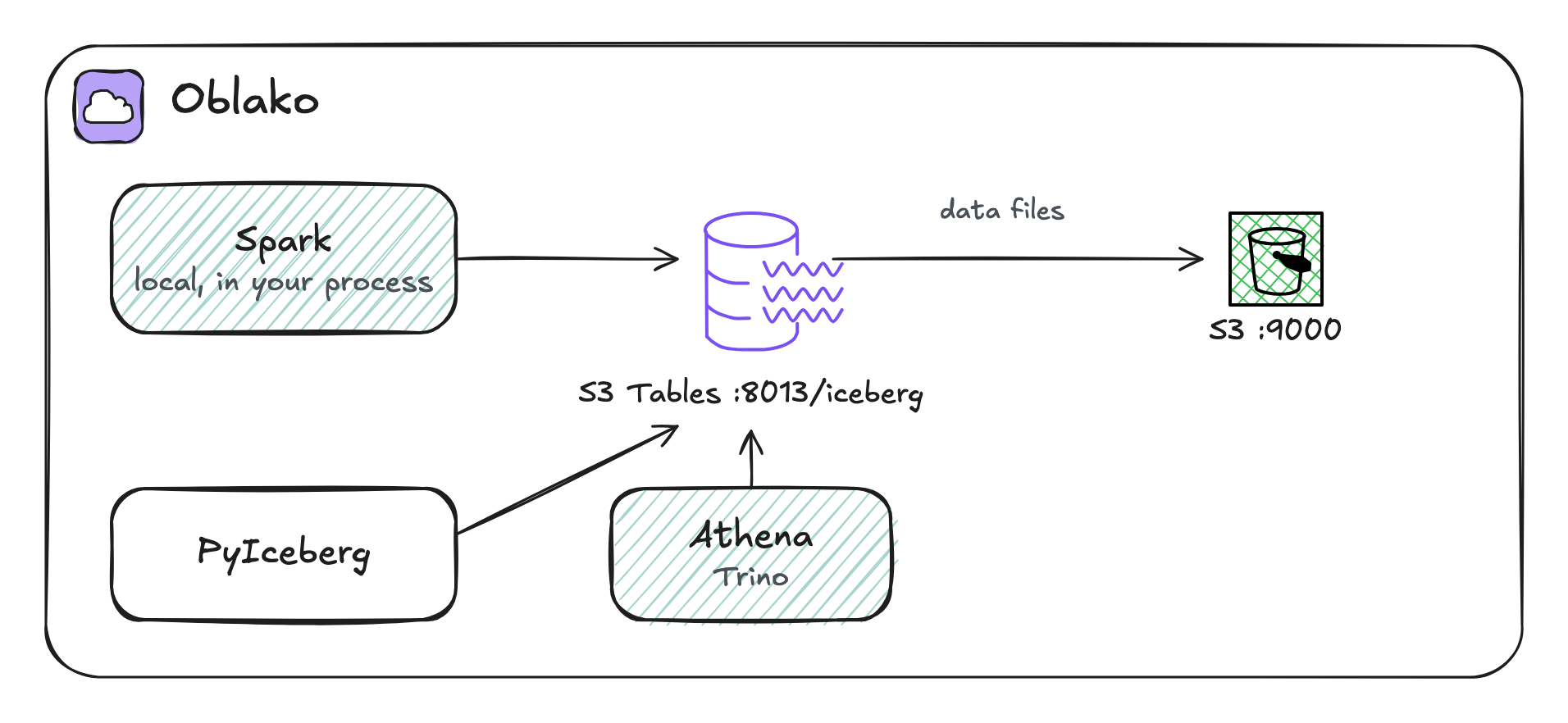
Spark reaches S3 Tables through its Iceberg REST endpoint, the same endpoint PyIceberg used. The catalog is configured with the table bucket’s ARN as the warehouse, and every request to it is signed with SigV4 for the s3tables service. Data files are read and written through Iceberg’s own S3 client, S3FileIO.
What oblako runs
oblako serves the S3 Tables Iceberg REST endpoint at http://localhost:8013/iceberg and stores the data files in its S3 on port 9000. Spark itself runs in your Python process, in local mode, with the Iceberg runtime it downloads; oblako only provides the endpoints (Figure 12.1).
12.3 A table bucket and a session
Create a table bucket for the chapter:
import boto3

s3tables = boto3.client("s3tables")
bucket = s3tables.create_table_bucket(name="lakehouse")
print(bucket["arn"])arn:aws:s3tables:us-east-1:123456789012:bucket/lakehouseEvery listing that uses Spark starts its session from one module, lake.py. It names the catalog lake, so tables are addressed as lake.<namespace>.<table>:
import boto3
from pyspark.sql import SparkSession

ICEBERG = "1.10.0"
PACKAGES = [
    f"org.apache.iceberg:{name}:{ICEBERG}"
    for name in (
        "iceberg-spark-runtime-4.0_2.13",
        "iceberg-aws-bundle",
    )
]
S3_FILE_IO = "org.apache.iceberg.aws.s3.S3FileIO"


def bucket_arn(name="lakehouse"):
    s3tables = boto3.client("s3tables")
    found = s3tables.list_table_buckets(prefix=name)
    return found["tableBuckets"][0]["arn"]


def session():
    # the JVM does not read the profile's endpoints, so ask boto3
    aws = boto3.Session()
    region = aws.region_name
    tables = aws.client("s3tables").meta.endpoint_url
    s3 = aws.client("s3")
    lake = "spark.sql.catalog.lake"
    builder = (
        SparkSession.builder.appName("lakehouse")
        .config("spark.jars.packages", ",".join(PACKAGES))
        .config("spark.sql.session.timeZone", "UTC")
        .config("spark.ui.showConsoleProgress", "false")
        .config(
            "spark.sql.extensions",
            "org.apache.iceberg.spark.extensions"
            ".IcebergSparkSessionExtensions",
        )
        .config(lake, "org.apache.iceberg.spark.SparkCatalog")
        .config(f"{lake}.type", "rest")
        .config(f"{lake}.uri", f"{tables}/iceberg")
        .config(f"{lake}.warehouse", bucket_arn())
        .config(f"{lake}.rest.sigv4-enabled", "true")
        .config(f"{lake}.rest.signing-name", "s3tables")
        .config(f"{lake}.rest.signing-region", region)
        .config(f"{lake}.io-impl", S3_FILE_IO)
    )
    endpoint, s3_config = s3.meta.endpoint_url, s3.meta.config.s3
    builder = builder.config(f"{lake}.s3.endpoint", endpoint)
    if s3_config.get("addressing_style") == "path":
        path_style = f"{lake}.s3.path-style-access"
        builder = builder.config(path_style, "true")
    spark = builder.getOrCreate()
    spark.sparkContext.setLogLevel("ERROR")
    return spark
Spark runs in the JVM, which does not read the endpoints in an AWS profile, so the module asks boto3 for them: the S3 Tables endpoint, to which the catalog adds /iceberg, and the S3 endpoint for S3FileIO. Under the oblako profile these are oblako’s, and the profile’s path-style setting switches on path-style addressing, which oblako’s S3 requires; under an AWS profile they are the regional AWS endpoints. The session runs in UTC, so that timestamps display in the same time zone that Iceberg uses to compute day partitions.
12.4 Creating a partitioned table
The table holds orders, partitioned by the day each order was placed. days(placed_at) is a partition transform: Iceberg derives the day from the timestamp, so queries filter on placed_at itself and Iceberg skips the days outside the filter, without a separate partition column. The listing creates the table and fills it with 7,000 orders, 1,000 a day for a week:
from lake import session

spark = session()
spark.sql("CREATE NAMESPACE IF NOT EXISTS lake.sales")
spark.sql("""
    CREATE TABLE lake.sales.orders (
        order_id  bigint,
        customer  string,
        total     decimal(10, 2),
        placed_at timestamp)
    USING iceberg
    PARTITIONED BY (days(placed_at))""")

# 7,000 orders, 1,000 a day from 1 October 2026
spark.sql("""
    INSERT INTO lake.sales.orders
    SELECT id,
           concat('customer-', id % 50),
           CAST((id % 97) * 1.25 AS decimal(10, 2)),
           timestamp'2026-10-01 00:00:00'
             + make_interval(0, 0, 0, CAST(id DIV 1000 AS int),
                             0, 0, CAST(id % 1000 * 60 AS int))
    FROM range(7000)""")
spark.sql("""
    SELECT date(placed_at) AS day, count(*) AS orders
    FROM lake.sales.orders GROUP BY 1 ORDER BY 1""").show()
+----------+------+
| day|orders|
+----------+------+
|2026-10-01| 1000|
|2026-10-02| 1000|
|2026-10-03| 1000|
|2026-10-04| 1000|
|2026-10-05| 1000|
|2026-10-06| 1000|
|2026-10-07| 1000|
+----------+------+Iceberg records the partitions and files in metadata tables, which Spark queries like ordinary tables by appending their names to the table’s:
from lake import session

spark = session()
spark.sql("""
    SELECT partition.placed_at_day AS day,
           record_count, file_count
    FROM lake.sales.orders.partitions
    ORDER BY day""").show()
+----------+------------+----------+
| day|record_count|file_count|
+----------+------------+----------+
|2026-10-01| 1000| 1|
|2026-10-02| 1000| 1|
|2026-10-03| 1000| 1|
|2026-10-04| 1000| 1|
|2026-10-05| 1000| 1|
|2026-10-06| 1000| 1|
|2026-10-07| 1000| 1|
+----------+------------+----------+Each day is one partition with one data file. Iceberg’s Spark writer distributes rows by partition before writing a partitioned table, so each day’s rows reach a single task.
12.5 Upserts with MERGE INTO
Late and corrected data is the usual reason to change a table in place. MERGE INTO matches incoming rows against the table by a key and, in one commit, updates the rows that match and inserts the rest. Here 100 orders get corrected totals and 50 late orders arrive:
from lake import session

spark = session()
# corrected totals for 100 existing orders, and 50 late orders
spark.sql("""
    SELECT id AS order_id,
           concat('customer-', id % 50) AS customer,
           CAST(id % 97 * 1.25 + 5 AS decimal(10, 2)) AS total,
           timestamp'2026-10-07 12:00:00' AS placed_at
    FROM range(6900, 7050)""").createOrReplaceTempView("updates")
spark.sql("""
    MERGE INTO lake.sales.orders AS o
    USING updates AS u
    ON o.order_id = u.order_id
    WHEN MATCHED THEN UPDATE SET o.total = u.total
    WHEN NOT MATCHED THEN INSERT *""")
spark.sql("""
    SELECT count(*) AS orders, sum(total) AS revenue
    FROM lake.sales.orders""").show()
+------+---------+
|orders| revenue|
+------+---------+
| 7050|422471.25|
+------+---------+The table has 7,050 orders: the 50 new ones were inserted and the 100 corrected ones replaced in place.
12.6 Deleting by partition
A DELETE whose filter covers whole partitions removes those partitions’ files from the table without reading or rewriting any data. This one drops the first day:
from lake import session

spark = session()
spark.sql("""
    DELETE FROM lake.sales.orders
    WHERE placed_at < timestamp'2026-10-02 00:00:00'""")
spark.sql("""
    SELECT operation,
           summary['deleted-data-files'] AS files_removed,
           summary['added-data-files'] AS files_added
    FROM lake.sales.orders.snapshots
    ORDER BY committed_at""").show()
+---------+-------------+-----------+
|operation|files_removed|files_added|
+---------+-------------+-----------+
| append| NULL| 7|
|overwrite| 1| 1|
| delete| 1| NULL|
+---------+-------------+-----------+The snapshots metadata table lists every commit so far. The append wrote the seven daily files. The overwrite is the MERGE INTO: by default Iceberg’s Spark writes are copy-on-write, so the merge replaced the one file holding the changed rows with a rewritten copy. The delete removed the first day’s file and wrote nothing.
12.7 Time travel
Each snapshot is a complete version of the table, and a query can read any snapshot the table still keeps:
from lake import session

spark = session()
first = spark.sql("""
    SELECT snapshot_id FROM lake.sales.orders.snapshots
    ORDER BY committed_at LIMIT 1""").first()[0]
count = "SELECT count(*) FROM lake.sales.orders"
print("now", spark.sql(count).first()[0])
then = spark.sql(f"{count} VERSION AS OF {first}").first()[0]
print("first snapshot", then)
now 6050
first snapshot 7000The first snapshot still has the 7,000 orders it was created with, before the merge added 50 and the delete removed 1,000. TIMESTAMP AS OF selects a snapshot by time in the same way.
12.8 Changing the schema
Iceberg tracks columns by ID, so adding a column changes only the metadata, and existing files read the new column as null:
from lake import session

spark = session()
spark.sql(
    "ALTER TABLE lake.sales.orders ADD COLUMN channel string"
)
spark.sql("""
    INSERT INTO lake.sales.orders
    VALUES (9001, 'customer-1', 20.00,
            timestamp'2026-10-07 18:00:00', 'web')""")
spark.sql("""
    SELECT channel, count(*) AS orders
    FROM lake.sales.orders GROUP BY channel""").show()
+-------+------+
|channel|orders|
+-------+------+
| NULL| 6050|
| web| 1|
+-------+------+12.9 Maintenance
Every commit adds files and a snapshot, and nothing is removed until it is maintained. Small files slow down reads, and old snapshots keep data files that the current table no longer uses. Iceberg’s Spark procedures handle both: rewrite_data_files compacts small files into larger ones, and expire_snapshots removes old snapshots and deletes the files only they referenced:
from lake import session

spark = session()


def files_and_snapshots():
    counts = [
        spark.sql(f"SELECT count(*) FROM lake.sales.orders.{t}")
        for t in ("files", "snapshots")
    ]
    return tuple(c.first()[0] for c in counts)


print("before (files, snapshots):", files_and_snapshots())
compacted = spark.sql("""
    CALL lake.system.rewrite_data_files(
        table => 'sales.orders',
        options => map('min-input-files', '2'))""").first()
rewritten = compacted.rewritten_data_files_count
added = compacted.added_data_files_count
print("rewrote", rewritten, "files into", added)
expired = spark.sql("""
    CALL lake.system.expire_snapshots(
        table => 'sales.orders',
        older_than => current_timestamp(),
        retain_last => 1)""").first()
deleted = expired.deleted_data_files_count
print("deleted", deleted, "unreferenced files")
print("after (files, snapshots):", files_and_snapshots())
before (files, snapshots): (7, 4)
rewrote 2 files into 1
deleted 4 unreferenced files
after (files, snapshots): (6, 1)The last day’s partition held two files, the merge’s rewritten file and the one-row insert from the schema listing, and compaction rewrote them into one. Expiring every snapshot except the latest deleted four data files that no snapshot still used: the first day’s file, the day-seven file replaced by the merge, and the two files just compacted. Time travel now reaches only the current snapshot.
On AWS, S3 Tables runs these jobs itself: compaction, snapshot expiration and unreferenced file removal are maintenance settings on the table bucket and on each table. Table buckets also refuse direct deletion of objects, so expire_snapshots as written here is likely to fail against a real table bucket; this is untested. Run the procedures yourself for Iceberg tables in general-purpose S3 buckets, and on oblako, which runs no maintenance.
12.10 Reading from other engines
The table is plain Iceberg, so other engines read it through the same catalog. PyIceberg, configured as in Chapter 4, reads the new column with a filter:
from catalog import open_catalog

table = open_catalog().load_table("sales.orders")
orders = table.scan(row_filter="channel == 'web'").to_arrow()
print(orders.num_rows, "web orders")
print(orders.select(["order_id", "total"]).to_pylist())
1 web orders
[{'order_id': 9001, 'total': Decimal('20.00')}]Athena reads it through the s3tablescatalog catalog of Chapter 5:
from athena_query import run_query

sql = (
    "SELECT date(placed_at) AS day, count(*) AS orders"
    ' FROM "s3tablescatalog/lakehouse"."sales"."orders"'
    " GROUP BY 1 ORDER BY 1"
)
for row in run_query(sql):
    print(row)
['day', 'orders']
['2026-10-02', '1000']
['2026-10-03', '1000']
['2026-10-04', '1000']
['2026-10-05', '1000']
['2026-10-06', '1000']
['2026-10-07', '1051']The first day is gone, and the last day has its 1,000 orders plus the 50 late ones and the order with a channel.
12.11 Cleaning up
import boto3
from lake import bucket_arn

s3tables = boto3.client("s3tables")
arn = bucket_arn()
for table in s3tables.list_tables(tableBucketARN=arn)["tables"]:
    s3tables.delete_table(
        tableBucketARN=arn,
        namespace=table["namespace"][0],
        name=table["name"],
    )
spaces = s3tables.list_namespaces(tableBucketARN=arn)[
    "namespaces"
]
for space in spaces:
    s3tables.delete_namespace(
        tableBucketARN=arn, namespace=space["namespace"][0]
    )
s3tables.delete_table_bucket(tableBucketARN=arn)
12.12 Where oblako differs from AWS
No managed maintenance. oblako’s table buckets run no compaction, snapshot expiration or unreferenced file removal, and they allow the deletes that
expire_snapshotsmakes.Spark runs locally. On AWS the same session code runs in Glue, EMR or EMR Serverless, which manage the cluster and supply the Iceberg libraries; this chapter runs Spark in local mode in your process.
One catalog per table bucket, as on AWS, but oblako’s REST endpoint implements the operations Spark, PyIceberg and Athena use in this book, which is a subset of the Iceberg REST specification.
12.13 Running it on AWS
With an AWS profile selected, lake.py connects to the regional S3 Tables endpoint and S3, and the listings run against your account; your credentials need the s3tables actions on the table bucket. Leave out the maintenance listing, or point it at an Iceberg table in a general-purpose bucket, and set the table bucket’s maintenance configuration instead. For production jobs, the same Spark SQL runs in AWS Glue 5 or Amazon EMR, which can also access S3 Tables.
12.14 Summary
Spark writes Iceberg tables to S3 Tables through the Iceberg REST endpoint, with SigV4 signing and the table bucket as the warehouse. Partition transforms such as days() partition a table by a derived value, MERGE INTO applies late and corrected data in one commit, and a DELETE over whole partitions drops files without rewriting them. Every commit is a snapshot that queries can read until it is expired. Compaction and snapshot expiration keep a table fast and its storage in check; S3 Tables runs them for you on AWS, and on oblako you run them with Iceberg’s Spark procedures. PyIceberg and Athena read the same table without copying it.