18 Moving to AWS
The pipeline and tests of Chapter 16 and the infrastructure of Chapter 17, run in an AWS account with only their settings changed.
18.1 Before you start
You need an AWS account and a profile for it in ~/.aws/config, created with aws configure sso for single sign-on or aws configure for access keys. The examples call it my-account. Your identity needs permission to create the stack’s resources: S3 buckets, an IAM role and its policy, a security group, and a Redshift Serverless namespace and workgroup.
The run below took a few minutes of Redshift Serverless compute, which bills per second for the RPUs in use. It also created two things that bill while idle: the namespace’s storage, and the public IPv4 address that public access allocates, which AWS bills by the hour like every public IPv4 address. Delete the stack as soon as you finish. In the outputs, the account ID is replaced by 111122223333, AWS’s documentation placeholder.
18.2 What changes
Nothing in the code changes. The pipeline and its tests take their connection settings from environment variables with oblako’s values as defaults, and the Terraform configuration takes the password and the allowed address as variables. Moving to AWS changes four kinds of settings (Figure 18.1):
The profile, which selects the credentials, the region and the endpoints:
oblakofor oblako,my-accountfor AWS.The Terraform workspace, which keeps a separate state for each target, so that the resources on oblako and on AWS are tracked apart.
The names the stack outputs: the bucket and the role carry the account ID, and the workgroup’s host name is AWS’s.
The secrets and the network: the admin password, and the address that may connect to Redshift.
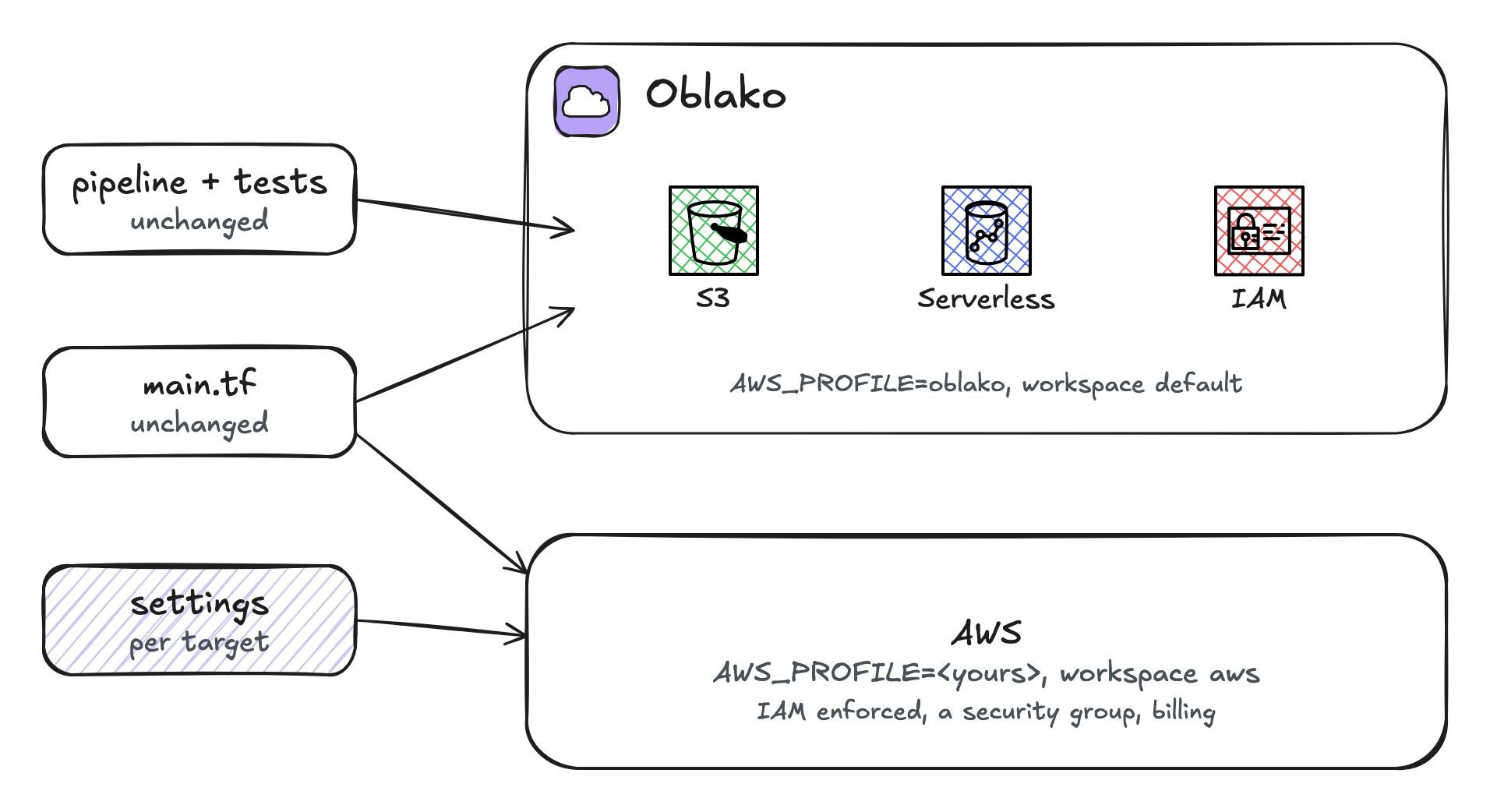
18.3 Deploying the stack
From the Terraform configuration of Chapter 17, select a workspace for AWS, which Terraform creates on first use, and apply with the AWS profile:
export AWS_PROFILE=my-account
terraform workspace select -or-create aws
export TF_VAR_admin_password=$ADMIN_PASSWORD
export TF_VAR_allowed_cidr=$(curl -s https://checkip.amazonaws.com)/32
terraform apply
terraform output
bucket = "daily-totals-111122223333"
copy_role_arn = "arn:aws:iam::111122223333:role/daily-totals-copy"
redshift_host = "daily-totals.111122223333.us-east-1.redshift-serverless.amazonaws.com"checkip.amazonaws.com returns the address from which your requests reach AWS. As Chapter 17 noted, the admin password ends up in the Terraform state in plain text; on AWS the namespace can instead have Secrets Manager create and hold it, with the provider’s manage_admin_password argument. The apply took about a minute. The workgroup reported AVAILABLE at the end of it, but its public endpoint refused connections for about three minutes more, so wait before concluding that the security group is wrong. Running nc -vz with the host name and port 5439 shows when it accepts them.
18.4 Running the tests
The integration tests of Chapter 16 read their settings from the environment. On AWS they are the stack’s outputs, the admin user and its password:
export REDSHIFT_HOST=$(terraform output -raw redshift_host)
export REDSHIFT_DATABASE=dev
export REDSHIFT_USER=pipeline_admin
export REDSHIFT_PASSWORD=$ADMIN_PASSWORD
export REDSHIFT_COPY_ROLE=$(terraform output -raw copy_role_arn)
uv run pytest -m integration -v
tests/test_pipeline.py::test_loads_a_day_from_two_files PASSED
tests/test_pipeline.py::test_rerunning_a_day_replaces_it PASSED
================ 2 passed, 3 deselected in 26.37s ================The tests did what they do on oblako. They created a bucket and a schema of their own, wrote events to S3 and ran the pipeline, which loaded the totals with COPY through the role. Then they read the totals back and removed what they created. They took 26.4 seconds, against 1.2 on oblako; the first run after the workgroup was created took 65.5.
18.5 What AWS adds
The run passed because the stack already accounted for what only AWS checks. The most common of these is IAM.
A policy that is too narrow
COPY reads S3 as the role attached to the namespace, so the role’s policy must cover every bucket the pipeline loads from. The tests create their own bucket, daily-totals-test- followed by a random suffix, which is why the policy allows daily-totals-* and not only the staging bucket. To see what the narrower policy does, I replaced the role’s policy with one for the staging bucket alone and ran the tests again:
FAILED tests/test_pipeline.py::test_loads_a_day_from_two_files
FAILED tests/test_pipeline.py::test_rerunning_a_day_replaces_it

error:    S3ServiceException: User: arn:aws:sts::111122223333:
          assumed-role/daily-totals-copy/RedshiftIamRoleSession
          is not authorized to perform: s3:ListBucket on
          resource: "arn:aws:s3:::daily-totals-test-29ae037a"
          because no identity-based policy allows the s3:ListB
code:     8001
context:  Listing bucket=daily-totals-test-29ae037a prefix=
          staging/daily_totals/date=2026-10-01/part-0.parquet
COPY assumed the role and was refused s3:ListBucket on the test’s bucket; Redshift cuts the message off where it is shown. The same tests pass on oblako with either policy, because oblako stores IAM policies without enforcing them. Running terraform apply again found the policy changed outside Terraform, put the stack’s version back, and the tests passed.
Bucket names are global, and a bucket’s ARN carries no account ID, so daily-totals-* on its own would also match buckets of that name in other accounts. The policy’s condition on aws:ResourceAccount limits it to the stack’s own account.
Other checks
The network is closed by default. A publicly accessible workgroup still accepts only what its security group admits, so the stack opens port 5439 to one address.
Certificates are verified.
redshift-connectorverifies AWS’s certificate with the bundle it ships with;oblako trustin Chapter 2 added oblako’s certificate to that bundle and removed nothing.Resources take time and bill. The workgroup took about a minute to create, its endpoint some minutes more to accept connections, and its deletion about two and a half minutes.
18.6 Running it from CI
The workflow of Chapter 16 could run the same tests against AWS by selecting an AWS profile in its integration job instead of starting oblako. On GitHub Actions the usual way to get credentials is an IAM role that trusts GitHub’s OpenID Connect provider, assumed by the aws-actions/configure-aws-credentials action, so that no long-lived keys are stored in the repository. The book does not show that workflow, because it was not run for the book; a common arrangement runs the tests against oblako on every pull request and against AWS before a release.
18.7 Tearing down
terraform destroy
terraform workspace select default
Destroy complete! Resources: 6 destroyed.Destroying the stack also releases the Elastic IP address that public access allocated. Afterwards no workgroup, namespace, bucket, Elastic IP, security group or role from the run remained in the account; aws redshift-serverless list-workgroups and aws s3 ls are quick checks.
18.8 Summary
The pipeline, its tests and its Terraform configuration moved from oblako to AWS with only settings changed: the profile, the Terraform workspace, the stack’s outputs, the password and the allowed address. On AWS the same tests passed, because the stack already handled what only AWS enforces: the role’s access to every bucket COPY reads, and a security group for the workgroup. Running the same code against both, oblako for every change and AWS before release, keeps the differences few and visible.