7 Redshift
Tables, loading, SQL, JSON and unloading in Redshift, through a driver and the Data API.
7.1 Before you start
Start Redshift, its Data API and S3, and trust the engine’s certificate in your project’s Python environment, as in Chapter 2:
oblako up redshift
oblako up redshift-data
oblako up s3
oblako trust --python .venv/bin/python
export AWS_PROFILE=oblako
uv add redshift-connector boto3 pandas pyarrowThe examples analyze page views: who opened which page, on which day, and how long it took to load.
7.2 Redshift in brief
Redshift stores each column separately and compressed, so a query that reads three columns of a wide table reads only those three. It splits every table across the slices of its compute nodes and runs each query on all slices in parallel, with a leader node planning the work and combining the results. You run it as a provisioned cluster of a chosen size, or as Redshift Serverless, which sizes itself and bills per use.
Two choices in a table’s DDL decide how well that parallelism works. The distribution key (DISTKEY) decides which slice each row lives on: rows with the same key share a slice, so joins and aggregations on that key need no data moved between nodes. The sort key (SORTKEY) decides the order rows are stored in, so a filter on it can skip whole blocks. Data is loaded and unloaded in bulk through S3, with COPY and UNLOAD.
What oblako runs
oblako’s Redshift is PostgreSQL 16 with Redshift’s surface added: the startup handshake Redshift’s driver expects, Redshift’s system views and functions, and the SUPER type. In front of it, on Redshift’s port, 5439, a wire proxy terminates TLS, rewrites Redshift-only SQL that PostgreSQL would reject, and carries out COPY and UNLOAD against oblako’s S3. The Data API is a separate engine on port 8002 that runs its statements through the same proxy, and moto holds the cluster’s metadata. Figure 7.1 shows the pieces.
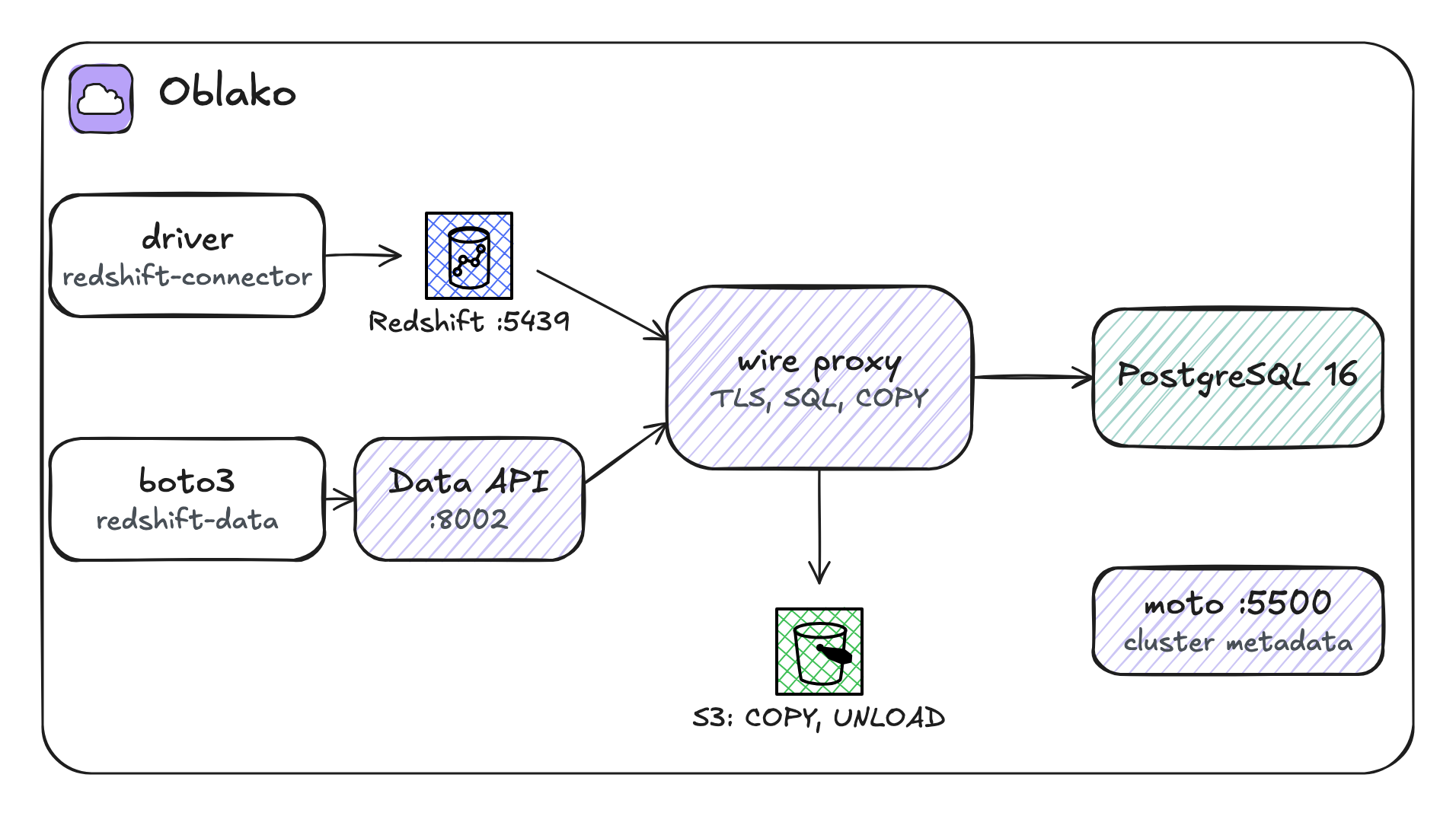
Redshift SQL therefore runs and returns Redshift’s results, while the data itself sits in PostgreSQL’s row-based storage, in a single engine on one node.
7.3 Connecting
Keep the connection in a small module, warehouse.py, that the listings share:
import redshift_connector


def connect():
    conn = redshift_connector.connect(
        host="localhost",
        port=5439,
        database="oblako",
        user="oblako",
        password="oblako",
        ssl=True,
        sslmode="verify-ca",
    )
    conn.autocommit = True
    return conn


def query(sql):
    with connect().cursor() as cur:
        cur.execute(sql)
        return cur.fetchall() if cur.description else []
redshift-connector is Amazon’s Python driver for Redshift; the same module, with your cluster’s endpoint and credentials, connects to AWS.
7.4 Creating tables
This table uses Redshift’s physical options: a compression encoding, varchar(max), a distribution key on the user, so each user’s views share a slice, and a sort key on the day, so date filters skip blocks:
from warehouse import query

query("DROP TABLE IF EXISTS page_views")
query(
    "CREATE TABLE page_views ("
    " day date ENCODE az64,"
    " user_id varchar(16),"
    " page varchar(max),"
    " load_ms integer"
    ") DISTKEY(user_id) SORTKEY(day)"
)
print(
    query(
        'SELECT "column", type FROM pg_table_def'
        " WHERE tablename = 'page_views'"
    )
)
(['day', 'date'], ['user_id', 'character varying(16)'], ['page', 'text'], ['load_ms', 'integer'])The statement runs unchanged, and so does the DDL that tools such as dbt, awswrangler and Alembic write for Redshift, within the limits listed at the end of the chapter. pg_table_def, Redshift’s view of a table’s columns, shows what was stored: varchar(max) became PostgreSQL’s text, and the encoding and keys were accepted and ignored. A single PostgreSQL has no slices to distribute over and no column blocks to sort.1
7.5 Loading with COPY
COPY loads data into Redshift by reading files from S3 in parallel on every slice. First, stage a small Parquet file in S3:
import boto3
import pandas as pd
from pyarrow import fs

s3 = boto3.client("s3")
s3.create_bucket(Bucket="wh-staging")
# pandas reads and writes S3 through pyarrow, whose S3 client
# ignores the profile's endpoints, so it gets the one boto3 uses
s3_fs = fs.S3FileSystem(endpoint_override=s3.meta.endpoint_url)
days = [
    "2026-09-01",
    "2026-09-01",
    "2026-09-02",
    "2026-09-02",
    "2026-09-03",
    "2026-09-03",
]
views = pd.DataFrame(
    {
        "day": pd.to_datetime(days).date,
        "user_id": ["u-1", "u-2", "u-1", "u-3", "u-2", "u-3"],
        "page": [
            "/",
            "/pricing",
            "/docs",
            "/",
            "/docs",
            "/pricing",
        ],
        "load_ms": [821, 1430, 2210, 450, 1980, 700],
    }
)
views.to_parquet(
    "wh-staging/page_views/part-0.parquet",
    index=False,
    filesystem=s3_fs,
)
print(len(views), "rows staged")
6 rows stagedThen load every file under the prefix:
from warehouse import query

query(
    "COPY page_views FROM 's3://wh-staging/page_views/'"
    " IAM_ROLE default FORMAT AS PARQUET"
)
print(
    query("SELECT count(*), min(day), max(day) FROM page_views")
)
([6, datetime.date(2026, 9, 1), datetime.date(2026, 9, 3)],)IAM_ROLE default tells Redshift to read S3 with the role attached to the cluster as its default. On oblako the wire proxy reads the files itself without checking the role, while on AWS that role must allow s3:GetObject on the prefix.
7.6 Redshift’s SQL
Redshift’s SQL is derived from PostgreSQL 8 and adds its own functions. These two queries use three of them: LISTAGG, which joins a group’s values into one string, and DATEDIFF and DATEADD, which take an unquoted date part such as day or month:
from warehouse import query

rows = query(
    "SELECT user_id,"
    " LISTAGG(page, ', ') WITHIN GROUP (ORDER BY day) AS path,"
    " DATEDIFF(day, min(day), max(day)) AS days_active"
    " FROM page_views GROUP BY user_id ORDER BY user_id"
)
for row in rows:
    print(row)

print(query("SELECT DATEADD(month, 1, '2026-09-30'::date)"))
['u-1', '/, /docs', 1]
['u-2', '/pricing, /docs', 2]
['u-3', '/, /pricing', 1]
([datetime.datetime(2026, 10, 30, 0, 0)],)oblako’s engine and proxy supply these functions, which PostgreSQL lacks in this form, and the queries return Redshift’s results.
7.7 JSON with SUPER
SUPER holds semi-structured values: objects, arrays and scalars. JSON_PARSE turns a JSON string into one, and the dot notation of PartiQL, the query language Redshift uses for semi-structured data, reaches inside it:
from warehouse import query

query("DROP TABLE IF EXISTS raw_events")
query("CREATE TABLE raw_events (payload SUPER)")
query(
    "INSERT INTO raw_events VALUES"
    ' (JSON_PARSE(\'{"page": "/",'
    ' "device": {"os": "ios"}}\')),'
    ' (JSON_PARSE(\'{"page": "/docs",'
    ' "device": {"os": "linux"}}\'))'
)
print(
    query(
        "SELECT payload.page::varchar, payload.device.os::varchar"
        " FROM raw_events ORDER BY 1"
    )
)
(['/', 'ios'], ['/docs', 'linux'])Each field is cast to varchar. Without the cast, Redshift returns a SUPER value to the driver as JSON text, so the page would read "/" with its quotation marks, while oblako returns the plain string either way. With the cast, both return the rows above.
Storing raw events as SUPER and extracting fields in SQL lets you load first and decide the schema later.
7.8 Unloading to S3
UNLOAD writes a query’s result to S3 in parallel, as files other engines can read:
import boto3
import pandas as pd
from pyarrow import fs

from warehouse import query

query(
    "UNLOAD ('SELECT day, count(*) AS views"
    " FROM page_views GROUP BY day')"
    " TO 's3://wh-staging/exports/daily_' IAM_ROLE default"
    " FORMAT AS PARQUET ALLOWOVERWRITE"
)
# pandas reads and writes S3 through pyarrow, whose S3 client
# ignores the profile's endpoints, so it gets the one boto3 uses
endpoint = boto3.client("s3").meta.endpoint_url
s3_fs = fs.S3FileSystem(endpoint_override=endpoint)
daily = pd.read_parquet("wh-staging/exports/", filesystem=s3_fs)
print(daily.sort_values("day").to_string(index=False))
day views
2026-09-01 2
2026-09-02 2
2026-09-03 2The TO location is a prefix, under which Redshift names the files itself. Redshift refuses to write over files it finds there, so a second run of the same UNLOAD fails unless it says ALLOWOVERWRITE, as this one does. Unloading to Parquet is the usual way to hand warehouse data to a lake, where Athena or Spark can read it.
7.9 The Data API
The Data API runs SQL over HTTPS without a driver or an open connection, which suits Lambda functions and scripts. Like Athena, it is asynchronous, so the listing submits a statement, polls until it finishes, and raises the error if it failed:
import time

import boto3

rsd = boto3.client("redshift-data")
statement = rsd.execute_statement(
    ClusterIdentifier="analytics",
    Database="oblako",
    DbUser="oblako",
    Sql="SELECT page, avg(load_ms) AS avg_ms,"
    " avg(load_ms::float) AS exact_ms FROM page_views"
    " GROUP BY page ORDER BY avg_ms DESC",
)
while True:
    desc = rsd.describe_statement(Id=statement["Id"])
    if desc["Status"] in ("FINISHED", "FAILED", "ABORTED"):
        break
    time.sleep(0.5)
if desc["Status"] != "FINISHED":
    raise RuntimeError(desc.get("Error", desc["Status"]))

result = rsd.get_statement_result(Id=statement["Id"])
print([col["name"] for col in result["ColumnMetadata"]])
for record in result["Records"]:
    print([list(field.values())[0] for field in record])
['page', 'avg_ms', 'exact_ms']
['/docs', 2095, 2095.0]
['/pricing', 1065, 1065.0]
['/', 635, 635.5]Each field in a record is a one-key dictionary naming its type, such as {"longValue": 6}, which is why the listing takes the single value out of each.
The two load times of / add up to 1271 milliseconds, so their average is 635.5, yet avg_ms reports 635. load_ms is an integer column, and on Redshift AVG of an integer returns an integer, BIGINT, dropping the fraction. Where the fraction matters, cast first, as exact_ms does with avg(load_ms::float).
7.10 SQLAlchemy and pandas
Most Python applications reach a database through SQLAlchemy, and so do pandas, Alembic and many BI tools. For Redshift, Amazon publishes the sqlalchemy-redshift dialect, which uses redshift-connector underneath:
uv add sqlalchemy sqlalchemy-redshiftThe engine URL names the dialect and the driver. This listing reflects the table’s columns from the catalog, builds a query with SQLAlchemy’s expression language, and hands the engine to pandas:
import pandas as pd
import sqlalchemy as sa

url = "redshift+redshift_connector://oblako:oblako@localhost:5439"
engine = sa.create_engine(
    f"{url}/oblako",
    connect_args={"ssl": True, "sslmode": "verify-ca"},
)

columns = sa.inspect(engine).get_columns("page_views")
print([(c["name"], str(c["type"])) for c in columns])

page_views = sa.Table(
    "page_views", sa.MetaData(), autoload_with=engine
)
query = (
    sa.select(page_views.c.page, sa.func.count().label("views"))
    .group_by(page_views.c.page)
    .order_by(sa.desc("views"), page_views.c.page)
)
with engine.connect() as conn:
    for row in conn.execute(query):
        print(row)

daily = pd.read_sql(
    "SELECT day, avg(load_ms) AS avg_ms"
    " FROM page_views GROUP BY day",
    engine,
)
print(daily.sort_values("day").to_string(index=False))
[('day', 'DATE'), ('user_id', 'VARCHAR(16)'), ('page', 'TEXT'), ('load_ms', 'INTEGER')]
('/', 2)
('/docs', 2)
('/pricing', 2)
day avg_ms
2026-09-01 1125
2026-09-02 1330
2026-09-03 1340To reflect a table, the dialect reads catalog columns that only Redshift has, such as each table’s distribution style and each column’s encoding, and oblako’s proxy answers those queries. Reflection therefore works, and so does Alembic’s autogenerate, which compares your models with the live schema to write migrations. The page column reflects as TEXT, as pg_table_def showed earlier, and the daily averages are whole numbers, for the reason the Data API section gave.
7.11 Where oblako differs from AWS
A row store on one node. Results match Redshift’s, while storage and speed are PostgreSQL’s. Distribution keys, sort keys and encodings are accepted and have no effect, so performance tuning has to wait for a real cluster.
A few results differ.
SELECT version()reports PostgreSQL. SUPER fields read with dot notation and no cast come back as plain text, where Redshift returns JSON text with quotation marks around strings; cast them, as the listing does, and both agree.varchar(max)is stored astext, where Redshift storesvarchar(65535), so a schema reflected from oblako, by Alembic’s autogenerate for example, shows a different type for those columns than one reflected from AWS.COPY and UNLOAD handle Parquet, CSV and delimited text, and run without checking the IAM role. UNLOAD also writes over existing files without
ALLOWOVERWRITE, where Redshift fails.Unsupported features. Late-binding views, which dbt creates for views configured with
bind: false,VARBYTE, workload management and concurrency scaling are unavailable.Python UDFs still run, on Python 3, but Redshift stopped supporting them after June 30, 2026, in favor of Lambda UDFs, so code that relies on them works only on oblako.2
The cluster is metadata.
describe_clustersanswers from moto, and the same engine serves whatever node type you ask for.
7.12 Running it on AWS
Point warehouse.py at your cluster or Serverless workgroup endpoint, with a database user and password, or with IAM authentication, which redshift-connector supports. Attach an IAM role to the cluster that can read and write the staging bucket, and make it the default role, or name it in IAM_ROLE. For the Data API, pass WorkgroupName for Serverless, or ClusterIdentifier with DbUser or a Secrets Manager SecretArn for a provisioned cluster. A provisioned cluster bills from the moment it starts, whether you query it or not, so pause or delete it when you finish.
7.13 Summary
Redshift is a columnar, parallel warehouse: distribution and sort keys decide how rows are spread and ordered, and COPY and UNLOAD move data in bulk through S3. Its SQL adds functions such as LISTAGG and DATEADD, the SUPER type for JSON, and the Data API for SQL over HTTPS. On oblako, PostgreSQL behind a wire proxy runs that SQL and returns Redshift’s results, with a short list of differences; storage and performance are PostgreSQL’s.
oblako also has a multi-node variant, built on the Citus extension, in which
DISTKEYshards a table across worker nodes. It is intended for self-hosting; for development, use the single-node engine.↩︎Redshift’s list of behavior changes, https://docs.aws.amazon.com/redshift/latest/mgmt/behavior-changes.html, ends the creation of new Python UDFs after October 30, 2025, and its UDF documentation, such as https://docs.aws.amazon.com/redshift/latest/dg/udf-example-uses.html, ends their use after June 30, 2026.↩︎