15 Orchestration with MWAA
A daily Airflow pipeline on Amazon MWAA, run on oblako with the same images AWS uses.
15.1 Before you start
oblako up s3
oblako up redshift
oblako up redshift-data
oblako up mwaa
export AWS_PROFILE=oblako
The first environment you create builds AWS’s Airflow image from its sources, which takes about six minutes and 4.7 GB of disk; later environments start in under a minute. The listings use Airflow 3.3.1 and the Redshift cluster analytics and database oblako of Chapter 7. The last listing removes everything they create.
15.2 Airflow and MWAA
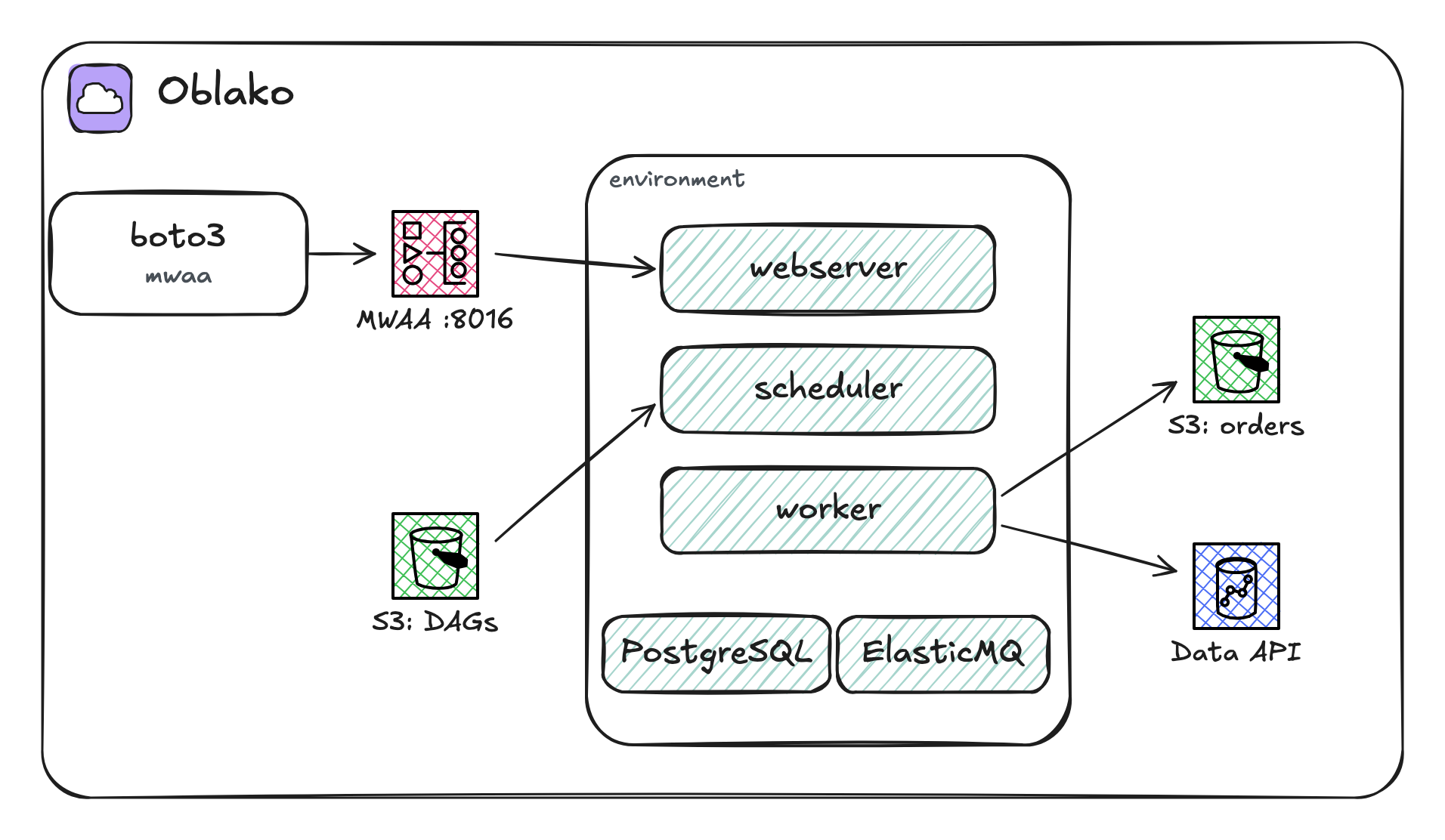
Apache Airflow runs DAGs, directed acyclic graphs of tasks written in Python, on a schedule or on demand. A scheduler decides which tasks are due, workers run them, a webserver serves the user interface and the REST API, and a metadata database records every run and task. With the Celery executor, which MWAA uses, the scheduler hands tasks to the workers through a queue.
Amazon Managed Workflows for Apache Airflow (MWAA) runs all of these for you as an environment. You give it an S3 bucket, the source bucket, and a folder in it for DAG files; MWAA copies new and changed files to its scheduler and workers, so deploying a DAG is an upload to S3. A requirements.txt, a plugins zip and a startup script in the same bucket are applied when the environment is created or updated. Tasks run with the environment’s execution role, and the InvokeRestApi operation calls Airflow’s REST API with your AWS credentials, without logging in to the webserver.
AWS’s Airflow images
Since Airflow 2.9, AWS publishes the images MWAA runs as source code, in the GitHub repository aws/amazon-mwaa-docker-images, under the Apache-2.0 license. The repository has one folder per Airflow version that MWAA supports, from 2.9.2 to 3.3.1 at the time of writing. Each folder holds the Dockerfiles for a base image and the images built on it, MWAA’s own entrypoint in Python, and a Docker Compose file that runs an environment on one machine. The Compose file starts PostgreSQL for the metadata database, ElasticMQ in place of SQS for the Celery queue, and then the webserver, scheduler and worker. It exists so that you can reproduce MWAA’s Airflow, with its configuration and installed packages, outside AWS. It replaces aws-mwaa-local-runner, an earlier tool for the same purpose, which AWS has archived and which stops at Airflow 2.
What oblako runs
oblako’s MWAA engine serves the MWAA API on port 8016. CreateEnvironment builds AWS’s image for the requested Airflow version, from a fixed commit of that repository, and runs the same containers as its Compose file on a network of their own (Figure 15.1). The engine copies DAG files from the source bucket into the environment every ten seconds, and InvokeRestApi reaches the webserver’s REST API. Tasks reach oblako’s services: the containers get the same endpoint settings as the oblako profile, so a DAG’s AWS calls go to oblako unchanged.
15.3 The pipeline
The pipeline loads one day of orders into Redshift and computes that day’s revenue. An upstream system writes each day’s orders as a CSV file under a prefix per day and, when the day is complete, an empty _SUCCESS file next to it. The DAG waits for that marker, loads the file with COPY and replaces the day’s row in a summary table:
import datetime

from airflow.providers.amazon.aws.operators.redshift_data import (
    RedshiftDataOperator,
)
from airflow.providers.amazon.aws.sensors.s3 import S3KeySensor
from airflow.sdk import dag

BUCKET = "shop-raw"
DATA_API = {
    "cluster_identifier": "analytics",
    "database": "oblako",
    "db_user": "oblako",
    "wait_for_completion": True,
}


@dag(
    schedule="@daily",
    start_date=datetime.datetime(2026, 9, 1),
    catchup=False,
    tags=["shop"],
)
def daily_orders():
    landed = S3KeySensor(
        task_id="orders_landed",
        bucket_name=BUCKET,
        bucket_key="orders/date={{ ds }}/_SUCCESS",
        poke_interval=10,
        timeout=600,
    )
    load = RedshiftDataOperator(
        task_id="load_orders",
        sql=[
            "DELETE FROM orders WHERE day = '{{ ds }}'",
            "COPY orders FROM "
            "'s3://shop-raw/orders/date={{ ds }}/orders.csv' "
            "IAM_ROLE 'arn:aws:iam::123456789012:role/copy' "
            "CSV IGNOREHEADER 1",
        ],
        **DATA_API,
    )
    summarise = RedshiftDataOperator(
        task_id="daily_revenue",
        sql=[
            "DELETE FROM daily_revenue WHERE day = '{{ ds }}'",
            "INSERT INTO daily_revenue "
            "SELECT day, count(*), sum(amount) FROM orders "
            "WHERE day = '{{ ds }}' GROUP BY day",
        ],
        **DATA_API,
    )
    landed >> load >> summarise


daily_orders()
The three tasks are operators from Airflow’s Amazon provider, which AWS’s image includes. S3KeySensor checks for the marker every ten seconds and fails after ten minutes. RedshiftDataOperator runs its statements through the Redshift Data API and waits for them to finish. The { ds } template is the run’s date, so each run touches only its own day, and deleting the day’s rows before loading them makes a rerun safe, as in Chapter 16. The schedule is daily; catchup=False stops Airflow from scheduling runs for the days between the start date and today.
The SQL runs through the Data API with a helper you have seen in Chapter 14:
import time

import boto3

data = boto3.client("redshift-data")


def run(sql):
    statement = data.execute_statement(
        ClusterIdentifier="analytics",
        Database="oblako",
        DbUser="oblako",
        Sql=sql,
    )
    while True:
        desc = data.describe_statement(Id=statement["Id"])
        if desc["Status"] in ("FINISHED", "FAILED", "ABORTED"):
            break
        time.sleep(0.2)
    if desc["Status"] != "FINISHED":
        raise RuntimeError(desc.get("Error"))
    return statement["Id"]
The next listing creates the two buckets and the two tables, writes one day of orders with its marker, and uploads the DAG to the source bucket:
import boto3
from warehouse import run

s3 = boto3.client("s3")
for bucket in ("shop-raw", "shop-dags"):
    s3.create_bucket(Bucket=bucket)

run("""CREATE TABLE orders (
    day date, order_id integer, customer integer,
    amount decimal(10, 2))""")
run("""CREATE TABLE daily_revenue (
    day date, orders bigint, revenue decimal(12, 2))""")

rows = ["day,order_id,customer,amount"]
rows += [
    f"2026-09-30,{n},{n % 7},{10 + n}.50" for n in range(1, 41)
]
prefix = "orders/date=2026-09-30/"
s3.put_object(
    Bucket="shop-raw",
    Key=prefix + "orders.csv",
    Body="\n".join(rows).encode(),
)
s3.put_object(
    Bucket="shop-raw", Key=prefix + "_SUCCESS", Body=b""
)
s3.upload_file(
    "dags/daily_orders.py", "shop-dags", "dags/daily_orders.py"
)
print("staged", len(rows) - 1, "orders and the DAG")
staged 40 orders and the DAG15.4 Creating the environment
import time

import boto3

mwaa = boto3.client("mwaa")
mwaa.create_environment(
    Name="shop",
    AirflowVersion="3.3.1",
    EnvironmentClass="mw1.micro",
    SourceBucketArn="arn:aws:s3:::shop-dags",
    DagS3Path="dags",
    ExecutionRoleArn="arn:aws:iam::123456789012:role/mwaa",
    NetworkConfiguration={
        "SubnetIds": ["subnet-a", "subnet-b"],
        "SecurityGroupIds": ["sg-airflow"],
    },
    WebserverAccessMode="PUBLIC_ONLY",
)
while True:
    env = mwaa.get_environment(Name="shop")["Environment"]
    if env["Status"] != "CREATING":
        break
    time.sleep(15)
print(env["Name"], env["Status"], env["AirflowVersion"])
shop AVAILABLE 3.3.1mw1.micro is MWAA’s smallest environment class, with one scheduler, one worker and one webserver. The network settings are required by the API; on AWS they name two private subnets and a security group, and oblako records them. The environment on oblako was available after about 20 seconds; on AWS, the same call took about 40 minutes.
15.5 Running the DAG
The next listing waits until the scheduler has parsed the DAG, unpauses it, starts a run for 30 September and waits for it to finish, all through InvokeRestApi:
import time

import boto3

mwaa = boto3.client("mwaa")


def rest(path, method="GET", body=None):
    extra = {"Body": body} if body is not None else {}
    resp = mwaa.invoke_rest_api(
        Name="shop", Path=path, Method=method, **extra
    )
    return resp["RestApiResponse"]


while "daily_orders" not in [
    d["dag_id"] for d in rest("/dags")["dags"]
]:
    time.sleep(15)  # the DAG processor has not parsed it yet
rest("/dags/daily_orders", "PATCH", {"is_paused": False})
run = rest(
    "/dags/daily_orders/dagRuns",
    "POST",
    {"logical_date": "2026-09-30T00:00:00Z"},
)
path = f"/dags/daily_orders/dagRuns/{run['dag_run_id']}"
while rest(path)["state"] not in ("success", "failed"):
    time.sleep(10)
tasks = rest(path + "/taskInstances")["task_instances"]
for t in sorted(tasks, key=lambda t: t["start_date"]):
    print(t["task_id"], t["state"])
orders_landed success
load_orders success
daily_revenue successA new DAG file appears in Airflow only after the scheduler next scans its DAG folder, which Airflow does every five minutes by default; on oblako the DAG appeared after five minutes, and on AWS after about three. InvokeRestApi returns Airflow’s own response, with fields whose value is null left out. When Airflow answers with an error, boto3 raises RestApiClientException or RestApiServerException, with Airflow’s status code and message in the exception’s response.
The summary table holds the day’s orders and revenue:
import boto3
from warehouse import run

data = boto3.client("redshift-data")
statement = run("SELECT day, orders, revenue FROM daily_revenue")
for row in data.get_statement_result(Id=statement)["Records"]:
    print([list(value.values())[0] for value in row])
['2026-09-30', 40, '1240.00']15.6 Cleaning up
import boto3
from warehouse import run

boto3.client("mwaa").delete_environment(Name="shop")
run("DROP TABLE IF EXISTS orders")
run("DROP TABLE IF EXISTS daily_revenue")
s3 = boto3.client("s3")
for bucket in ("shop-raw", "shop-dags"):
    for obj in s3.list_objects_v2(Bucket=bucket).get(
        "Contents", []
    ):
        s3.delete_object(Bucket=bucket, Key=obj["Key"])
    s3.delete_bucket(Bucket=bucket)
Deleting the environment removes its containers, its metadata database and the files synced to it.
15.7 Where oblako differs from AWS
Anyone can log in to the webserver. oblako runs Airflow with AWS’s
testingauthentication, in which every user is an administrator.CreateCliTokenandCreateWebLoginTokenare not available; useInvokeRestApi, or openWebserverUrlin a browser.Logs stay in the containers. The environment reports MWAA’s default logging configuration, with task logs sent to CloudWatch, but oblako does not send them; the webserver shows each task’s log.
Capacity and networking are recorded only. The environment class, worker and scheduler counts, subnets and security groups are reported as given; an environment has one worker and the resources of your machine.
The execution role is not enforced, so a task can call any oblako service.
15.8 Running it on AWS
An MWAA environment needs a VPC with two private subnets in different availability zones, with a route to the internet through a NAT gateway or VPC endpoints for the services Airflow uses. The source bucket must have versioning enabled and public access blocked. The execution role must be allowed to read the source bucket and to call what the DAG calls: here s3:GetObject and s3:ListBucket on the orders bucket, the Data API actions, and redshift:GetClusterCredentials for the db_user. Your own credentials need the airflow actions, including airflow:InvokeRestApi.
The environment bills by the hour from creation to deletion, and creating or deleting one takes tens of minutes, so describe it, with its network, in CloudFormation and delete the stack when you finish, as Chapter 17 shows. Deleting the stack leaves behind the log group MWAA created for task logs, named airflow- followed by the environment’s name and -Task; delete it as well. The listings then run unchanged with an AWS profile selected.
15.9 Summary
MWAA runs Airflow’s scheduler, workers, webserver and metadata database as an environment that reads its DAGs from an S3 bucket, and InvokeRestApi calls Airflow’s REST API with AWS credentials. AWS publishes the images MWAA runs, and oblako’s MWAA engine runs them per environment. A DAG built from the Amazon provider’s operators therefore runs on oblako as written, against oblako’s S3 and Redshift, and the same calls create and drive an environment on AWS.