10 DynamoDB
Table design, conditional writes, DynamoDB Streams and vector search.
10.1 Before you start
oblako up dynamodb
export AWS_PROFILE=oblako
uv add "boto3>=1.43.64"Vector search requires boto3 1.43.64 or later. The examples use a table of shop orders and a table of products with embeddings, and the last listing removes both tables.
10.2 DynamoDB in brief
A DynamoDB table holds items, each a set of attributes up to 400 KB. The only fixed part of an item is its primary key: a partition key, which decides where the item is stored, and optionally a sort key, which orders items that share a partition key. Every other attribute is free-form and can differ from item to item.
The key is also the only efficient way to read items. GetItem reads one item by its full key, and Query reads the items of one partition key in sort-key order, optionally narrowed by a condition on the sort key. Scan reads the whole table, which makes it the operation to avoid on large tables. A DynamoDB design therefore starts from the access patterns, the questions your application asks of the data, and chooses keys so that each question is one Query. A question the table’s key cannot answer gets a global secondary index (GSI), a copy of the table under another key that DynamoDB keeps up to date.
In on-demand mode you pay per request and set no capacity in advance, whereas in provisioned mode you reserve read and write capacity. DynamoDB Streams is a log of every change to a table’s items, kept in order for each item, and vector indexes search the embeddings stored on items by similarity.
What oblako runs
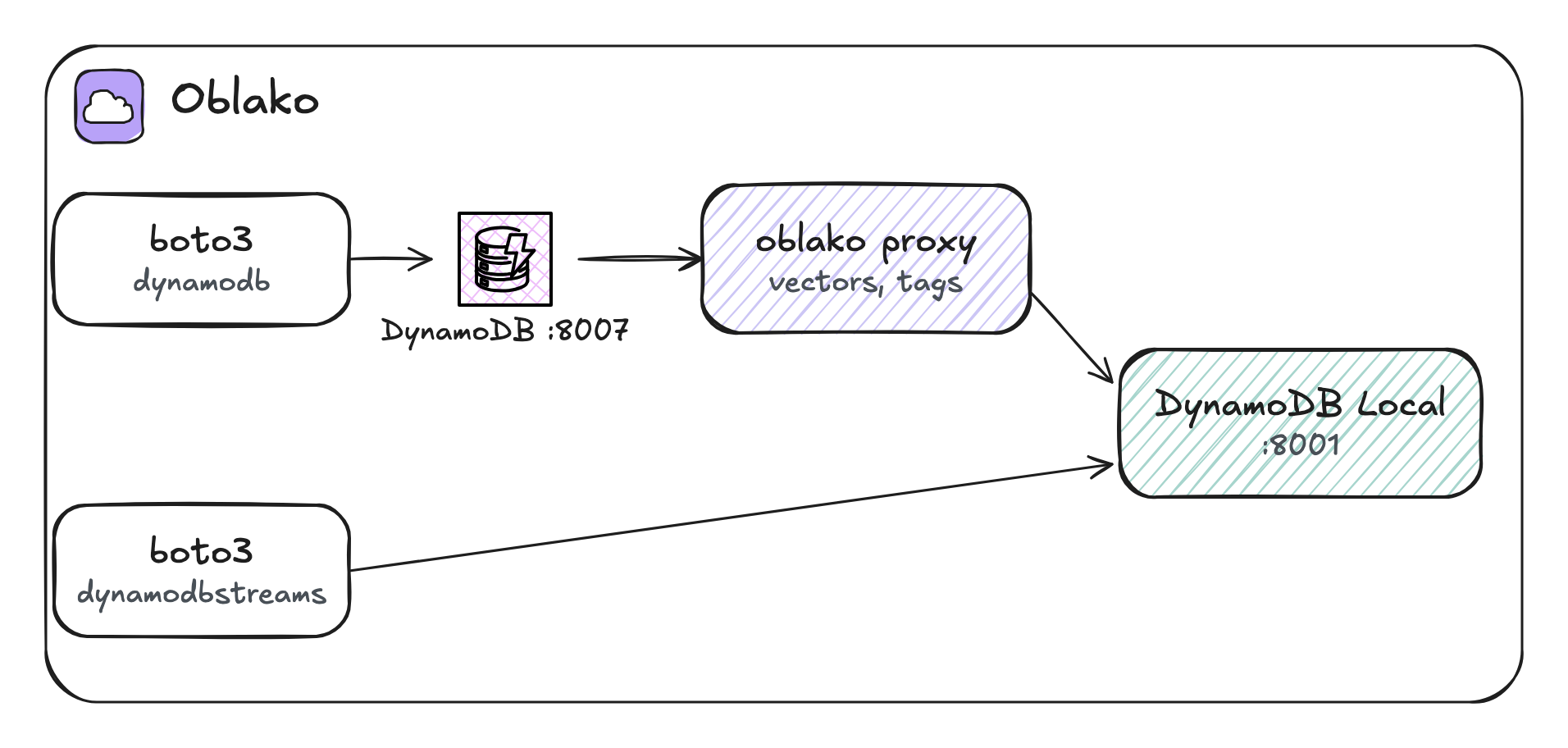
oblako runs DynamoDB Local, the downloadable version of DynamoDB that AWS publishes, with its data on a volume. In front of it, an oblako proxy on port 8007 forwards every call and adds two features that DynamoDB Local lacks: vector indexes with SearchVectors, and tags. The oblako profile points the dynamodb client at the proxy, while DynamoDB Streams have their own API and endpoint, which the profile points at DynamoDB Local directly on port 8001 (Figure 10.1).
10.3 Table design
The shop asks two questions of its orders: what has this customer ordered, newest last? and which orders are waiting to ship? The first is answered by the table’s key: partition key customer, sort key order_id, which starts with the order date so that orders sort by time. The second needs a GSI keyed by status:
import boto3

dynamodb = boto3.client("dynamodb")
dynamodb.create_table(
    TableName="orders",
    AttributeDefinitions=[
        {"AttributeName": "customer", "AttributeType": "S"},
        {"AttributeName": "order_id", "AttributeType": "S"},
        {"AttributeName": "status", "AttributeType": "S"},
    ],
    KeySchema=[
        {"AttributeName": "customer", "KeyType": "HASH"},
        {"AttributeName": "order_id", "KeyType": "RANGE"},
    ],
    GlobalSecondaryIndexes=[
        {
            "IndexName": "by-status",
            "KeySchema": [
                {"AttributeName": "status", "KeyType": "HASH"},
                {"AttributeName": "order_id", "KeyType": "RANGE"},
            ],
            "Projection": {"ProjectionType": "ALL"},
        }
    ],
    BillingMode="PAY_PER_REQUEST",
    StreamSpecification={
        "StreamEnabled": True,
        "StreamViewType": "NEW_AND_OLD_IMAGES",
    },
)
dynamodb.get_waiter("table_exists").wait(TableName="orders")
table = dynamodb.describe_table(TableName="orders")["Table"]
billing = table["BillingModeSummary"]["BillingMode"]
print(table["TableStatus"], billing)
print("stream:", table["StreamSpecification"]["StreamViewType"])
ACTIVE PAY_PER_REQUEST
stream: NEW_AND_OLD_IMAGESAttributeDefinitions declares only the attributes used in a key, here three; total and anything else stay undeclared. StreamSpecification turns on the table’s stream.
10.4 Reads and writes
The boto3 resource API reads and writes plain Python values, whereas the client API needs every value tagged with its type ({"S": "..."}). batch_writer groups puts into BatchWriteItem calls of up to 25 items and retries any the service returns unprocessed:
from decimal import Decimal

import boto3

orders = boto3.resource("dynamodb").Table("orders")
with orders.batch_writer() as batch:
    for n in range(1, 13):
        batch.put_item(
            Item={
                "customer": f"customer-{n % 3}",
                "order_id": f"2026-10-{n:02d}#{n:04d}",
                "total": Decimal(n * 125) / 10,
                "status": "shipped" if n % 4 else "placed",
            }
        )
print("items:", orders.scan(Select="COUNT")["Count"])
items: 12DynamoDB numbers are exact decimals and the resource API refuses Python floats, so totals are Decimal values. A scan is acceptable here only because the table holds twelve items.
The next listing runs both queries and reads one item by its key:
import boto3
from boto3.dynamodb.conditions import Key

orders = boto3.resource("dynamodb").Table("orders")

key = {"customer": "customer-1", "order_id": "2026-10-04#0004"}
order = orders.get_item(Key=key)["Item"]
print("get:", order["status"], order["total"])

early = orders.query(
    KeyConditionExpression=Key("customer").eq("customer-1")
    & Key("order_id").begins_with("2026-10-0"),
)
for o in early["Items"]:
    print("customer-1:", o["order_id"], o["status"])

placed = orders.query(
    IndexName="by-status",
    KeyConditionExpression=Key("status").eq("placed"),
)
print("placed:", [o["customer"] for o in placed["Items"]])
get: placed 50
customer-1: 2026-10-01#0001 shipped
customer-1: 2026-10-04#0004 placed
customer-1: 2026-10-07#0007 shipped
placed: ['customer-1', 'customer-2', 'customer-0']The Query on the table reads one customer’s orders in sort-key order, and begins_with on the sort key keeps the first nine days of October, which leaves out the same customer’s order 0010. The Query on the GSI answers the second question without a scan. Reads from a GSI are eventually consistent, meaning that a write to the table reaches the index a moment later.
10.5 Conditional writes
A condition expression makes a write check the item’s state atomically, as part of the write itself. The next listing uses one so that two workers that both see order 0004 as placed cannot both ship it:
import boto3

orders = boto3.resource("dynamodb").Table("orders")
errors = orders.meta.client.exceptions
key = {"customer": "customer-1", "order_id": "2026-10-04#0004"}


def ship():
    orders.update_item(
        Key=key,
        UpdateExpression="SET #s = :shipped",
        ConditionExpression="#s = :placed",
        ExpressionAttributeNames={"#s": "status"},
        ExpressionAttributeValues={
            ":placed": "placed",
            ":shipped": "shipped",
        },
    )


ship()
print("shipped once")
try:
    ship()
except errors.ConditionalCheckFailedException:
    print("second ship refused: the order is no longer placed")
shipped once
second ship refused: the order is no longer placedThe second update finds the order already shipped. Its condition fails, so DynamoDB leaves the item as the first update wrote it, and boto3 raises ConditionalCheckFailedException. The listing refers to status through the #s placeholder because status is a reserved word in DynamoDB expressions. The same pattern with a version number checked on every write gives optimistic locking, in which a write succeeds only if the item is unchanged since it was read.
10.6 DynamoDB Streams
The stream keeps a record of every change to an item for 24 hours, in the order the changes were made to that item. With NEW_AND_OLD_IMAGES, each record carries the item as it was before and after the change. Like a Kinesis data stream, the stream is split into shards, partitions of the stream that are read separately, and this listing reads every shard from its oldest record:
from collections import Counter

import boto3

dynamodb = boto3.client("dynamodb")
streams = boto3.client("dynamodbstreams")

table = dynamodb.describe_table(TableName="orders")["Table"]
arn = table["LatestStreamArn"]
described = streams.describe_stream(StreamArn=arn)
records = []
for shard in described["StreamDescription"]["Shards"]:
    iterator = streams.get_shard_iterator(
        StreamArn=arn,
        ShardId=shard["ShardId"],
        ShardIteratorType="TRIM_HORIZON",
    )["ShardIterator"]
    batch = streams.get_records(ShardIterator=iterator)
    records += batch["Records"]

print(Counter(r["eventName"] for r in records))
for record in records:
    if record["eventName"] == "MODIFY":
        change = record["dynamodb"]
        old = change["OldImage"]["status"]["S"]
        new = change["NewImage"]["status"]["S"]
        print(change["Keys"]["order_id"]["S"], old, "->", new)
Counter({'INSERT': 12, 'MODIFY': 1})
2026-10-04#0004 placed -> shippedThe stream holds twelve inserts from the batch write and the one update that succeeded, with the status before and after it; the refused update changed nothing and so produced no record. A consumer of the stream can copy changes to S3 for Athena, keep a search index in step, or trigger a Lambda function on each change. A production consumer stores the sequence number of the last record it processed and resumes after it with the AFTER_SEQUENCE_NUMBER iterator type.
10.7 Vector search
A vector index stores the embedding attribute of each item and answers SearchVectors requests with the items whose vectors are nearest to a query vector. As in chapters 4 and 8, the examples use short hand-written vectors in place of a model’s embeddings.
The index can carry a search schema. A HASH element is the vector index partition key: every search names one value of it and examines only the items with that value, which keeps searches fast as the index grows. INLINE_FILTER attributes are stored next to each vector, so a search can filter on them as it runs. Both are declared in AttributeDefinitions, as keys are:
import boto3

dynamodb = boto3.client("dynamodb")
dynamodb.create_table(
    TableName="products",
    AttributeDefinitions=[
        {"AttributeName": "sku", "AttributeType": "S"},
        {"AttributeName": "category", "AttributeType": "S"},
        {"AttributeName": "brand", "AttributeType": "S"},
    ],
    KeySchema=[{"AttributeName": "sku", "KeyType": "HASH"}],
    BillingMode="PAY_PER_REQUEST",
    VectorIndexes=[
        {
            "IndexName": "similar",
            "VectorAttribute": {"AttributeName": "embedding"},
            "SearchSchema": [
                {
                    "AttributeName": "category",
                    "SearchSchemaElementType": "HASH",
                },
                {
                    "AttributeName": "brand",
                    "SearchSchemaElementType": "INLINE_FILTER",
                },
            ],
            "Projection": {"ProjectionType": "ALL"},
            "Dimensions": 3,
            "DistanceFunction": "COSINE",
        }
    ],
)
dynamodb.get_waiter("table_exists").wait(TableName="products")
table = dynamodb.describe_table(TableName="products")["Table"]
for index in table["VectorIndexes"]:
    print(index["IndexName"], index["IndexStatus"])
similar ACTIVEVector indexes need on-demand mode. The table’s key is still sku, and category partitions only the vector index. Items are written as usual, with the embedding as a list of numbers:
import boto3

dynamodb = boto3.client("dynamodb")


def vector(*values):
    return {"L": [{"N": str(v)} for v in values]}


products = [  # sku, category, brand, title, embedding
    ("k-100", "kitchen", "acme", "Chef's knife", (0.9, 0.1, 0)),
    ("k-101", "kitchen", "acme", "Paring knife", (0.8, 0.2, 0.1)),
    ("k-102", "kitchen", "forge", "Bread knife", (0.7, 0.3, 0)),
    ("k-200", "kitchen", "forge", "Breadboard", (0.2, 0.9, 0.1)),
    ("g-300", "garden", "acme", "Pruning shears", (0.9, 0, 0.2)),
]
for sku, category, brand, title, embedding in products:
    dynamodb.put_item(
        TableName="products",
        Item={
            "sku": {"S": sku},
            "category": {"S": category},
            "brand": {"S": brand},
            "title": {"S": title},
            "embedding": vector(*embedding),
        },
    )
print(len(products), "products")
5 productsThe next listing searches the kitchen partition for the products nearest a query vector, then searches only the kitchen products of one brand:
import boto3

dynamodb = boto3.client("dynamodb")
query = [{"N": "1.0"}, {"N": "0.1"}, {"N": "0.0"}]


def search(condition, values):
    found = dynamodb.search_vectors(
        TableName="products",
        IndexName="similar",
        SearchVector=query,
        TopK=3,
        SearchConditionExpression=condition,
        ExpressionAttributeValues=values,
    )
    for hit in found["SearchResults"]:
        title = hit["Item"]["title"]["S"]
        print(f"{hit['Score']:.4f} {title}")


search("category = :c", {":c": {"S": "kitchen"}})
print("--")
search(
    "category = :c AND brand = :b",
    {":c": {"S": "kitchen"}, ":b": {"S": "forge"}},
)
0.0001 Chef's knife
0.0177 Paring knife
0.0462 Bread knife
--
0.0462 Bread knife
0.6888 BreadboardWith COSINE the score is a distance, in which 0 means the same direction and a lower score means closer, so results come nearest first. The pruning shears point almost the same way as the chef’s knife, but they are in the garden partition, so the kitchen search leaves them out. The second search keeps only one brand. SearchVectors returns the vector itself only when a ProjectionExpression names it, because embeddings are large and searches are billed by the bytes they process.
DynamoDB enforces the index’s rules on searches and on writes:
import boto3

dynamodb = boto3.client("dynamodb")
errors = dynamodb.exceptions

try:  # the vector index partition key must be in every search
    dynamodb.search_vectors(
        TableName="products",
        IndexName="similar",
        SearchVector=[{"N": "1"}, {"N": "0"}, {"N": "0"}],
        TopK=3,
    )
except errors.ClientError as e:
    print(e.response["Error"]["Code"], "on search")

try:  # a vector must have the index's dimensions
    dynamodb.put_item(
        TableName="products",
        Item={
            "sku": {"S": "k-999"},
            "category": {"S": "kitchen"},
            "embedding": {"L": [{"N": "1"}, {"N": "0"}]},
        },
    )
except errors.ClientError as e:
    print(e.response["Error"]["Code"], "on write")
ValidationException on search
ValidationException on writeA search must name the vector index partition key, and a vector must have the index’s dimensions. Inline filters are optional in a search, and SearchConditionExpression currently supports only equality. An item written without the partition key attribute is stored in the table without an error but is left out of the index, so it never appears in a search.
DynamoDB is also used as an online feature store, the low-latency side of a feature store such as Feast, which Part III sets up over Redshift and DynamoDB.
10.8 Cleaning up
import boto3

dynamodb = boto3.client("dynamodb")
for name in ("orders", "products"):
    try:
        dynamodb.delete_table(TableName=name)
    except dynamodb.exceptions.ResourceNotFoundException:
        pass
10.9 Where oblako differs from AWS
One local instance. DynamoDB Local has no partitions, throughput limits, throttling or global tables, so every request runs at the speed of your machine.
Vector search is exact. The proxy compares the query with every indexed vector, so results on oblako are the true nearest neighbors, whereas AWS uses an approximate index. An index on oblako is searchable as soon as it exists, while AWS builds the index first and makes new writes searchable a moment later. A scan of the whole table per search suits test data but does not scale to millions of items.
Some write checks are partial. Vector dimensions are checked on
PutItem,BatchWriteItemand transactional puts but not onUpdateItem, and searches report noConsumedCapacity.ARNs are DynamoDB Local’s, with region
ddblocaland account000000000000; use the stream ARN the API returns and do not build one.No Streams triggers. You can read the stream, but oblako invokes no Lambda function from it.
10.10 Running it on AWS
The listings run unchanged against DynamoDB in your account. On-demand tables this small cost close to nothing, and the cleanup listing deletes them. Your role needs the dynamodb actions the listings call, dynamodb:SearchVectors on the vector index, and the dynamodb:GetRecords family on the stream. A vector index is created with the table and built asynchronously, so wait until DescribeTable reports it ACTIVE without Backfilling, and treat a ValidationException on the first searches as a reason to retry, as AWS’s documentation advises. Newly written items become searchable a moment after the write.
10.11 Summary
A DynamoDB table is designed from its access patterns, with partition and sort keys that answer the main question with a Query and a GSI for another. Condition expressions make writes check state atomically, and the stream records every change, in order for each item, for downstream consumers. Vector indexes add similarity search over embeddings stored on items, scoped by a vector index partition key and narrowed by inline filters. On oblako, DynamoDB Local holds the data and a proxy adds vector search and tags, so the same boto3 code runs on oblako and on AWS.