11 Streaming with Kinesis and Firehose
Kinesis Data Streams, and Firehose delivery to S3 and Redshift.
11.1 Before you start
oblako up kinesis
oblako up firehose
oblako up trino
oblako up athena
oblako up redshift
export AWS_PROFILE=oblako
uv add boto3 redshift-connectorThe chapter reuses the events bucket and the web database of Chapter 5, the Athena helper athena_query.py from the same chapter, and warehouse.py from Chapter 7; copy both helpers next to this chapter’s listings. Two listings each wait about a minute for Firehose to deliver, and the last listing removes what the chapter creates.
11.2 Kinesis and Firehose in brief
A Kinesis data stream is an append-only log split into shards, each of which stores part of the stream. Each record carries a partition key, which Kinesis hashes with MD5 to a 128-bit number, and the shard whose hash key range holds the result stores the record. Records with the same partition key therefore land in one shard, in the order they were written, and each gets a sequence number there. A stream keeps records for 24 hours by default and for up to a year. A record stays in the stream after it is read, so any number of applications can read the same stream, each at its own position. A shard takes up to 1 MB or 1,000 records a second of writes in provisioned mode; on-demand streams add shards as traffic grows.
Amazon Data Firehose is a managed consumer that delivers data to storage. A Firehose stream (formerly delivery stream, the name the API still uses) takes records directly or from a Kinesis stream and buffers them until a size or time limit. It then writes each batch to its destination: S3, Redshift, OpenSearch, Apache Iceberg tables, Splunk, Snowflake or an HTTP endpoint, among others. On the way it can convert JSON to Parquet or ORC and compress the output. Firehose takes the place of the consumer code you would otherwise write, including its tracking of how far it has read.
What oblako runs
On oblako, Kinesis Data Streams is served by kinesalite, an open-source implementation of the Kinesis API, on port 4567, and Firehose by an oblako engine on port 8008. The engine buffers, names and writes S3 objects as Firehose does, and converts records to Parquet with the column types of a Glue table. It loads Redshift with the COPY statement Firehose issues, which oblako’s Redshift (Chapter 7) runs against S3 (Figure 11.1).
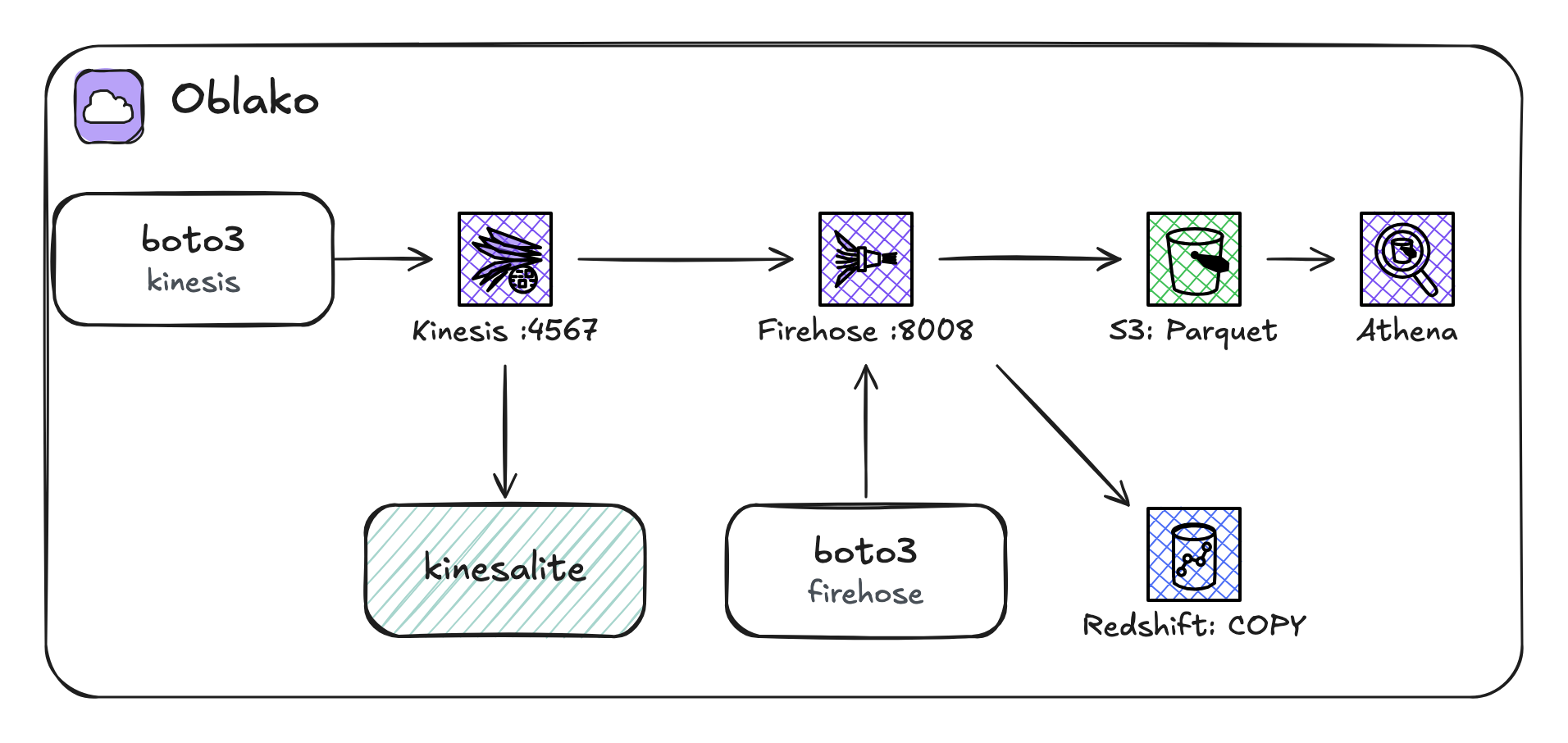
COPY on Redshift.
11.4 Producers
PutRecords writes up to 500 records in one call, and the next listing uses it to write forty clicks:
from collections import Counter

import boto3

from clicks import as_records, clicks

kinesis = boto3.client("kinesis")
result = kinesis.put_records(
    StreamName="clicks", Records=as_records(clicks(40, seed=1))
)
print("failed:", result["FailedRecordCount"])
print(Counter(r["ShardId"] for r in result["Records"]))
failed: 0
Counter({'shardId-000000000000': 36, 'shardId-000000000001': 4})Always check FailedRecordCount. PutRecords succeeds as a call even when some of its records fail, typically because a shard is over its limit, and the failed records must be sent again. The clicks split 36 to 4 between the shards because the six partition keys hash to six points, five of which fell in the first shard’s half. Since the partition key decides both ordering and load, choose a key with many distinct values; with few, one shard can become hot, taking most of the writes while the others idle.
11.5 Consumers
A reader asks for a shard iterator at a position, then pages through records with GetRecords. TRIM_HORIZON starts at the oldest record still kept:
import json
from collections import defaultdict

import boto3

kinesis = boto3.client("kinesis")
stream = kinesis.describe_stream(StreamName="clicks")[
    "StreamDescription"
]

for shard in stream["Shards"]:
    iterator = kinesis.get_shard_iterator(
        StreamName="clicks",
        ShardId=shard["ShardId"],
        ShardIteratorType="TRIM_HORIZON",
    )["ShardIterator"]
    records = kinesis.get_records(ShardIterator=iterator)[
        "Records"
    ]
    users = defaultdict(int)
    for record in records:
        users[json.loads(record["Data"])["user"]] += 1
    print(shard["ShardId"], len(records), "records")
    for user, count in sorted(users.items()):
        print(f"  {user}: {count}")
shardId-000000000000 36 records
user-2: 4
user-3: 7
user-4: 10
user-5: 9
user-6: 6
shardId-000000000001 4 records
user-1: 4Each user’s clicks are in one shard, in the order they were written. Kinesis guarantees order within a partition key; records with different partition keys have no defined order relative to each other.
A reader that restarts must resume where it stopped, so it records the sequence number of the last record it processed, called its checkpoint, and resumes after that record:
import boto3

from clicks import as_records, clicks

kinesis = boto3.client("kinesis")
shard = kinesis.describe_stream(StreamName="clicks")
shard_id = shard["StreamDescription"]["Shards"][0]["ShardId"]


def read(**position):
    iterator = kinesis.get_shard_iterator(
        StreamName="clicks", ShardId=shard_id, **position
    )["ShardIterator"]
    return kinesis.get_records(ShardIterator=iterator)["Records"]


seen = read(ShardIteratorType="TRIM_HORIZON")
checkpoint = seen[-1][
    "SequenceNumber"
]  # store this after processing
print("processed", len(seen), "up to", checkpoint[-6:])

kinesis.put_records(
    StreamName="clicks", Records=as_records(clicks(10, 2))
)
new = read(
    ShardIteratorType="AFTER_SEQUENCE_NUMBER",
    StartingSequenceNumber=checkpoint,
)
print("new since the checkpoint:", len(new))
processed 36 up to 001346
new since the checkpoint: 8Eight of the ten new clicks landed in this shard, and the reader sees only those eight. In production this loop is rarely written by hand. The Kinesis Client Library balances shards across workers and keeps checkpoints in a DynamoDB table, a stream can trigger a Lambda function, and Firehose can read a stream and deliver it to S3 or Redshift.
11.6 Firehose to S3
Firehose can convert JSON records to Parquet as it writes them, which makes the data much cheaper to query. It takes the columns and their types from a table in the Glue Data Catalog, so define that table first, partitioned by day:
import boto3

glue = boto3.client("glue")
try:
    glue.create_database(DatabaseInput={"Name": "web"})
except glue.exceptions.AlreadyExistsException:
    pass

HIVE = "org.apache.hadoop.hive.ql.io.parquet"
STORAGE = {
    "InputFormat": f"{HIVE}.MapredParquetInputFormat",
    "OutputFormat": f"{HIVE}.MapredParquetOutputFormat",
    "SerdeInfo": {
        "SerializationLibrary": f"{HIVE}.serde.ParquetHiveSerDe"
    },
}
glue.create_table(
    DatabaseName="web",
    TableInput={
        "Name": "stream_clicks",
        "TableType": "EXTERNAL_TABLE",
        "PartitionKeys": [{"Name": "dt", "Type": "string"}],
        "StorageDescriptor": {
            "Columns": [
                {"Name": "user", "Type": "string"},
                {"Name": "page", "Type": "string"},
                {"Name": "at", "Type": "timestamp"},
            ],
            "Location": "s3://events/stream-clicks/",
            **STORAGE,
        },
    },
)
print("table web.stream_clicks")
table web.stream_clicksThen create the Firehose stream, reading the Kinesis stream:
import boto3

ROLE = "arn:aws:iam::123456789012:role/firehose-delivery"
ERRORS = "stream-errors/!{firehose:error-output-type}/"
kinesis = boto3.client("kinesis")
firehose = boto3.client("firehose")

source = kinesis.describe_stream_summary(StreamName="clicks")
firehose.create_delivery_stream(
    DeliveryStreamName="clicks-to-s3",
    DeliveryStreamType="KinesisStreamAsSource",
    KinesisStreamSourceConfiguration={
        "KinesisStreamARN": source["StreamDescriptionSummary"][
            "StreamARN"
        ],
        "RoleARN": ROLE,
    },
    ExtendedS3DestinationConfiguration={
        "RoleARN": ROLE,
        "BucketARN": "arn:aws:s3:::events",
        "Prefix": "stream-clicks/dt=!{timestamp:yyyy-MM-dd}/",
        "ErrorOutputPrefix": ERRORS,
        "BufferingHints": {
            "IntervalInSeconds": 60,
            "SizeInMBs": 64,
        },
        "DataFormatConversionConfiguration": {
            "SchemaConfiguration": {
                "DatabaseName": "web",
                "TableName": "stream_clicks",
                "RoleARN": ROLE,
            },
            "InputFormatConfiguration": {
                "Deserializer": {"OpenXJsonSerDe": {}}
            },
            "OutputFormatConfiguration": {
                "Serializer": {"ParquetSerDe": {}}
            },
        },
    },
)
description = firehose.describe_delivery_stream(
    DeliveryStreamName="clicks-to-s3"
)["DeliveryStreamDescription"]
print(
    description["DeliveryStreamStatus"],
    description["DeliveryStreamType"],
)
ACTIVE KinesisStreamAsSourceThe Prefix sets where objects go. Firehose evaluates !{timestamp:yyyy-MM-dd} with the arrival time of the oldest record in each object, so objects land in Hive-style dt= folders that match the table’s partition. A prefix with expressions requires an ErrorOutputPrefix, under which Firehose writes the records that fail to convert, with the reason. Format conversion requires a buffer size of at least 64 MB, so here the 60-second interval decides when a batch is written. A Firehose stream reads its source from the LATEST position and so delivers only clicks written after it was created. The next listing sends new clicks and waits:
import time

import boto3

from clicks import as_records, clicks

kinesis = boto3.client("kinesis")
s3 = boto3.client("s3")

kinesis.put_records(
    StreamName="clicks", Records=as_records(clicks(200, seed=3))
)
started = time.monotonic()
objects = []
while not objects:
    time.sleep(5)
    listing = s3.list_objects_v2(
        Bucket="events", Prefix="stream-clicks/"
    )
    objects = listing.get("Contents", [])
waited = time.monotonic() - started
for obj in objects:
    folder, name = obj["Key"].rsplit("/", 1)
    print(folder + "/")
    print("  " + name[:34] + "..." + name[-8:])
print(f"delivered after about {waited:.0f} s")
stream-clicks/dt=2026-10-02/
clicks-to-s3-1-2026-10-02-17-07-46....parquet
delivered after about 65 sAn object’s name is its evaluated prefix, then the stream’s name and version, the date and time, and a random identifier, with .parquet added by the conversion. Athena reads a partition only once it is in the catalog. On AWS, a Glue crawler or Athena’s MSCK REPAIR TABLE can find new partitions, but with a known layout it is simpler to register the partition yourself:
import boto3

glue = boto3.client("glue")
s3 = boto3.client("s3")

table = glue.get_table(DatabaseName="web", Name="stream_clicks")[
    "Table"
]
listing = s3.list_objects_v2(
    Bucket="events", Prefix="stream-clicks/", Delimiter="/"
)
for common in listing.get("CommonPrefixes", []):
    folder = common["Prefix"]  # stream-clicks/dt=2026-10-02/
    day = folder.rstrip("/").split("dt=")[1]
    storage = dict(table["StorageDescriptor"])
    storage["Location"] = f"s3://events/{folder}"
    try:
        glue.create_partition(
            DatabaseName="web",
            TableName="stream_clicks",
            PartitionInput={
                "Values": [day],
                "StorageDescriptor": storage,
            },
        )
        print("added partition dt =", day)
    except glue.exceptions.AlreadyExistsException:
        print("partition dt =", day, "exists")
added partition dt = 2026-10-02Query the clicks with Athena:
from athena_query import run_query

rows = run_query("""
    SELECT page, count(*) AS clicks,
           count(DISTINCT "user") AS users
    FROM stream_clicks
    GROUP BY page
    ORDER BY clicks DESC""")
for row in rows:
    print(row)
['page', 'clicks', 'users']
['/docs', '55', '6']
['/signup', '54', '6']
['/', '53', '6']
['/pricing', '38', '6']All 200 clicks arrived. The usual pattern is one partition per day, registered once a day, and Athena’s partition projection, which computes partitions from the table’s properties, removes the need to register them.
11.7 Firehose to Redshift
For Redshift, Firehose stages each batch in S3 and then runs a COPY on the cluster from the staged files, with the credentials of its role and the CopyOptions you give it. Most failures come from these options; for example, without a format option, COPY expects pipe-delimited text, and JSON records fail to load. This stream sends JSON, gzipped in staging:
import boto3

from warehouse import query

ROLE = "arn:aws:iam::123456789012:role/firehose-delivery"
query("DROP TABLE IF EXISTS page_views")
query("""
    CREATE TABLE page_views (
        "user" varchar(32),
        page   varchar(64),
        at     timestamp
    )""")

firehose = boto3.client("firehose")
firehose.create_delivery_stream(
    DeliveryStreamName="views-to-redshift",
    DeliveryStreamType="DirectPut",
    RedshiftDestinationConfiguration={
        "RoleARN": ROLE,
        "ClusterJDBCURL": "jdbc:redshift://localhost:5439/oblako",
        "Username": "oblako",
        "Password": "oblako",
        "CopyCommand": {
            "DataTableName": "page_views",
            "CopyOptions": "JSON 'auto' GZIP TIMEFORMAT 'auto'",
        },
        "S3Configuration": {
            "RoleARN": ROLE,
            "BucketARN": "arn:aws:s3:::events",
            "Prefix": "staging/page-views/",
            "CompressionFormat": "GZIP",
            "BufferingHints": {
                "IntervalInSeconds": 60,
                "SizeInMBs": 5,
            },
        },
    },
)
print("views-to-redshift created")
views-to-redshift createdJSON ’auto’ matches the records’ keys to column names, GZIP matches the staging compression, and TIMEFORMAT ’auto’ parses the ISO timestamps. This stream takes records directly (DirectPut) from the application:
import json
import time

import boto3

from clicks import clicks
from warehouse import query

firehose = boto3.client("firehose")
events = list(clicks(50, seed=4))
firehose.put_record_batch(
    DeliveryStreamName="views-to-redshift",
    Records=[{"Data": json.dumps(e).encode()} for e in events],
)

count = 0
while count < len(events):
    time.sleep(5)
    count = query("SELECT count(*) FROM page_views")[0][0]
print("rows in page_views:", count)
print(
    query("""
    SELECT "user", count(*) FROM page_views
    GROUP BY 1 ORDER BY 2 DESC LIMIT 3""")
)
rows in page_views: 50
(['user-1', 14], ['user-3', 9], ['user-2', 8])11.8 Cleaning up
import boto3

from warehouse import query

firehose = boto3.client("firehose")
for name in ("clicks-to-s3", "views-to-redshift"):
    try:
        firehose.delete_delivery_stream(DeliveryStreamName=name)
    except firehose.exceptions.ResourceNotFoundException:
        pass

kinesis = boto3.client("kinesis")
try:
    kinesis.delete_stream(StreamName="clicks")
except kinesis.exceptions.ResourceNotFoundException:
    pass

glue = boto3.client("glue")
try:
    glue.delete_table(DatabaseName="web", Name="stream_clicks")
except glue.exceptions.EntityNotFoundException:
    pass

s3 = boto3.client("s3")
for prefix in ("stream-clicks/", "stream-errors/", "staging/"):
    listing = s3.list_objects_v2(Bucket="events", Prefix=prefix)
    for obj in listing.get("Contents", []):
        s3.delete_object(Bucket="events", Key=obj["Key"])
query("DROP TABLE IF EXISTS page_views")
11.9 Where oblako differs from AWS
No limits or scaling. kinesalite enforces no shard throughput limits, so nothing is throttled, and it lacks on-demand mode, resharding and enhanced fan-out. Its ARNs and errors name account
000000000000.Firehose destinations are S3 and Redshift. The engine lacks Lambda transformation, dynamic partitioning, ORC output, and ZIP and Snappy compression. It also lacks
UpdateDestination, so the stream version in object names is always 1.Buffering is as configured. oblako flushes on whatever interval you set, which shortens tests, whereas AWS has minimum intervals for some destinations. Records still in the buffer when the Firehose engine stops are lost, but the Firehose streams themselves are kept.
Failures are not retried. The engine logs a failed Redshift
COPYwith oblako’s own error text and leaves the staged object in S3. AWS instead retries for a configurable time, records the reason inSTL_LOAD_ERRORS, and writes a manifest of the failed files to S3.Glue partitions are registered by hand here, as on AWS without a crawler, because oblako has no crawler and no
MSCK REPAIR TABLE.
11.10 Running it on AWS
The listings run unchanged in your account. Firehose needs an IAM role it can assume, so in place of the placeholder ROLE, create one that firehose.amazonaws.com trusts, with read access to the Kinesis stream, write access to the bucket, and glue:GetTable for format conversion. For Redshift, Firehose connects from AWS’s network, so the cluster must accept connections from Firehose’s address range for your Region and the role must be able to read the staging bucket, since the COPY uses it. Kinesis streams bill per shard-hour and Firehose per gigabyte, so run the cleanup listing when you finish.
11.11 Summary
A Kinesis data stream keeps records in shards for a day or more, ordered per partition key, and any number of readers can read it, each tracking its own sequence number. Partition keys with many values spread the load across shards. Firehose is a managed reader that delivers a stream to storage: it buffers records, names objects with time-based prefixes, converts JSON to Parquet with a Glue table’s schema, and loads Redshift with a COPY whose options you supply. On oblako, kinesalite holds the stream and oblako’s Firehose engine delivers it, so you can query a stream with Athena or Redshift on your laptop.