2 Running oblako
Installing oblako, starting its services, and pointing code and the AWS CLI at them.
2.1 What you need
oblako runs on macOS and Linux and needs the following:
A container runtime. Docker is the default. Podman, Colima, a Kubernetes cluster and Apple’s
containeralso work; Section 2.7 covers them.Python 3.12 and uv, the Python package manager the book uses to install tools and run scripts.
Disk space. The images oblako pulls take a few gigabytes, and the largest of them for the data services is the Redshift engine, at about 1 GB.
The AWS CLI is optional, since everything this chapter does with boto3 can also be done with aws.
2.2 Installing oblako
Install oblako from its source repository. uv tool install puts the oblako command on your path, isolated from your projects’ dependencies:
git clone https://github.com/almostly/oblako.git
cd oblako
uv tool install .
Check that the command is installed:
oblako --helpusage: oblako [-h]
{up,down,status,logs,pull,models,test,
test-integration,dashboard,notebook,
redshift-data,trust,bedrock-runtime,rds-data,
cloudformation,agentcore} ...2.3 Starting the services
oblako up starts the services that run in containers:
oblako upIt pulls missing images, starts the containers and waits until each one answers. The first run takes a few minutes because of the downloads, and later runs take seconds. The containers it starts are the S3 front and S3Proxy, Redshift, RDS, DynamoDB, Step Functions, OpenSearch, Ollama for Bedrock, and moto for the control planes.
A bare oblako up leaves out two groups, which you start by name when a chapter needs them. The first is the query stack, made up of Trino (the engine behind Athena) and the Iceberg catalog behind S3 Tables; starting Trino also starts the Glue Data Catalog it reads from:
oblako up trino
oblako up iceberg
The second group is the Python engines described in Chapter 1, such as Athena, S3 Tables, S3 Vectors, Firehose and the Data APIs. Each runs outside any container as a background process on its port and writes its log under ~/.oblako/logs:
oblako up athena
oblako up s3tables
Each chapter in Part II lists the commands it needs at its start.
The same names work for a single container service, and for down and logs:
oblako up redshift      # start just Redshift
oblako logs redshift    # show its log
oblako down redshift    # stop it
oblako status lists every service and engine with its state. On the machine this book was written on, with the data services running, it printed:
  bedrock: stopped
  opensearch: stopped
  redshift: running
  rds: stopped
  s3proxy: running
  dynamodb: running
  stepfunctions: stopped
  sagemaker: stopped
  s3vectors: running
  s3tables: running
  athena: running
  ...
  glue: running
  s3-ext: running
s3proxy is S3, and s3-ext is the add-ons engine behind the S3 front. moto, which serves the control planes, is missing from the list but starts with everything else.
2.4 Endpoints
Your code reaches oblako through an endpoint per service. The AWS SDKs and the AWS CLI read endpoints, like credentials and the region, from a profile in the shared configuration file, ~/.aws/config, and oblako writes such a profile for you:
oblako configureThis adds a profile named oblako to ~/.aws/config and leaves your other profiles as they are. Trimmed to a few services, it reads:
[profile oblako]
region = us-east-1
services = oblako
request_checksum_calculation = when_required
response_checksum_validation = when_required
s3 =
    addressing_style = path

[services oblako]
dynamodb =
    endpoint_url = http://localhost:8007
redshift_data =
    endpoint_url = http://localhost:8002
s3 =
    endpoint_url = http://localhost:9000
The services line names a section that gives each service its endpoint; the full section lists every service oblako runs, with the ports from Chapter 1. The checksum settings are needed because S3Proxy does not support the checksums newer SDKs add to every upload by default; with them set, the SDK adds a checksum only where an operation requires one. Path-style addressing puts the bucket name in the path of each S3 request instead of in the host name, which S3Proxy requires. The command also writes keys for the profile to ~/.aws/credentials. oblako accepts any key, but the SDK signs a request only when it has one, so the keys are generated once for your machine and kept on later runs.
Select the profile in your working shell, and every AWS tool started from that shell then talks to oblako:
export AWS_PROFILE=oblakoSetting AWS_PROFILE to one of your AWS profiles instead points the same tools at AWS, as switching a kubectl context points kubectl at another cluster (Figure 2.1). Chapter 18 builds on this to move the same code to AWS. A few tools outside the AWS SDKs do not read profiles: Spark and PyIceberg ask boto3 for the endpoint the profile gives (Chapters 4 and 12), and PostgreSQL clients use their own variables (Chapter 8).
This script makes a first call to three services:
import boto3

s3 = boto3.client("s3")
s3.create_bucket(Bucket="first-bucket")
s3.put_object(
    Bucket="first-bucket",
    Key="notes/today.txt",
    Body=b"oblako is up",
)
for obj in s3.list_objects_v2(Bucket="first-bucket")["Contents"]:
    print("s3:", obj["Key"], obj["Size"])

dynamodb = boto3.client("dynamodb")
dynamodb.create_table(
    TableName="first-table",
    KeySchema=[{"AttributeName": "id", "KeyType": "HASH"}],
    AttributeDefinitions=[
        {"AttributeName": "id", "AttributeType": "S"}
    ],
    BillingMode="PAY_PER_REQUEST",
)
dynamodb.put_item(
    TableName="first-table",
    Item={"id": {"S": "1"}, "note": {"S": "hello"}},
)
got = dynamodb.get_item(
    TableName="first-table", Key={"id": {"S": "1"}}
)
item = got["Item"]
print("dynamodb:", item["note"]["S"])

identity = boto3.client("sts").get_caller_identity()
print("sts:", identity["Account"], identity["Arn"])
s3: notes/today.txt 12
dynamodb: hello
sts: 123456789012 arn:aws:sts::123456789012:user/moto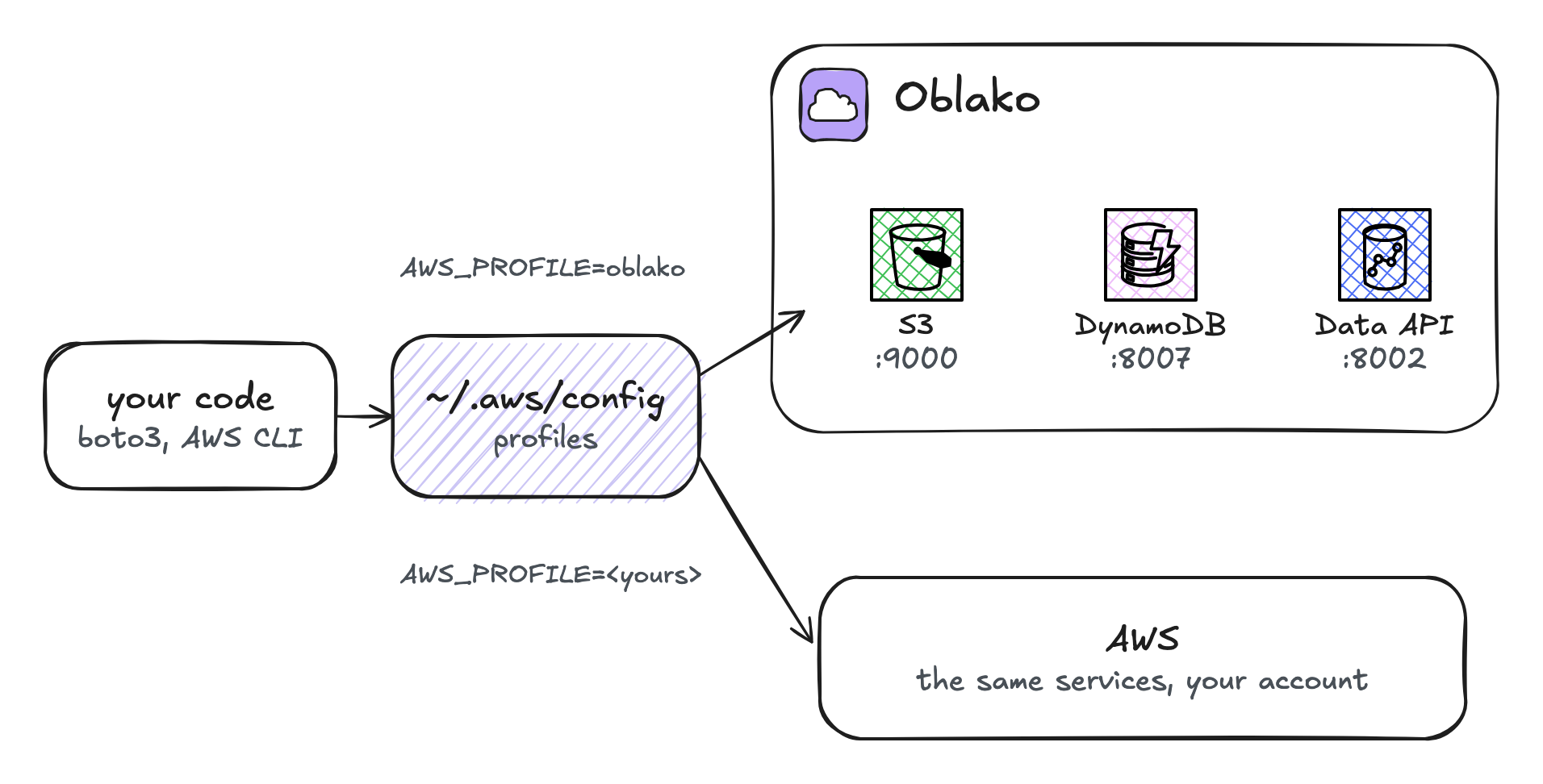
AWS_PROFILE=oblako the SDK sends each call to oblako’s port for that service; with one of your AWS profiles the same code calls AWS.
moto answers GetCallerIdentity with a fixed account number, 123456789012, which also appears in the ARNs that moto and oblako’s own engines create. Kinesis and DynamoDB are the exceptions: kinesalite and DynamoDB Local put account 000000000000 in their ARNs.
The AWS CLI reads the same profile, so it sees the same bucket:
aws s3 ls s3://first-bucket --recursive2026-10-03 17:20:47 12 notes/today.txtWith AWS_PROFILE=oblako, every AWS command in that shell goes to oblako, and with another profile, commands go to AWS. Before running anything that creates or deletes resources, run aws sts get-caller-identity; the account 123456789012 means you are talking to oblako.
2.5 Connecting to Redshift
Redshift is the one service in this book that your code reaches through its own driver instead of boto3. The engine encrypts connections with a certificate it generates, and redshift-connector checks certificates against a bundle it ships with, so oblako trust adds oblako’s certificate to that bundle in the Python environment you name:
oblako trust --python .venv/bin/pythonThen connect with full certificate checking, as you would to AWS:
import redshift_connector

conn = redshift_connector.connect(
    host="localhost",
    port=5439,
    database="oblako",
    user="oblako",
    password="oblako",
    ssl=True,
    sslmode="verify-ca",
)
Reinstalling redshift-connector replaces the bundle, so run oblako trust again afterwards.
2.6 Data and resets
Each stateful service keeps its data in a named Docker volume: oblako-s3-data, oblako-redshift-data, oblako-dynamodb-data and oblako-rds-data. oblako down stops the containers and keeps the volumes, so your buckets and tables are there after the next oblako up.
To reset all data, stop the services and remove the volumes:
oblako down
docker volume rm oblako-s3-data oblako-redshift-data \
    oblako-dynamodb-data oblako-rds-data
Some engines keep their data only in memory. S3 Vectors, for example, holds its vectors in memory, so they are lost when it stops, as the chapter on S3 Vectors explains.
2.7 Other container runtimes
oblako starts containers through a pluggable backend, chosen with one variable that you set before oblako up. Your code stays the same whichever backend you choose, because each backend makes the services reachable on the same ports on localhost; the Kubernetes backend does it by port-forwarding.
OBLAKO_CONTAINER_BACKEND |
Runtime |
|---|---|
docker (default) |
Docker Engine |
podman |
Podman |
colima |
Colima |
kubernetes |
any Kubernetes cluster, reached through kubectl port-forward |
apple |
Apple’s container, on macOS 26 and later |
export OBLAKO_CONTAINER_BACKEND=podman
oblako up
Two limits apply. The S3 front, and with it tagging, Inventory and event notifications, needs a runtime that speaks the Docker API (Docker, Podman or Colima); on Kubernetes or Apple’s container, port 9000 is S3Proxy alone. The services that start a container per task, namely Lambda, Glue jobs and SageMaker, need a Docker daemon whichever backend runs the rest.
2.8 The dashboard and notebooks
Two more commands help with local development, though no chapter depends on them. oblako dashboard starts a web interface on port 8000, built with Cloudscape, the open-source design system of the AWS console. It shows which services are running, lets you browse buckets and DynamoDB tables, and runs SQL against Redshift. oblako notebook starts JupyterLab on port 8888 with the endpoints already set, so boto3 in a notebook reaches oblako without a profile.
Both are for your own machine. Neither asks for a login, so do not open their ports to other machines or deploy them for other people.
2.9 Summary
Install oblako with uv tool install from its repository, start the containers with oblako up and the Python engines by name, and run oblako configure once, so that AWS_PROFILE=oblako points the SDKs and the AWS CLI at them. Before connecting to Redshift, run oblako trust once per Python environment. Data survives oblako down, and removing the volumes resets it.
Part II starts with S3, which the other data services build on.